
1. Introdução
This manual provides essential information for the safe and efficient use of your suevery Prebuilt Gaming PC. Please read these instructions carefully before operating the device and retain them for future reference. This gaming PC is designed for high-performance computing, suitable for gaming, business, and everyday use.

Imagem 1.1: Terminadoview of the suevery Prebuilt Gaming PC with internal RGB lighting.
2. Guia de configuração
Follow these steps to set up your new suevery Prebuilt Gaming PC:
- Desembalagem: Carefully remove the PC from its packaging. Inspect for any visible damage.
- Colocação: Coloque o computador em uma superfície estável e plana com ventilação adequada. Certifique-se de que nenhuma entrada de ar esteja obstruída.
- Conecte periféricos:
- Connect your monitor(s) to the graphics card's HDMI or DisplayPort outputs.
- Conecte seu teclado e mouse às portas USB disponíveis.
- Connect speakers or headphones to the audio output ports.
- For wired internet, connect an Ethernet cable to the LAN port. For Wi-Fi, ensure antennas are attached if external.
- Conexão de energia: Connect the power cable to the PC's power supply unit and then to a grounded electrical outlet.
- Primeira inicialização: Press the power button on the front of the PC. The system will initiate the boot process. Follow any on-screen instructions for initial operating system setup.
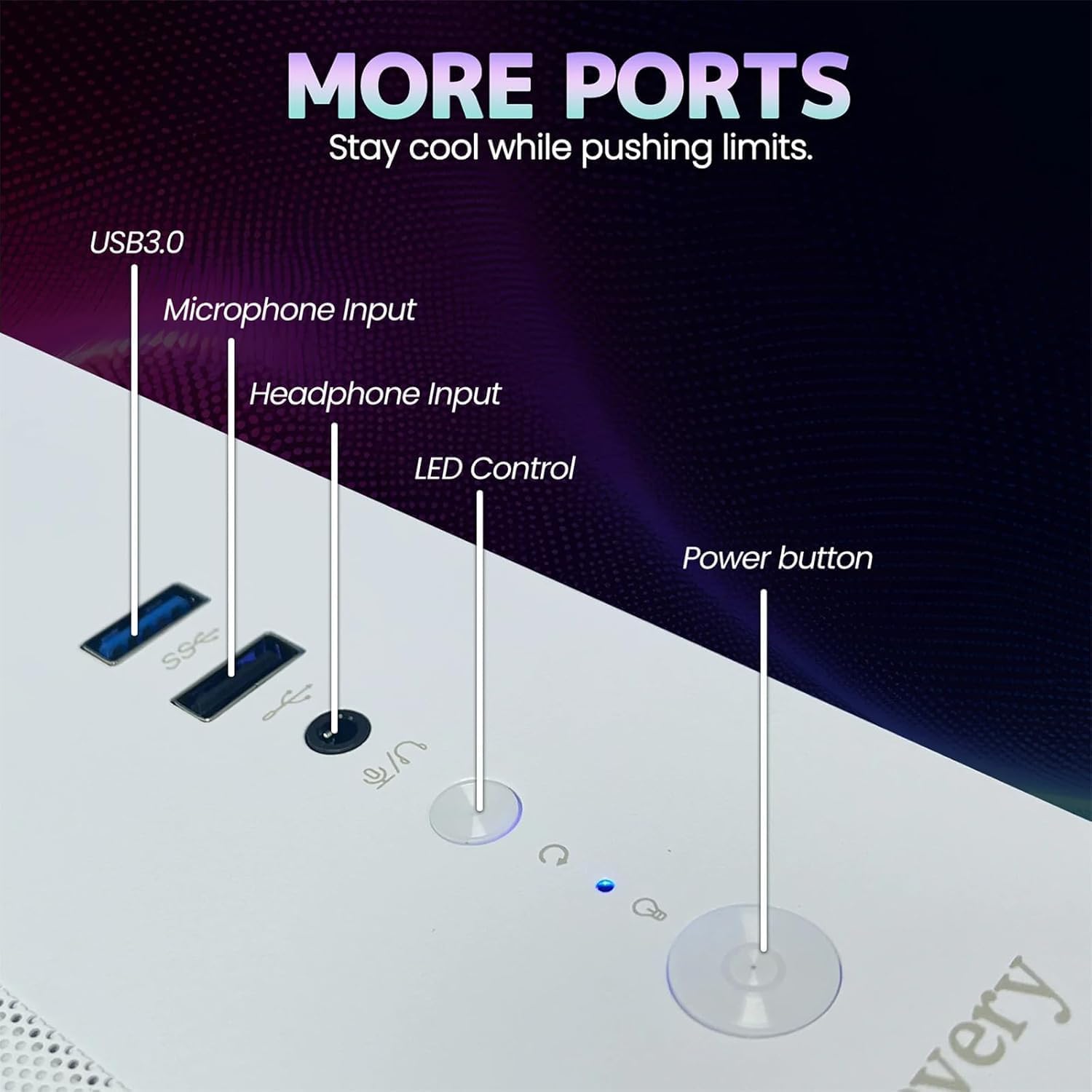
Image 2.1: Rear panel of the PC illustrating various connectivity ports including USB, HDMI, and audio jacks.
3. Instruções de operação
Your suevery Prebuilt Gaming PC comes with a pre-installed operating system (DOS, requiring user installation of a full OS). Once your preferred operating system is installed and configured, you can begin using your PC.
- Ligar/desligar: Press the power button to turn the PC on. To turn off, use the operating system's shutdown function. Avoid direct power-off unless necessary to prevent data loss.
- Controle de iluminação RGB: The PC features customizable RGB lighting. Refer to the specific software or physical button (if available, as indicated in Image 2.1) for adjusting lighting modes and colors.
- Instalação do software: Install necessary drivers for your graphics card and other components from the manufacturer's websites for optimal performance. Install your desired games and applications.
- Conectividade: Utilize the Wi-Fi 6 for high-speed wireless internet or the Ethernet port for a stable wired connection. The multiple USB ports allow for connecting various peripherals.
Video 3.1: An official video demonstrating the suevery Prebuilt Gaming PC Desktop Computer, showcasinseu design e características.
4. Manutenção
A manutenção regular garante a longevidade e o desempenho ideal do seu PC.
- Limpeza de pó: Periodically clean dust from the internal components, especially fans and heatsinks, using compressed air. Ensure the PC is powered off and unplugged before cleaning.
- Atualizações de software: Keep your operating system, drivers, and antivirus software updated to ensure security and performance.
- Gerenciamento de cabos: Ensure internal and external cables are neatly organized to improve airflow and prevent accidental disconnections.
- Ventilação: Always ensure the PC has clear space around its vents for proper airflow.

Imagem 4.1: Interna view of the PC highlighting the cooling fans and component layout, emphasizing the importance of dust removal.
5. Solução De Problemas
Esta seção aborda problemas comuns que você pode encontrar.
| Problema | Solução possível |
|---|---|
| O computador não liga. | Check power cable connections to the PC and wall outlet. Ensure the power supply switch on the back of the PC is in the 'On' position. Test the outlet with another device. |
| Nenhuma imagem exibida no monitor. | Ensure the monitor is powered on and connected to the graphics card (not the motherboard's video output). Try a different cable or monitor. |
| O sistema está lento ou travando. | Check for background applications consuming resources. Update drivers. Scan for malware. Ensure adequate ventilation to prevent overheating. |
| Problemas de conexão Wi-Fi. | Ensure Wi-Fi antennas are securely attached. Restart your router and PC. Update Wi-Fi drivers. |
| A iluminação RGB não está funcionando. | Check connections to the RGB controller. Use the dedicated RGB control button or software to adjust settings. |
6. Especificações
Detailed technical specifications for your suevery Prebuilt Gaming PC.
| Recurso | Detalhe |
|---|---|
| Marca | suevery |
| Nome do modelo | SU-V9W2-V9W4 |
| Modelo de CPU | AMD Ryzen 5 (6 Cores, 3.6 GHz up to 4.1 GHz) |
| Memória RAM | 16 GB DDR4 3200 MHz (Max 32 GB) |
| Armazenar | 512 GB M.2 PCIe NVMe SSD |
| Coprocessador gráfico | RX 560 4G GDDR5 (Dedicated) |
| Sistema operacional | DOS (Sistema operacional instalado pelo usuário necessário) |
| Conectividade | Wi-Fi 6 (802.11ax), USB (2x USB 3.0, 4x USB 2.0), HDMI |
| Consumo de energia | 400 Watts |
| Dimensões (C x L x A) | 13.35 x 10.87 x 12.99 polegadas |
| Cor | Branco |

Image 6.1: Dimensional diagram of the suevery Prebuilt Gaming PC, indicating its compact size.
7. Garantia e Suporte
Your suevery Prebuilt Gaming PC comes with a Garantia de 1 anos a partir da data da compra, cobrindo defeitos de fabricação.
For technical support, warranty claims, or further assistance, please contact suevery customer service through the retailer's platform or visit the official suevery website para informações de contato.
Please have your product model number (Ryzen5-16G-512G-RX560 4G) and proof of purchase ready when contacting support.