
1. Introdução
The XTOOL IP500 is a professional diagnostic scan tool designed for Jeep, Dodge, and Chrysler vehicles. It offers comprehensive full system diagnostics, bi-directional control, and various special reset functions. This manual provides instructions for setting up, operating, maintaining, and troubleshooting your IP500 device.

Image 1.1: The XTOOL IP500 diagnostic tool, highlighting its key capabilities including bi-directional control, full system diagnostics, all services, and FCA CAN FD support.
2. Configuração
2.1 Conteúdo da embalagem
Antes de começar, certifique-se de que todos os componentes estejam presentes:
- XTOOL IP500 Main Unit
- Cabo principal OBD2
- 12+8 Adapter Cable (for 2018+ FCA vehicles)
- Adaptador de energia (se aplicável)
- Manual do usuário (este documento)
2.2 Conectando o Dispositivo
- Localize a porta OBD2 do veículo, geralmente localizada embaixo do painel, do lado do motorista.
- For most vehicles, connect the OBD2 Main Cable directly to the vehicle's OBD2 port and the IP500 device.
- For 2018 and newer FCA (Fiat Chrysler Automobiles) vehicles (Jeep, Dodge, Chrysler, RAM), use the included 12+8 Adapter Cable. Connect the 12-pin and 8-pin connectors to the vehicle's respective ports, then connect the OBD2 male connector of the adapter to the OBD2 female connector of the main cable, and finally to the IP500 device.
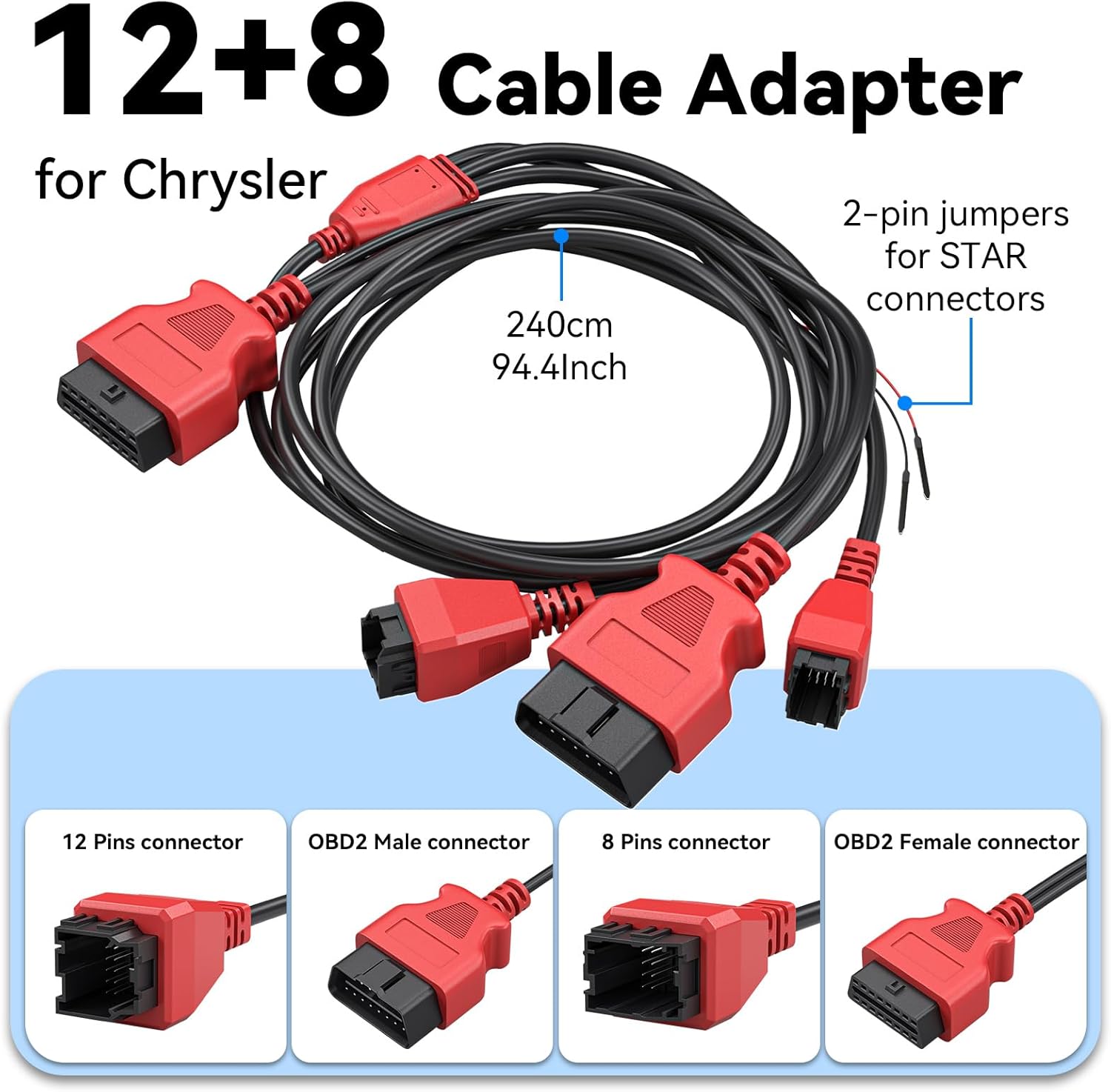
Imagem 2.1: Detalhada view of the 12+8 Cable Adapter, illustrating its various connectors and overall length, essential for connecting to newer FCA vehicles.
2.3 Initial Power-On and Software Updates
- Once connected, the IP500 device should power on automatically. If not, press the power button.
- Follow the on-screen prompts to select your preferred language (23 languages supported).
- Conecte o dispositivo a uma rede Wi-Fi.
- Navigate to the 'Updates' section on the main menu to download and install the latest software. Regular updates ensure optimal performance and vehicle compatibility.
3. Instruções de operação
3.1 Navegação no Menu Principal
The IP500 features a 5.45" HD touchscreen for intuitive navigation. The main menu typically includes options such as 'Auto Scan', 'Diagnosis', 'OBD II', 'Special Function', 'Updates', and 'More'.
3.2 Diagnóstico completo do sistema
This function allows you to access and diagnose all available electronic control modules within the vehicle. It supports comprehensive diagnostics for Fiat Group vehicles (Chrysler, Dodge, Jeep, RAM) from 1998 to 2024.
- Select 'Diagnosis' from the main menu.
- Selecione a marca e o modelo do veículo.
- Perform an 'Auto Scan' or manually select specific systems (e.g., Engine, Transmission, ABS, Airbag, HVAC, Suspension, Headlamp, Audio, A/C).
- View live data streams, read and clear Diagnostic Trouble Codes (DTCs).

Image 3.1: The IP500 device displaying a diagnostic menu, with an overlay showing various vehicle systems it can diagnose, such as engine, airbag, and transmission.
3.3 Special Functions and Reset Services
The IP500 provides access to 18+ special functions for various vehicle maintenance and repair tasks, including those for 2018+ FCA vehicles using the 12+8 adapter.
- Select 'Special Function' from the main menu.
- Choose the desired service from the list. Common services include:
- Reinicialização do EPB: Electronic Parking Brake reset.
- Reinicialização do SAS: Calibração do sensor de ângulo de direção.
- Reinicialização do BMS: Reinicialização do sistema de gerenciamento de bateria.
- Ajuste do farol: Adjusting headlight settings.
- Codificação do injetor: Coding new injector values.
- Sincronização do acelerador: Throttle body relearn.
- Sangramento do ABS: Performing ABS brake bleeding.
- Gearbox Matching: Transmission adaptation.
- Sistema de suspensão: Suspension calibration.
- Inicialização da janela: Window motor relearn.
- Seat Matching: Seat position calibration.
- Reinicialização da luz de manutenção: Resetting service indicators.
- A/F Settings: Air/Fuel ratio adjustments.
- Modo de transporte: Deactivating/activating transport mode.

Image 3.2: A visual representation of the 'ALL RESET SERVICES' menu on the IP500, showing various available functions for vehicle maintenance.
3.4 Controle bidirecional (testes ativos)
This feature allows the IP500 to send commands to vehicle components and receive feedback, enabling active testing of actuators and sensors. This helps in quickly pinpointing issues.
- Select 'Diagnosis' and then navigate to the specific system.
- Look for 'Active Test' or 'Bi-Directional Control' options.
- Examples of components that can be tested include: Windows, Mirrors, Injectors, Door Locks, Braking systems, Wipers, Headlights, and Horns.

Image 3.3: The IP500 illustrating bi-directional control capabilities, showing how it can command and receive feedback from various vehicle components.
3.5 Funções OBD2 completas
The IP500 supports all 10 modes of OBD2 testing, providing essential diagnostic information for emissions-related issues.
- Select 'OBD II' from the main menu.
- As funções disponíveis incluem:
- Leia os códigos: Retrieve current, pending, and permanent DTCs.
- Códigos claros: Erase DTCs and turn off the Malfunction Indicator Light (MIL).
- Dados ao vivo: View parâmetros de dados em tempo real.
- Quadro de congelamento: View a snapshot of vehicle operating conditions when an emission-related fault occurs.
- Prontidão I / M: Verifique se os sistemas de monitoramento de emissões estão prontos para uso.
- Teste do monitor de O2: Recuperar resultados do teste de monitoramento do sensor de O2.
- Teste do monitor de bordo: Obtenha resultados para componentes e sistemas de transmissão relacionados a emissões.
- Teste de componentes: Initiate a leak test for the vehicle's EVAP system.
- Informações do veículo: Recuperar o número de identificação do veículo (VIN), o ID de calibração (CALID) e o número de verificação de calibração (CVN).

Image 3.4: The IP500's interface showing the comprehensive range of OBD2 functions available for vehicle diagnostics.
3.6 FCA Secure Gateway Access
For 2018+ FCA vehicles equipped with a Secure Gateway Module (SGM), the 12+8 adapter cable provides direct diagnostic access without requiring an FCA AutoAuth subscription. This allows full diagnostic capabilities on these newer models.

Image 3.5: The IP500 demonstrating FCA Secure Gateway Access, indicating its compatibility with 2018+ Chrysler, Dodge, and Jeep vehicles.
4. Manutenção
4.1 Limpando o Dispositivo
Use um pano macio e macioamp cloth to clean the device's screen and body. Avoid using abrasive cleaners or solvents that could damage the surface.
4.2 Atualizações de Software
Regularly check for and install software updates via Wi-Fi. These updates provide new vehicle coverage, bug fixes, and improved functionality. The IP500 offers free lifetime functional updates.
4.3 Armazenamento
Store the device in a cool, dry place away from direct sunlight and extreme temperatures. Keep it in its protective case when not in use to prevent damage.
5. Solução De Problemas
5.1 O dispositivo não liga
- Ensure the device is correctly connected to the vehicle's OBD2 port.
- Verifique a voltagem da bateria do veículo.tage; a low battery might prevent the device from powering up.
- Verify the OBD2 port fuse in the vehicle.
5.2 Erros de comunicação
- Confirm the ignition is in the ON position (engine off).
- Ensure the correct vehicle make, model, and year are selected in the device menu.
- For 2018+ FCA vehicles, verify the 12+8 adapter is correctly installed.
- Tente conectar-se a um veículo diferente para descartar um problema específico deste veículo.
5.3 Travamentos de software ou desempenho lento
- Reinicie o dispositivo.
- Certifique-se de que o software esteja atualizado.
- Clear cache or temporary files if the option is available in device settings.
6. Especificações
| Recurso | Descrição |
|---|---|
| Processador | Dual-Core de 1.2 GHz |
| Mostrar | Tela sensível ao toque HD de 5.45" |
| Bateria | 3150mAh |
| Armazenar | 32 GB |
| Sistema operacional | baseado em Android |
| Cobertura de Veículos | Fiat Group (Chrysler, Dodge, Jeep, RAM) 1998-2024; 2018+ FCA with 12+8 adapter |
| Idiomas | 23 idiomas suportados |
| Atualizações | Free Lifetime Functional Updates |
7. Garantia e Suporte
7.1 Informações de garantia
For detailed warranty information, please refer to the official XTOOL website or contact your point of purchase. The device includes free lifetime functional updates, ensuring ongoing software support.
7.2 Suporte Técnico
If you encounter any issues or require technical assistance, please contact XTOOL customer support. Contact details can typically be found on the official XTOOL website ou na seção "Sobre" do dispositivo.