
1. Introdução
Obrigado pela compra.asing the Sharp PS-916 Bluetooth Party Speaker System. This system includes two identical portable Bluetooth speakers designed to deliver powerful audio with versatile connectivity options. Please read this manual carefully before using the product to ensure proper operation and to maximize your listening experience.
Conteúdo da embalagem:
- 2 x Sharp PS-916 Party Speakers
- 1 x cabo de carregamento
- 1 x Controle Remoto
- 1 x Manual do Usuário

Image: The Sharp PS-916 system includes two speakers for a complete stereo experience.
2. Configuração
2.1 Carregando as caixas de som
The PS-916 speakers are equipped with rechargeable batteries, providing up to 12 hours of playback. Before initial use, fully charge both speakers.
- Connect the charging cable to the DC IN port on the rear of each speaker.
- Plug the other end of the charging cable into a suitable power adapter (not included) or USB power source.
- A luz indicadora de carregamento acenderá. Ela mudará de cor ou se apagará quando o carregamento estiver completo.
2.2 Ligar/Desligar
To power on or off each speaker, press and hold the ON/STAND BY INPUT botão localizado no painel de controle.
Emparelhamento Bluetooth 2.3 (Alto-falante único)
- Ensure the speaker is powered on and in Bluetooth mode. The Bluetooth indicator will flash, indicating it is ready for pairing.
- No seu dispositivo móvel, ative o Bluetooth e pesquise os dispositivos disponíveis.
- Select "Sharp PS-916" from the list of devices.
- Assim que a conexão for estabelecida, o indicador Bluetooth deixará de piscar e permanecerá aceso.
Emparelhamento estéreo sem fio verdadeiro (TWS) 2.4 (dois alto-falantes)
TWS allows you to connect two PS-916 speakers wirelessly for a stereo sound experience.
- Power on both PS-916 speakers.
- Ensure neither speaker is currently connected to a Bluetooth device.
- On one of the speakers (this will be the primary speaker), press the TWS button. The speaker will enter TWS pairing mode.
- The primary speaker will automatically search for the secondary speaker. Once connected, you will hear an audible confirmation, and the TWS indicator lights on both speakers will illuminate.
- Agora, conecte seu dispositivo móvel à caixa de som principal via Bluetooth, conforme descrito na seção 2.3. O áudio será reproduzido em estéreo pelas duas caixas de som.
3. Operação
3.1 Painel de controle sobreview

Image: Main control panel for the Sharp PS-916 speaker.
- ON/STAND BY INPUT: Power on/off, switch input modes (Bluetooth, USB, TF, AUX, FM).
- PLAY/PAUSE (►/∕∕): Reproduzir ou pausar a reprodução de áudio.
- ANTERIOR (◀◀): Pule para a faixa anterior.
- NEXT (▶▶): Pule para a próxima faixa.
- BOTÃO DE VOLUME: Gire para ajustar o volume principal.
- TWS: Initiate or disconnect True Wireless Stereo pairing.
- EQUALIZADOR: Cycle through preset equalizer modes.
- GRAVES: Activate or deactivate bass boost.
- LUZ: Change or turn off the LED light effects.
- MIC CONTROL: Adjust microphone volume or echo (if applicable).
3.2 Portas de entrada
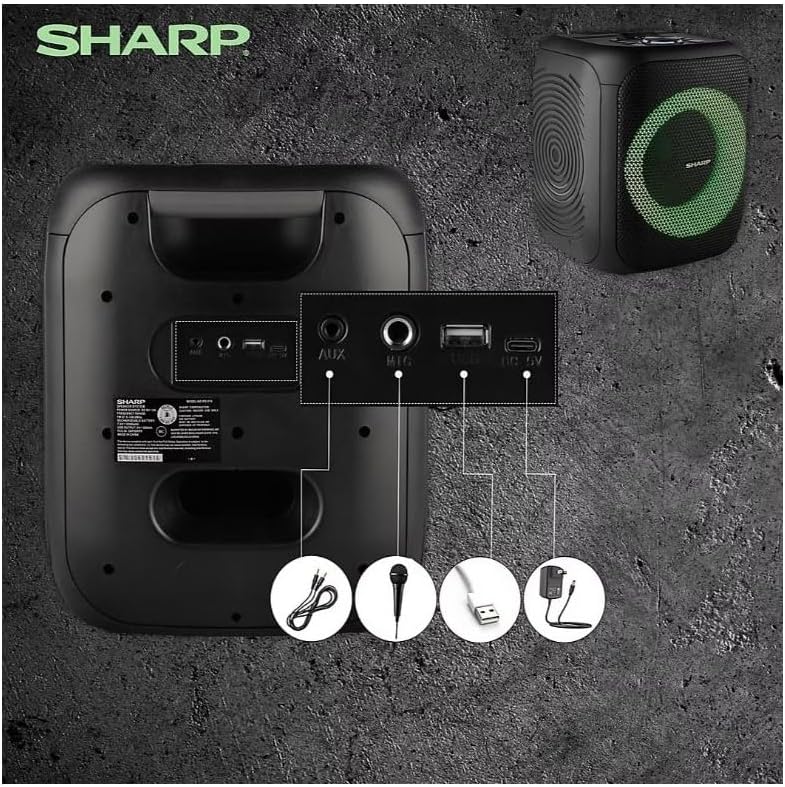
Image: Rear panel with various input and charging ports.
- ENTRADA AUX: Conecte dispositivos de áudio externos usando um cabo de áudio de 3.5 mm.
- MIC ENTRADA: Connect a microphone (sold separately) for karaoke or announcements.
- USB: Insert a USB flash drive for audio playback.
- CARTÃO TF: Insert a TF (microSD) card for audio playback.
- DC IN: Connect the charging cable to power and charge the speaker.
3.3 Playing Audio from USB/TF Card
- Insert a USB flash drive or TF card into the corresponding port.
- Pressione o ON/STAND BY INPUT button repeatedly until the display shows the USB or TF mode.
- A reprodução começará automaticamente. Use o REPRODUZIR/PAUSAR, ANTERIOR, e PRÓXIMO botões para controlar a reprodução.
3.4 Utilizando a entrada AUX
- Connect one end of a 3.5mm audio cable to the AUX IN port on the speaker.
- Conecte a outra extremidade à entrada de fone de ouvido ou à saída de áudio do seu dispositivo externo.
- Pressione o ON/STAND BY INPUT button repeatedly until the display shows AUX mode.
- Controle a reprodução e o volume a partir do seu dispositivo externo.
3.5 Operação de rádio FM

Image: The PS-916 features an integrated FM Tuner.
- Pressione o ON/STAND BY INPUT button repeatedly until the display shows FM mode.
- Pressione e segure o REPRODUZIR/PAUSAR Botão para escanear e salvar automaticamente as estações de FM disponíveis.
- Use o ANTERIOR e PRÓXIMO botões para navegar pelas estações salvas.
3.6 Efeitos de luz LED
Pressione o LUZ button to cycle through different LED light modes or to turn the lights off.
4. Manutenção
4.1 Limpeza
- Sempre desligue a caixa de som e desconecte-a da fonte de alimentação antes de limpá-la.
- Use um pano macio e seco para limpar as superfícies externas.
- Não utilize produtos de limpeza líquidos, aerossóis ou solventes, pois estes podem danificar o acabamento ou os componentes internos.
4.2 Armazenamento
- Guarde as caixas de som em local fresco e seco, longe da luz solar direta e de temperaturas extremas.
- Se for armazenar a bateria por um longo período, carregue-a até aproximadamente 50% a cada poucos meses para manter sua saúde.
5. Solução De Problemas
If you encounter issues with your Sharp PS-916 speakers, please refer to the following common problems and solutions:
| Problema | Solução possível |
|---|---|
| A caixa de som não liga. | Verifique se a bateria está carregada. Conecte o cabo de carregamento e tente novamente. |
| Sem som no alto-falante. | Verifique o nível de volume tanto na caixa de som quanto no dispositivo conectado. Certifique-se de que o modo de entrada correto esteja selecionado. |
| O dispositivo Bluetooth não pôde ser emparelhado. | Ensure the speaker is in Bluetooth pairing mode (indicator flashing). Move your device closer to the speaker. Disconnect from other Bluetooth devices. |
| O emparelhamento TWS falha. | Ensure both speakers are powered on and not connected to any other Bluetooth devices. Try initiating TWS pairing again. |
| Som distorcido. | Reduce the volume on both the speaker and your connected device. Ensure the audio source is not distorted. |
6. Especificações
| Recurso | Detalhe |
|---|---|
| Marca | Afiado |
| Nome do modelo | PS-916 |
| Configuração do alto-falante | 8" Woofer, 1" Tweeter (per speaker) |
| Potência de saída máxima | 400 Watts (por alto-falante) |
| Potência de saída RMS | 40 Watts (por alto-falante) |
| Tecnologia de Conectividade | Bluetooth |
| Entradas Adicionais | USB, TF Card, 3.5mm AUX, Microphone Input |
| Duração da bateria | Até 12 horas |
| Características especiais | True Wireless Stereo (TWS) Pairing, Bass Boost, LED Light Effects, FM Tuner |
| Cor | Preto |
| Peso do item | 6.5 libras (por alto-falante) |
| UPC | 728434122111 |
| GTIN | 728434122111 |
7. Garantia e suporte
7.1 Informações de garantia
This Sharp PS-916 product comes with a 90-day limited warranty. This warranty covers manufacturing defects under normal use. It does not cover damage caused by misuse, accidents, unauthorized modifications, or normal wear and tear.
7.2 Suporte ao cliente
For technical assistance, warranty claims, or further inquiries, please refer to the contact information provided with your purchase documentation or visit the official Sharp support website.