
Introdução
Thank you for choosing the Acer OHR632 Wireless Gaming Headset. This headset offers versatile connectivity options, high-fidelity audio, and a comfortable design for extended gaming sessions. Please read this manual carefully to ensure proper setup and optimal performance of your device.
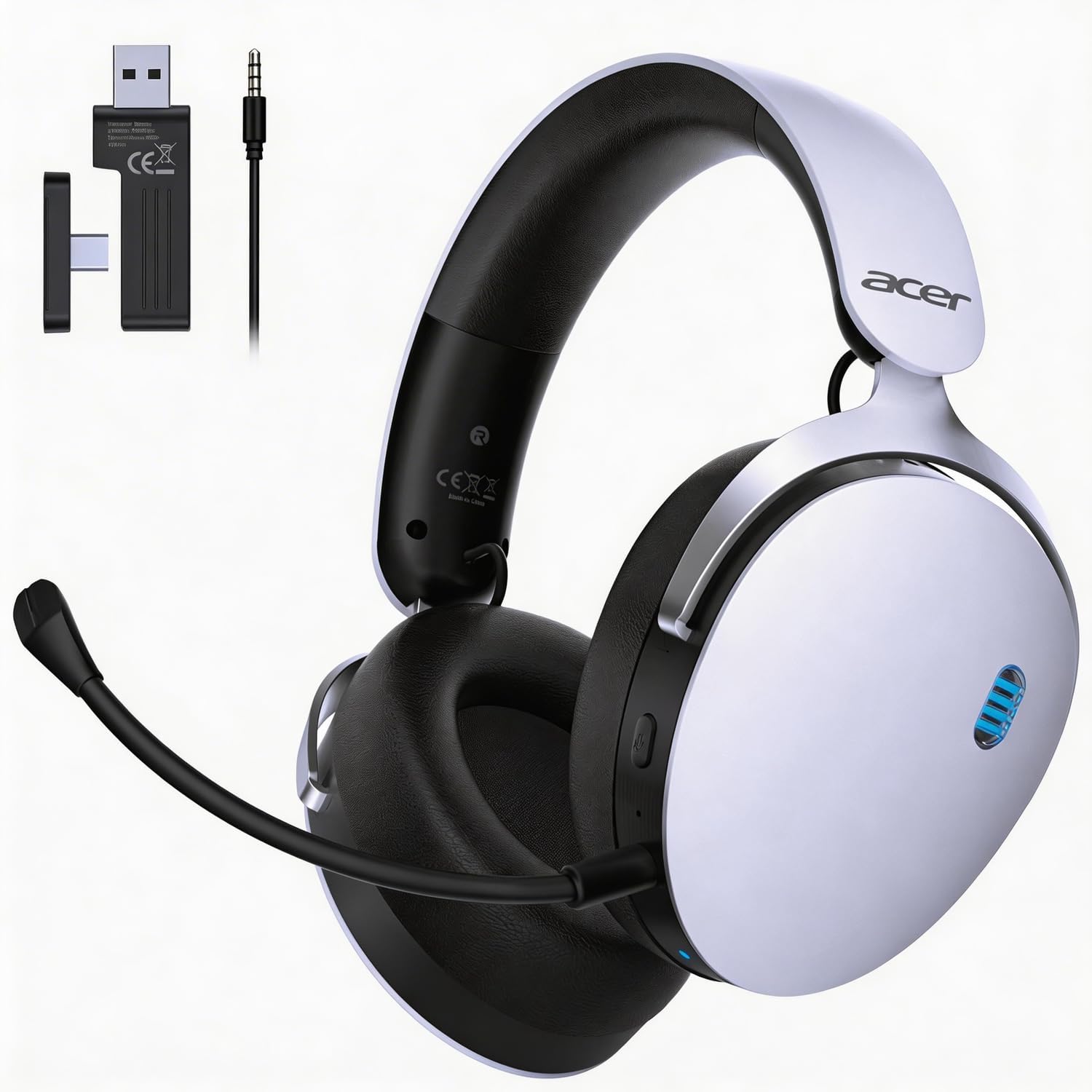
Image: The Acer OHR632 Wireless Gaming Headset in white, showcasinseu design elegante.
O que está incluído
Verifique se todos os itens estão presentes na embalagem:
- Fone de ouvido sem fio para jogos
- Manual do usuário
- Microfone destacável
- Cabo de carregamento USB-A para USB-C
- 3.5mm Audio Cable (4-prong)
- 2.4GHz Wireless USB Dongle (with USB-C adapter)

Image: A visual representation of all components included in the Acer OHR632 Wireless Gaming Headset package.
Configurar
1. Conectando o microfone
- Localize a entrada do microfone no fone de ouvido esquerdo.
- Align the microphone's 3.5mm jack with the port, ensuring the groove on the jack matches the port's shape.
- Gently push the microphone into the port until it clicks securely into place.
- Adjust the flexible microphone arm to your preferred speaking position.
To remove the microphone, gently pull it out from the port.

Image: The Acer OHR632 headset with the detachable microphone connected, ready for use.
2. Carregando o fone de ouvido
- Conecte a extremidade USB-C do cabo de carregamento à porta USB-C do fone de ouvido.
- Conecte a extremidade USB-A do cabo de carregamento a uma porta USB energizada (por exemplo, computador, adaptador de parede).
- The LED indicator on the headset will show charging status. A full charge takes approximately 3 hours.

Image: An illustration demonstrating the charging process of the Acer OHR632 headset, highlighting its long battery life.
3. Conectando-se aos dispositivos
The Acer OHR632 offers three connection methods:
3.1. Conexão sem fio de 2.4 GHz (recomendada para jogos)
- Insert the 2.4GHz USB dongle into an available USB-A port on your PS5, PS4, PC, or Switch dock. If your device only has USB-C, use the included USB-C adapter.
- Power on the headset. It should automatically pair with the dongle.
- Ensure the headset is selected as the audio output/input device in your system settings.
3.2. Conexão Bluetooth 5.3
- Ligue o fone de ouvido.
- Press and hold the Bluetooth pairing button (refer to headset controls section) until the LED indicator flashes, indicating pairing mode.
- On your Bluetooth-enabled device (e.g., smartphone, tablet, PC), search for "Acer OHR632" in the Bluetooth settings and select it to pair.
3.3. Conexão com fio de 3.5 mm
- Conecte uma extremidade do cabo de áudio de 3.5 mm à porta de 3.5 mm do fone de ouvido.
- Connect the other end of the 3.5mm audio cable to the audio jack of your device (e.g., controller, PC, Switch handheld).
- O fone de ouvido funcionará no modo com fio, ignorando as funções sem fio.

Image: A diagram illustrating the three connectivity options: 2.4GHz wireless, Bluetooth 5.3, and 3.5mm wired.
Instruções de operação
Ligar/Desligar
- Para ligar: Pressione e mantenha pressionado o botão Liga/Desliga por 2 segundos.
- Para desligar: Pressione e mantenha pressionado o botão Liga/Desliga por 3 segundos.
Controle de volume
- Volume Up: Rotate the volume wheel upwards.
- Volume Down: Rotate the volume wheel downwards.
Microfone sem som / com som
- Press the dedicated Mute button on the earcup to toggle microphone mute on or off.
Alternando modos de conexão
- The headset automatically prioritizes connections. When the 3.5mm cable is plugged in, it will switch to wired mode.
- To switch between 2.4GHz wireless and Bluetooth, use the mode switch button (refer to headset diagram for exact location).
Características
- Conectividade 3 em 1: Seamlessly switch between 2.4GHz wireless, Bluetooth 5.3, and 3.5mm wired connections for ultimate versatility across PS5, PS4, PC, Switch, and other compatible devices.
- Som envolvente: Equipped with powerful 50mm drivers and ultra-low latency (≤20ms), delivering high-fidelity stereo sound for a truly immersive audio experience.
- Detachable Noise-Reduction Microphone: Ensures crystal-clear communication with its omni-directional noise-canceling design. The flexible arm allows for optimal positioning.
- Conforto durante todo o dia: Lightweight design, adjustable headband, and memory foam ear cushions provide comfort for extended wear.
- Bateria de longa duração: Enjoy up to 40 hours of gameplay on a single charge, with quick charging capabilities.

Image: Detailed illustration of the headset's 3-in-1 connectivity modes.

Image: A user experiencing immersive sound with the Acer OHR632 headset.

Image: A user communicating clearly using the noise-canceling microphone of the Acer OHR632 headset.

Image: Close-up of the breathable, soft ear cushions for ultimate comfort.
Manutenção
- Limpeza: Use um pano macio e seco para limpar o fone de ouvido. Não use produtos químicos agressivos ou materiais abrasivos.
- Armazenar: Guarde o fone de ouvido em local fresco e seco, longe da luz solar direta e de temperaturas extremas.
- Cuidados com a bateria: Para prolongar a vida útil da bateria, evite descarregar completamente os fones de ouvido com frequência. Carregue-os regularmente, mesmo que não os utilize por longos períodos.
Solução de problemas
| Problema | Solução |
|---|---|
| No audio in wireless mode | Ensure the USB dongle is properly connected and the headset is powered on and paired. Check system audio settings to confirm the headset is selected as the output device. |
| Microfone não funciona | Verify the microphone is securely attached and not muted. Check system audio settings to ensure the headset microphone is selected as the input device. |
| Problemas de emparelhamento Bluetooth | Ensure the headset is in Bluetooth pairing mode (flashing LED). Turn off and on Bluetooth on your device and try pairing again. Keep devices close during pairing. |
| Bateria de curta duração | Ensure the headset is fully charged (approx. 3 hours). Reduce volume levels or disable unnecessary features if available to conserve battery. |
Especificações
- Marca: ácer
- Nome do modelo: EAR632
- Cor: Branco
- Colocação da orelha: Sobre a orelha
- Tecnologia de conectividade: Wireless (2.4GHz, Bluetooth 5.3), Wired (3.5mm)
- Motoristas: 50 mm
- Duração da bateria: Até 40 horas
- Tempo de carregamento: Aproximadamente 3 horas
- Microfone: Removível, omnidirecional, com redução de ruído.
- Peso: 11.3 oz (320g)
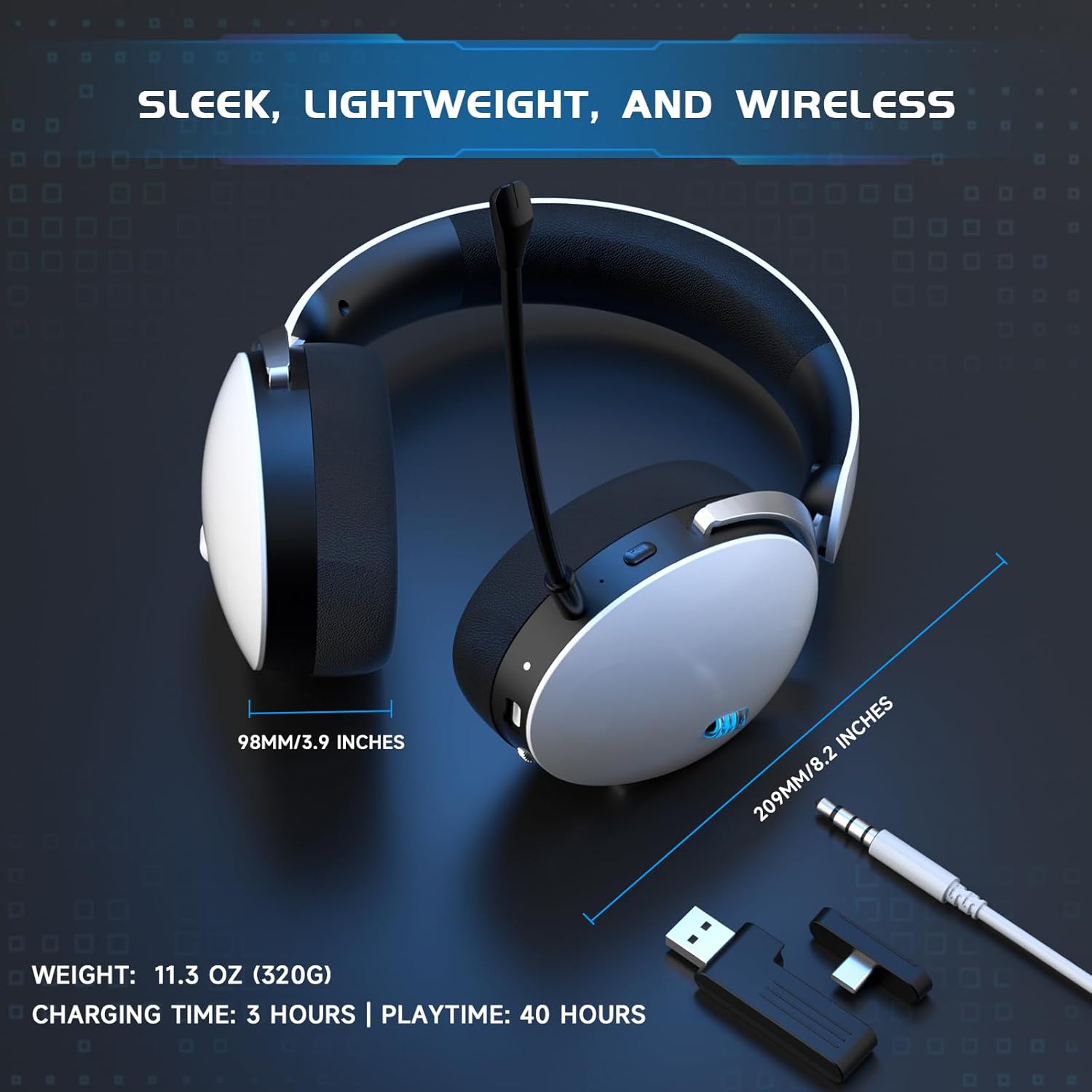
Image: Visual representation of the headset's dimensions, weight, charging time, and playtime.
Garantia e Suporte
This Acer OHR632 Wireless Gaming Headset comes with a Garantia do fabricante de 1 anos. For technical support, warranty claims, or further assistance, please contact Acer customer service or visit the official Acer support webGuarde o comprovante de compra para validação da garantia.
Produto acimaview Vídeo
Watch this video for an unboxing, overview, and demonstration of the Acer OHR632 Wireless Gaming Headset's features and functionality.
Vídeo: Unboxing e review of the Acer OHR632 Wireless Gaming Headset by a seller, demonstrating its features and performance.