
1. Introdução
The TOPDON TOPBT600PLUS is a professional-grade 2-in-1 Battery and Resistance Tester designed for comprehensive battery diagnostics in various automotive and industrial settings. This device accurately tests 6V, 12V, and 24V battery systems, providing reliable data for flooded, AGM, GEL, and EFB lead-acid batteries. Additionally, it supports internal resistance measurements for lithium, alkaline, and carbon-zinc batteries. Featuring a bright 3.5-inch display and an onboard power supply, the BT600PLUS offers fast, versatile, and dependable performance.
2. Informações de segurança
Leia todos os avisos e instruções de segurança antes de usar este produto. O não cumprimento dessas instruções pode resultar em choque elétrico, incêndio ou ferimentos graves.
- Proteção para os olhos: Always wear ANSI-approved eye protection when working near batteries.
- Ventilação: Ao testar baterias, assegure-se de que a ventilação seja adequada, pois elas podem emitir gases explosivos.
- Ácido da bateria: Evite o contato com o ácido da bateria. Em caso de contato, lave imediatamente com água e procure atendimento médico.
- Sparks and Flames: Mantenha faíscas, chamas e materiais fumegantes longe das baterias.
- Ferramentas isoladas: Utilize ferramentas isoladas para evitar curtos-circuitos acidentais.
- Conexão adequada: Connect the tester leads correctly to the battery terminals (red to positive, black to negative).
- Ambiente operacional: Não opere o dispositivo em damp ou condições úmidas.
3. Produto acabadoview
The TOPBT600PLUS features a robust design for professional use. Its main components include a 3.5-inch color display, control buttons, and two sets of test leads for versatile connection options.
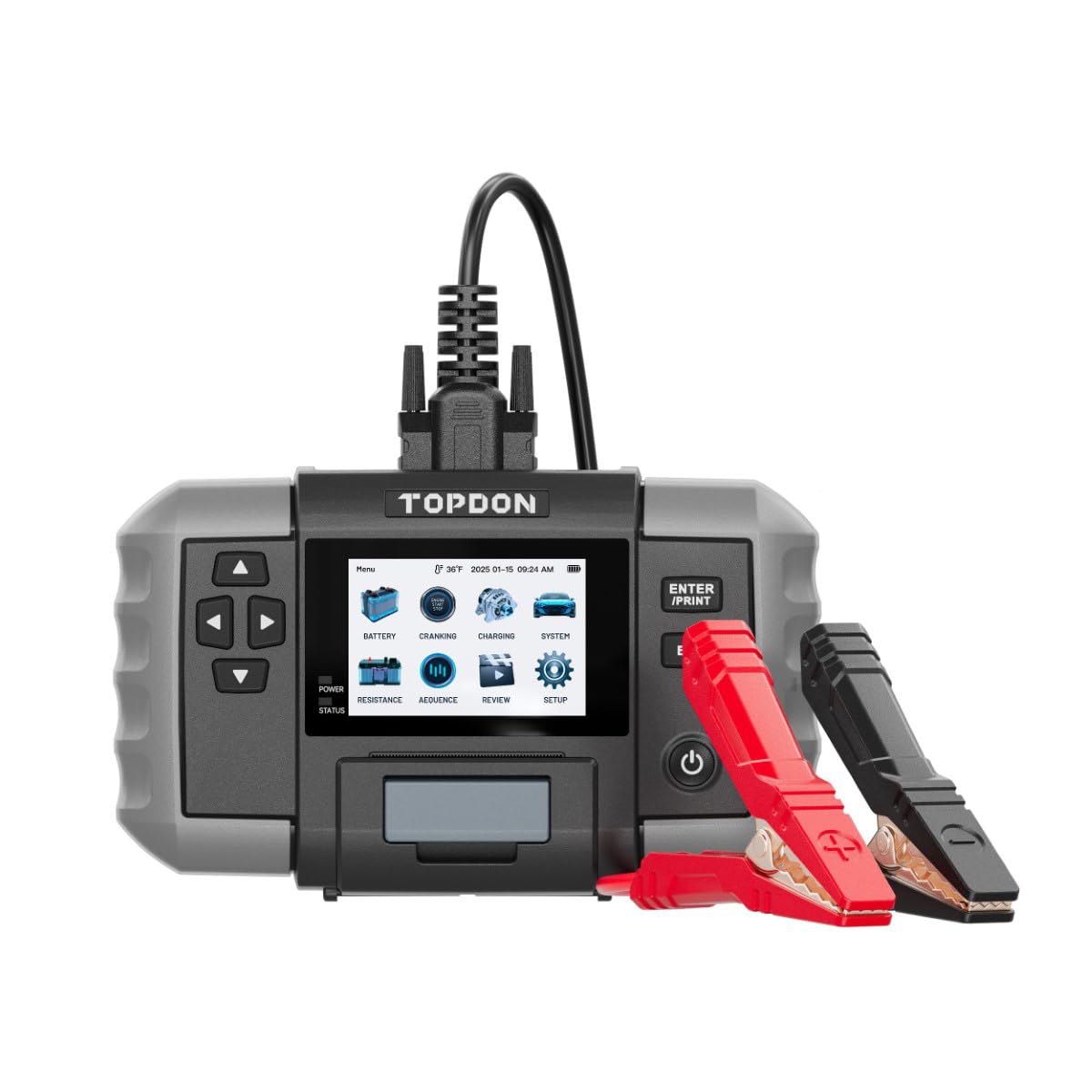
Figura 1: Frente view of the TOPDON TOPBT600PLUS device. This image displays the main unit with its 3.5-inch screen and control buttons, along with the attached test leads.
The device's onboard power source allows for testing batteries down to 2V, enhancing its flexibility for various diagnostic scenarios.
4. Configuração
Follow these steps to prepare your TOPBT600PLUS for operation:
- Desembalagem: Carefully remove the TOPBT600PLUS from its packaging and inspect for any damage.
- Inicialização inicial: The device is equipped with an internal power source. Press the power button to turn it on.
- Conectando leads de teste: Ensure the test leads are securely connected to the device. The red clamp is for the positive (+) terminal, and the black clamp is for the negative (-) terminal.
- Preparação da bateria: Para obter leituras precisas, certifique-se de que os terminais da bateria estejam limpos e livres de corrosão.
5. Instruções de operação
The TOPBT600PLUS offers various testing modes for comprehensive battery analysis.
5.1. Teste de bateria
This mode performs cranking, charging, and system tests for 6V, 12V, and 24V batteries.
- Conectar à bateria: Anexe o cl vermelhoamp ao terminal positivo (+) da bateria e ao terminal preto clamp ao terminal negativo (-) da bateria.
- Selecione o tipo de bateria: On the device screen, select the appropriate battery type (e.g., Flooded, AGM, GEL, EFB).
- Input Battery Specifications: Enter the battery's Cold Cranking Amps (CCA) or other relevant ratings as prompted.
- Iniciar teste: Follow the on-screen instructions to initiate the test. The device will guide you through cranking and charging system checks.
- View Resultados: The 3.5-inch display will show detailed results, including battery voltage, CCA value, internal resistance, and overall battery health status.
5.2. Resistance Test
This mode measures the internal resistance of various battery chemistries.
- Conectar à bateria: Anexe o cl vermelhoamp ao terminal positivo (+) da bateria e ao terminal preto clamp ao terminal negativo (-) da bateria.
- Select Resistance Test: Navigate to the Resistance Test option on the device menu.
- Select Battery Chemistry: Choose the correct battery chemistry (e.g., Lithium, Alkaline, Carbon-Zinc) if prompted.
- Iniciar teste: Initiate the test. The device will measure and display the internal resistance.
- Interpretar resultados: Compare the measured resistance with the manufacturer's specifications for the battery to assess its condition.
5.3. Sequence Testing
The TOPBT600PLUS supports sequence testing for up to 500 batteries across 10 groups, ideal for batch testing.
- Setup Thresholds: Configurar volumetage or resistance thresholds within the device settings to automatically identify underperforming units.
- Realizar testes: Connect and test batteries sequentially. The device will alert you if a battery falls outside the set parameters.
6. Manutenção
Proper maintenance ensures the longevity and accuracy of your TOPBT600PLUS.
- Limpeza: Limpe o dispositivo com um pano macio e seco. Não utilize produtos de limpeza abrasivos ou solventes.
- Armazenar: Store the tester in a dry, cool environment, away from direct sunlight and extreme temperatures.
- Cuidados com o chumbo: Inspect test leads regularly for damage. Replace if insulation is cracked or wires are exposed.
- Atualizações de software: Check the official TOPDON webO site é atualizado periodicamente para obter atualizações de firmware, garantindo desempenho e compatibilidade ideais.
7. Solução De Problemas
If you encounter issues with your TOPBT600PLUS, refer to the following common problems and solutions:
| Problema | Possível causa | Solução |
|---|---|---|
| O dispositivo não liga | Low internal battery; device malfunction | Ensure the internal battery is charged. If issue persists, contact support. |
| Leituras imprecisas | Poor connection; dirty battery terminals; incorrect battery type selected | Clean battery terminals. Ensure clamps are securely attached. Verify correct battery type and specifications are entered. |
| Sem saída de exibição | Screen damage; software error | Restart the device. If the screen remains blank, contact customer support. |
| Clamps get hot during testing | Loose connection; excessive current draw | Garantir clamps are tightly secured. Discontinue test if excessive heat is observed and check battery condition. |
8. Especificações
Key technical specifications for the TOPDON TOPBT600PLUS:
- Marca: TOPDON
- Modelo: TOPBT600PLUS
- Fonte de energia: Battery Powered (Internal)
- Vol operacional mínimotage: 2 Volts
- Peso: 4.41 libras
- Mostrar: Tela colorida de 3.5 polegadas
- Supported Battery Types (Lead-Acid): Inundado, AGM, GEL, EFB
- Supported Battery Chemistries (Resistance Test): Lithium, Alkaline, Carbon-Zinc
- Vol do Sistematage: 6V, 12V, 24V
9. Garantia e Suporte
For detailed warranty information, please refer to the warranty card included with your product or visit the official TOPDON webOs termos da garantia normalmente cobrem defeitos de fabricação por um período específico a partir da data da compra.
For technical support, troubleshooting assistance, or service inquiries, please contact TOPDON customer support through their official website ou as informações de contato fornecidas na documentação do produto.