
1. Introdução
Thank you for choosing the Sharp 40HF2265E Full HD Google TV. This manual provides essential information for setting up, operating, and maintaining your television. Featuring integrated Google TV, HDR10 support, Dolby Digital audio, and Bluetooth connectivity, your new TV offers a rich entertainment experience. Please read this manual thoroughly before use to ensure proper operation and to maximize your viewprazer.

Imagem 1.1: Frente view of the Sharp 40HF2265E Full HD Google TV.
2. O que está na caixa
Desembale cuidadosamente sua televisão e verifique se todos os seguintes itens estão incluídos:
- Sharp 40HF2265E Television
- Cabo de energia
- Controle remoto (requer 2 pilhas AAA, nem sempre incluídas)
- Manual do usuário (este documento)
- Cartão de garantia
If any items are missing or damaged, please contact your retailer or Sharp customer support immediately.
3. Configuração
3.1 Instalação do suporte
To install the TV stand, place the TV screen-down on a soft, flat surface to prevent scratches. Align the stand feet with the corresponding slots on the bottom of the TV and secure them with the provided screws. Ensure the stand is firmly attached before placing the TV upright.

Imagem 3.1: Frente view of the TV with stand feet attached.
3.2 Montagem na parede
If you prefer to wall-mount your TV, you will need a VESA-compatible wall mount (not included). The Sharp 40HF2265E supports a VESA mounting standard of 200 x 200 mm. Refer to the wall mount's instructions for installation. Always ensure the wall can support the weight of the TV and the mount.

Imagem 3.2: Traseira view of the TV, highlighting VESA mounting points and ports.
3.3 Conectando Periféricos
Connect your external devices to the appropriate ports on the back and side of the TV. The TV features multiple HDMI, USB, and other connectivity options.
- Portas HDMI: Para conectar leitores de Blu-ray, consoles de jogos, decodificadores, etc.
- Portas USB: Para conectar dispositivos de armazenamento USB para reproduzir mídia ou para atualizações de software.
- Conexão de Rede: Para uma conexão de internet com fio.
- Entrada de antena/cabo: Para conectar uma antena ou sinal de TV a cabo.
- Saída de áudio: Para conectar sistemas de áudio externos.
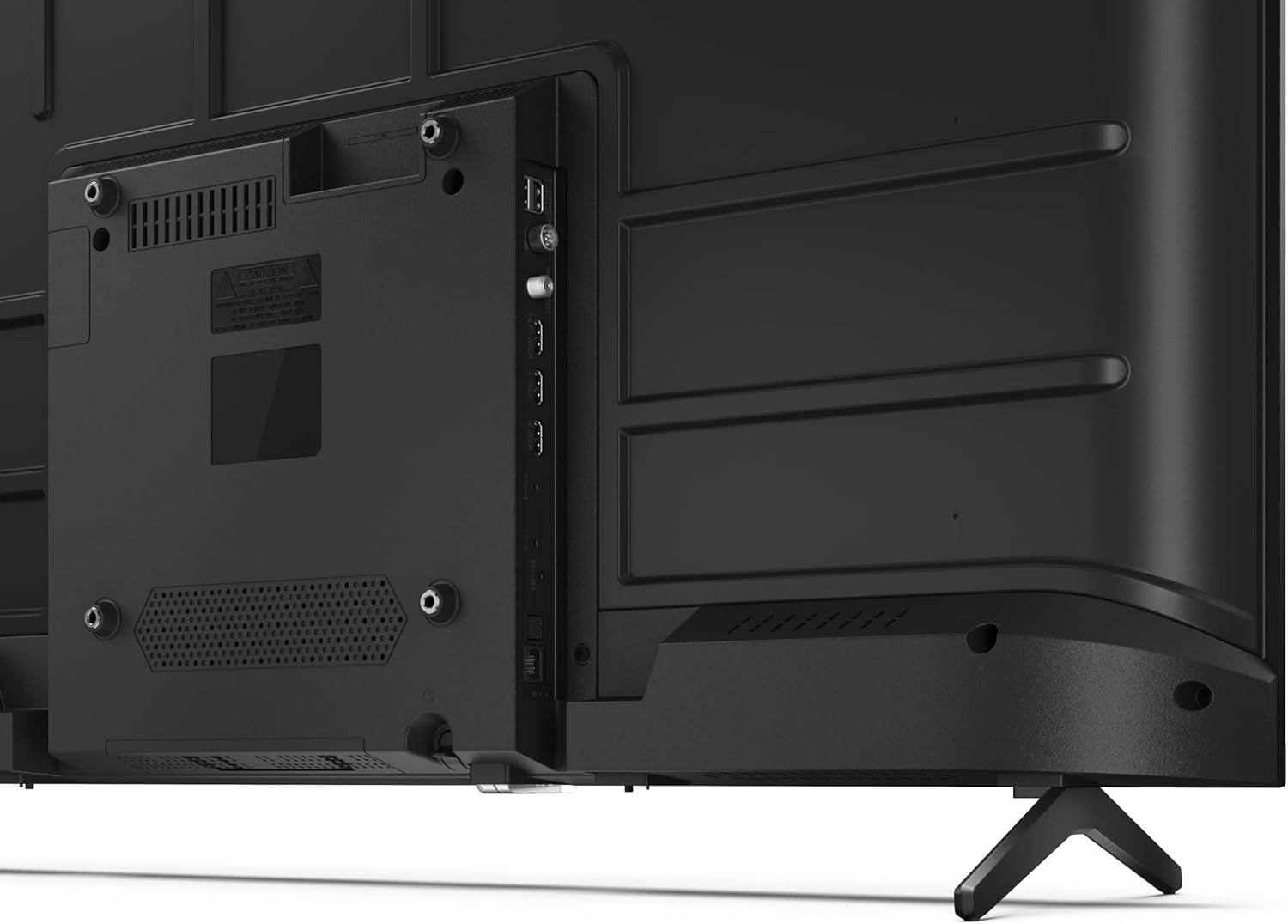
Imagem 3.3: Detalhada view das portas de conectividade da TV.
3.4 Inicialização e configuração do Google TV
After connecting all necessary cables, plug the power cable into an electrical outlet. Press the power button on the remote control or on the TV. Follow the on-screen instructions to complete the initial setup, including network connection, Google account login, and channel scanning.
4. Operação
4.1 Funções de controle remoto
The remote control allows you to navigate the TV's features. Common buttons include Power, Volume Up/Down, Channel Up/Down, Input Source, Home (Google TV), Navigation (directional arrows, OK), Back, and Google Assistant.
4.2 Interface do Google TV
Your Sharp TV runs on Google TV, providing a personalized home screen with content recommendations from your subscriptions. Use the remote's navigation buttons to browse movies, shows, apps, and your library.

Image 4.1: The Google TV home screen on the Sharp 40HF2265E.
4.3 Seleção de entrada
To switch between connected devices (e.g., HDMI 1, HDMI 2, TV tuner), press the 'Input' or 'Source' button on your remote control and select the desired input from the on-screen menu.
4.4 Configurações de imagem e som
Access the TV's settings menu to adjust picture modes (Standard, Vivid, Cinema, Game), brightness, contrast, color, and sound modes (Standard, Music, Movie, Speech). The TV supports HDR10 for enhanced contrast and color, and Dolby Digital for rich audio.

Image 4.2: Visual representation of HDR (High Dynamic Range) technology.
4.5 Google Assistente e Chromecast
Use the built-in Google Assistant for voice control. Press the Google Assistant button on your remote and speak your commands, such as searching for content, controlling smart home devices, or getting information. Chromecast allows you to cast content directly from compatible devices like smartphones or tablets to your TV.

Image 4.3: Google Assistant integration for voice commands.
4.6 Conectividade Bluetooth
Pair Bluetooth-enabled devices such as headphones or soundbars with your TV for a wireless audio experience. Navigate to the TV's settings menu, select 'Remotes & Accessories', and then 'Pair new device' to connect.
5. Manutenção
5.1 Limpando a TV
Desligue sempre a TV da tomada antes de limpá-la. Use um pano macio e seco para limpar a tela e a carcaça da TV. Para manchas persistentes, esfregue levemente.ampen the cloth with water or a specialized screen cleaner. Never use abrasive cleaners, waxes, or solvents.
5.2 Atualizações de Software
Your Google TV may receive automatic software updates. Ensure your TV is connected to the internet to receive these updates, which can improve performance and add new features. You can also manually check for updates in the settings menu.
6. Solução De Problemas
Se você tiver problemas com sua TV, consulte as seguintes soluções comuns:
- Sem energia: Verifique se o cabo de alimentação está firmemente conectado tanto à TV quanto à tomada. Certifique-se de que a tomada esteja funcionando corretamente.
- Sem imagem/som: Verifique se a entrada selecionada está correta. Confira todas as conexões de cabo (HDMI, antena). Tente reiniciar a TV.
- Controle remoto não funciona: Substitua as pilhas (2 AAA). Certifique-se de que não haja obstruções entre o controle remoto e o sensor infravermelho da TV.
- Problemas de conexão de rede: For Wi-Fi, check your router and ensure the TV is within range. For wired connections, check the Ethernet cable. Try restarting your router and the TV.
- Problemas com a qualidade da imagem: Ajuste as configurações de imagem (brilho, contraste, nitidez). Certifique-se de que a fonte de entrada esteja fornecendo um sinal de alta qualidade.
For more complex issues, consult the comprehensive troubleshooting section in the full digital manual or contact Sharp customer support.
7. Especificações
Below are the technical specifications for the Sharp 40HF2265E Full HD Google TV:

Image 7.1: Dimensions of the Sharp 40HF2265E TV.
| Recurso | Especificação |
|---|---|
| Marca | Afiado |
| Número do modelo | 40HF2265E |
| Nome do modelo | Série HF |
| Ano do modelo | 2025 |
| Tamanho da tela | 40 polegadas (81 centímetros) |
| Tecnologia de exibição | LIDERADO |
| Resolução | 1080p (Full HD) |
| Taxa de atualização | 60 Hz |
| Proporção da tela | 16:9 |
| Taxa de contraste | 100000:1 |
| Screen Finish | Fosco |
| Tempo de resposta | 8 milissegundos |
| Tecnologia de luz de fundo | LIDERADO |
| Supported HDR Format | HDR10, HLG |
| Melhoria da qualidade da imagem | Dynamic Contrast, HDR10, HLG |
| Motion Enhancement Technology | Motion Interpolation |
| Sistema operacional | Google TV |
| Internet Applications | Apple TV, Google TV, Hulu, Prime Video, YouTube |
| Características especiais | Bluetooth, Chromecast, Dolby Digital, HD Tuner |
| Tecnologia de Conectividade | Ethernet, USB, Wi-Fi |
| Tecnologia sem fio | Bluetooth |
| Versão Bluetooth | 5.0 |
| Screen Mirroring Technology | Chromecast, Google Cast |
| Total de portas HDMI | 3 |
| Total USB 2.0 Ports | 2 |
| Number of Composite Video Inputs | 1 |
| Entrada de áudio | Mini composite/CVBS + audio input |
| Total Audio Output Ports | 2 |
| Modo de saída de áudio | Estéreo |
| Codificação de áudio | DD |
| Integrated Surround Sound Format | Dolby AC-4, Dolby Digital, Dolby Digital Plus |
| Potência máxima de saída do alto-falante | 16 Watts (2x8W) |
| Número de canais de áudio | 2.0 |
| Sistema de transmissão | DVB-T2/C/S/S2 |
| Codificação de vídeo | MKV |
| Dimensões do produto (DxLxA) | 8.4 cm de largura x 89.2 cm de comprimento x 50.9 cm de altura |
| Peso do item | 5.4 quilos |
| Peso sem suporte | 5.4 quilos |
| Largura da base | 765 milímetros |
| Padrão de montagem VESA | 200 x 200 mm |
| Consumo de energia | 37 Watts |
| Volumetage | 230 volts |
| Remote Control Battery Size | AAA |
| Remote Control Battery Quantity | 2 |
| Parental Control Technology | Kindersicherung Über Google Tv |
| Disponibilidade de peças de reposição na UE | 7 anos |
8. Garantia e Suporte
8.1 Garantia do Produto
The Sharp 40HF2265E television comes with a 2-year manufacturer's warranty. Please refer to the included Warranty Card for detailed terms and conditions regarding coverage and service. Keep your proof of purchase for warranty claims.
8.2 Suporte ao cliente
If you require further assistance, have questions not covered in this manual, or need technical support, please contact Sharp customer service. Contact information can typically be found on the Warranty Card or the official Sharp website.


