
1. Introdução
Thank you for choosing Monster Persona 6th ANC Active Noise Cancelling Headphones. These headphones are designed to provide a superior audio experience with advanced features such as Active Noise Cancellation, Bluetooth 6.0 connectivity, 60 hours of playtime, and three distinct music modes. This manual will guide you through the setup, operation, and maintenance of your new headphones to ensure optimal performance and longevity.
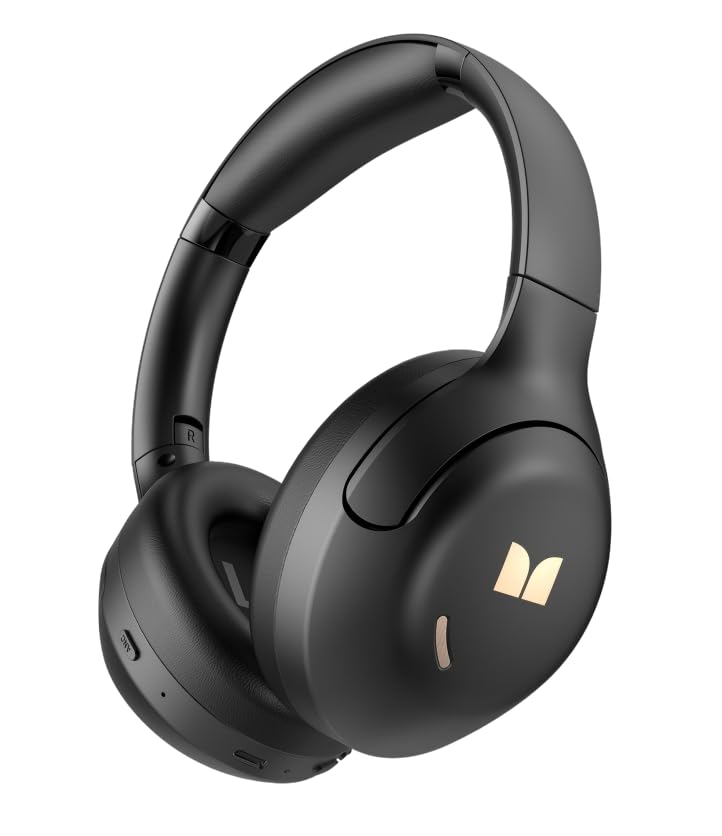
Imagem 1.1: Frente view of the Monster Persona 6th ANC Active Noise Cancelling Headphones. The headphones feature a sleek, over-ear design with cushioned earcups and an adjustable headband, providing comfort for extended listening sessions.
2. Conteúdo da embalagem
Por favor, verifique se a embalagem contém os seguintes itens:
- Fones de ouvido Monster Persona 6th ANC × 1
- Cabo de carregamento tipo C × 1
- Audio Cable × 1 (for wired connection)
- Manual do usuário × 1
3. Configuração
3.1 Carregando os fones de ouvido
Before first use, fully charge your headphones. A full charge takes approximately 2-3 hours.
- Conecte o cabo de carregamento Tipo C à porta de carregamento dos fones de ouvido.
- Conecte a outra extremidade do cabo a um adaptador de energia USB (não incluído) ou à porta USB de um computador.
- O indicador LED mostrará o status do carregamento (por exemplo, vermelho para carregando, azul para totalmente carregado).
Carga rápida: Uma carga de 10 minutos proporciona aproximadamente 5 horas de reprodução.
Image 3.1: Location of the Type-C charging port on the Monster Persona 6th ANC Headphones. The port is typically located on the bottom edge of one earcup, alongside other control buttons.
3.2 Ligar/Desligar
- Ligar: Press and hold the Power button for 3 seconds until the LED indicator flashes blue and you hear a power-on prompt.
- Desligar: Press and hold the Power button for 3 seconds until the LED indicator flashes red and you hear a power-off prompt.
3.3 Emparelhamento Bluetooth
Emparelhe seus fones de ouvido com seu dispositivo para áudio sem fio.
- Certifique-se de que os fones de ouvido estejam desligados.
- Press and hold the Power button for 5-7 seconds until the LED indicator flashes blue and red alternately, indicating pairing mode.
- No seu dispositivo (smartphone, tablet, computador), ative o Bluetooth e procure por dispositivos disponíveis.
- Select "Monster Persona 6th ANC" from the list of devices.
- Once connected, the LED indicator will flash blue slowly, and you will hear a connection prompt.
Conexão de dispositivo duplo: These headphones support connecting to two Bluetooth devices simultaneously. After pairing with the first device, disable Bluetooth on the first device, pair with the second, then re-enable Bluetooth on the first device. The headphones should connect to both.
4. Operando os fones de ouvido
4.1 Controles Básicos
| Função | Ação |
|---|---|
| Ligar/Desligar | Press and hold Power button for 3 seconds. |
| Reproduzir/Pausar | Press the Multi-function button (often the Power button when not powering on/off). |
| Aumentar o volume | Pressione rapidamente o botão '+'. |
| Diminuir volume | Pressione rapidamente o botão '-'. |
| Próxima faixa | Pressione e segure o botão '+'. |
| Faixa anterior | Pressione e segure o botão '-'. |
| Atender/encerrar chamada | Pressione o botão multifuncional. |
| Rejeitar chamada | Pressione e segure o botão multifuncional. |
| Ativar Assistente de Voz | Pressione duas vezes o botão multifuncional. |
Image 4.1: Diagram illustrating the location and function of control buttons on the Monster Persona 6th ANC Headphones. Buttons typically include Power/Multi-function, Volume Up/Next Track, Volume Down/Previous Track, and an ANC mode button.
4.2 Music Modes (EQ Modes)
Your headphones feature three distinct music modes to optimize your listening experience. Press the dedicated EQ/Mode button to cycle through them:
- Modo de cancelamento de ruído ativo (ANC): Reduces ambient noise for an immersive audio experience. Ideal for travel or noisy environments.
- Modo de transparência: Permite que você ouça o que está ao seu redor enquanto desfruta do seu áudio. Útil para manter a percepção em ambientes urbanos ou ao interagir com outras pessoas.
- Modo Padrão: Provides a balanced, classic sound profile without active noise cancellation or transparency features.
4.3 conexão com fio
You can use the included audio cable to connect your headphones to devices without Bluetooth capability or when the battery is depleted. Simply plug one end into the headphone's audio jack and the other into your device's 3.5mm audio output.
5. Manutenção
5.1 Limpeza
- Limpe os fones de ouvido com um pano macio, seco e sem fiapos.
- Não utilize produtos de limpeza abrasivos, álcool ou solventes químicos.
- Evite a entrada de umidade em qualquer abertura.
5.2 Armazenamento
- Guarde os fones de ouvido em local fresco e seco, longe da luz solar direta e de temperaturas extremas.
- If storing for an extended period, charge the headphones every three months to maintain battery health.
6. Solução De Problemas
Se você tiver problemas com seus fones de ouvido, consulte as seguintes soluções comuns:
| Problema | Solução |
|---|---|
| Os fones de ouvido não ligam. | Certifique-se de que os fones de ouvido estejam carregados. Conecte-os a uma fonte de energia usando o cabo Tipo C. |
| Não foi possível emparelhar com o dispositivo. | Ensure headphones are in pairing mode (flashing blue/red). Turn off and on Bluetooth on your device. Move headphones closer to the device. Clear previous Bluetooth connections on your device. |
| Sem som ou volume muito baixo. | Check headphone and device volume levels. Ensure headphones are properly paired. Try playing different audio sources. If using wired connection, ensure cable is fully inserted. |
| O ANC não está funcionando de forma eficaz. | Ensure ANC mode is activated. ANC is most effective against low-frequency, constant noise. It may not completely eliminate all sounds. |
| Conexão intermitente. | Ensure no obstacles between headphones and device. Move away from strong Wi-Fi signals or other Bluetooth devices that may cause interference. Keep within the 33 feet Bluetooth range. |
7. Especificações
| Recurso | Detalhe |
|---|---|
| Marca | Monstro |
| Nome do modelo | Persona Monstro 6º ANC |
| Colocação da orelha | Sobre a orelha |
| Controle de Ruído | Cancelamento de ruído ativo |
| Tecnologia de Conectividade | Wireless (Bluetooth), Wired (3.5mm Audio Cable) |
| Versão Bluetooth | 6.0 |
| Alcance Bluetooth | 33 pés (10 metros) |
| Duração da bateria | Até 60 horas |
| Porta de carregamento | Tipo C |
| Tamanho do driver de áudio | 40 milímetros |
| Faixa de frequência | 20Hz - 20,000Hz |
| Tipo de controle | Controle de botão |
| Material | Plástico |
| Características adicionais | 3 Music Modes (ANC, Transparency, Standard), Dual Device Connection, Hands-free Calling |
8. Garantia e Suporte
8.1 Informações de garantia
Your Monster Persona 6th ANC Headphones come with a Garantia de 180 dias A garantia é válida a partir da data da compra. Esta garantia cobre defeitos de fabricação e mão de obra em condições normais de uso. Não cobre danos causados por uso indevido, acidentes, modificações não autorizadas ou desgaste normal.
8.2 Suporte ao cliente
For technical assistance, warranty claims, or any questions regarding your Monster Persona 6th ANC Headphones, please contact Monster customer support through their official website or the retailer where the product was purchased. Please have your purchase receipt and product model information ready when contacting support.