
Introdução
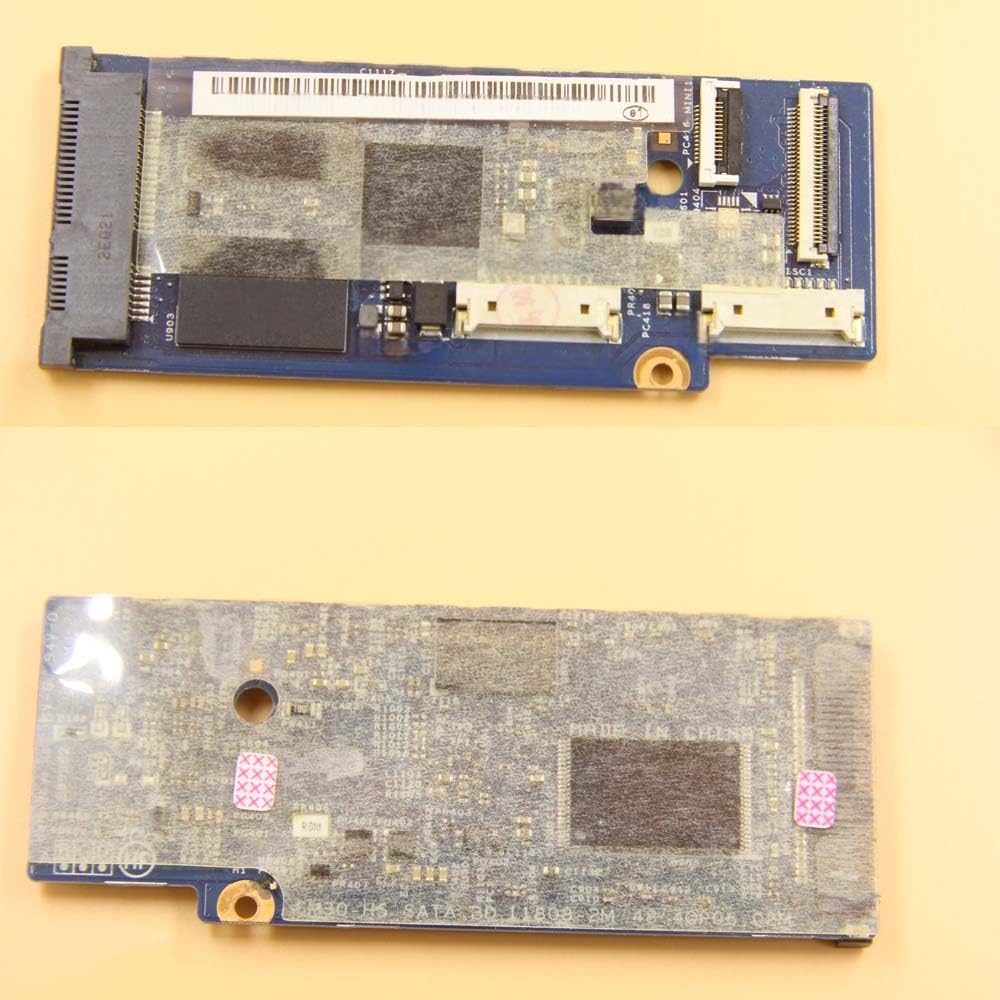
This manual provides essential instructions for the installation, operation, maintenance, and troubleshooting of the Generic S3-951 Board SM30-HS SATA BD 48.4QP06.02M. This board is designed to provide SATA connectivity, typically as a replacement or upgrade component within compatible systems, such as the Acer Aspire S3-951 series. Please read this manual thoroughly before proceeding with any installation or operation.
Informações de segurança
When handling electronic components, always observe standard safety precautions to prevent damage to the board or injury to yourself. No specific safety warnings beyond general electronic component handling are applicable for this product.
- Proteção contra descarga eletrostática (ESD): Always use an anti-static wrist strap or take other ESD precautions (e.g., touching a grounded metal object) before handling the board.
- Desconexão de energia: Ensure the host system is completely powered off and disconnected from its power source before installation or removal of the board.
- Manuseie com cuidado: Avoid touching the gold connectors or integrated circuits directly. Hold the board by its edges.
Configuração e instalação
Follow these general steps for installing the S3-951 Board SM30-HS SATA BD. Specific steps may vary depending on your host system's design.
- Prepare o sistema: Power off your computer or host device completely and disconnect all power cables and peripherals.
- Aceda aos componentes internos: Open the computer chassis or access panel according to your system's service manual.
- Localize a área de instalação: Identify the designated slot or area for the SATA board. If replacing an existing board, carefully remove the old one.
- Install the Board: Gently align the S3-951 Board with its connector slot. Apply even pressure to firmly seat the board into place. Ensure it is securely fastened, if applicable, with screws or clips.
- Cabos de conexão: Attach the necessary SATA data and power cables to the board and your storage device (e.g., hard drive, SSD). Ensure all connections are snug.
- Remonte e ligue: Close the computer chassis or access panel. Reconnect all power cables and peripherals. Power on your system.
Instruções de operação
Once installed, the S3-951 Board SM30-HS SATA BD operates as an integral part of your system's storage interface. It provides the necessary connection for SATA devices.
- Reconhecimento do sistema: Upon booting, your operating system should automatically detect the new SATA interface.
- Instalação do driver: In most modern operating systems, generic SATA drivers are pre-installed. If prompted, install any specific drivers provided by your system manufacturer or the board's manufacturer.
- Configuração da BIOS/UEFI: If your storage device is not detected or if you wish to change boot order, access your system's BIOS/UEFI settings. Ensure the SATA controller is enabled and configured correctly (e.g., AHCI mode for optimal performance).
Manutenção
The S3-951 Board SM30-HS SATA BD requires minimal maintenance. Adhering to these guidelines can help ensure its longevity and reliable performance.
- Mantenha limpo: Periodically clean the interior of your computer to prevent dust buildup on the board, which can impede cooling and performance. Use compressed air for this purpose.
- Ventilação: Ensure your system has adequate ventilation to prevent overheating of internal components, including the SATA board.
- Nenhuma peça que possa ser reparada pelo usuário: The board contains no user-serviceable parts. Do not attempt to repair or modify the board yourself.
Solução de problemas
If you encounter issues with your S3-951 Board, consider the following troubleshooting steps:
- Placa não detectada:
- Verify that the board is correctly seated in its slot.
- Ensure all power and data cables are securely connected.
- Check BIOS/UEFI settings to confirm the SATA controller is enabled.
- Storage Device Not Detected:
- Confirm the storage device itself is functional by testing it in another system or port.
- Inspect SATA data and power cables for damage and ensure they are properly connected.
- Check disk management in your operating system to see if the drive is recognized but uninitialized or unformatted.
- Instabilidade ou travamentos do sistema:
- Ensure the board is compatible with your system model.
- Re-seat the board to ensure a proper connection.
- Update your system's BIOS/UEFI to the latest version.
Especificações
| Recurso | Detalhe |
|---|---|
| Marca | Genérico |
| Fabricante | Genérico |
| Número do modelo | LCLC-RHYS-757 |
| Número da peça | 48.4QP06.02M |
| ASIN | B0GVJTJ1JC |
| Interface | SATA |
| Compatibilidade | S3-951 series (e.g., Acer Aspire S3-951) |
Informações de garantia
Warranty coverage for the S3-951 Board SM30-HS SATA BD is typically provided by the seller or manufacturer at the time of purchase. Please refer to your purchase documentation, invoice, or the seller's terms and conditions for specific warranty details, duration, and claim procedures.
Suporte Técnico
For technical assistance, troubleshooting beyond the scope of this manual, or warranty claims, please contact the seller or the manufacturer directly. Have your product model number (LCLC-RHYS-757) and purchase information readily available when seeking support.


