
1. Introdução
This manual provides essential information and instructions for using your realme 16T 5G Smartphone. Please read this manual thoroughly before using your device to ensure proper operation and to maximize its performance and longevity. Keep this manual for future reference.
2. O que está na caixa
Verifique se todos os itens estão presentes na embalagem do seu produto:
- realme 16T Smartphone
- Cabo de dados USB
- Capa de telefone
- Guia de início rápido
3. Dispositivo acabadoview
Familiarize yourself with the physical components of your realme 16T 5G Smartphone.
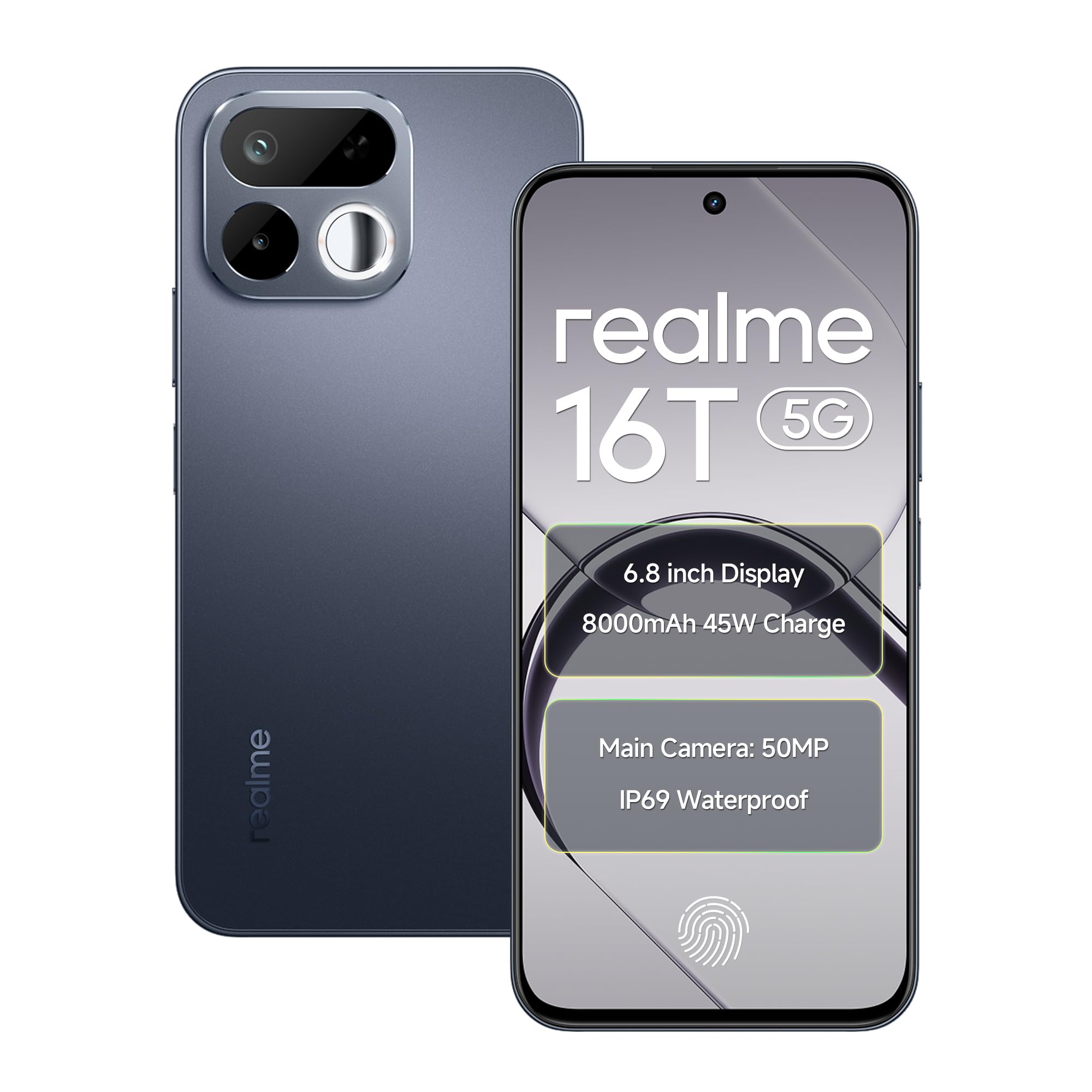
Imagem: Frente e verso view of the realme 16T 5G Smartphone, showcasinseu design e módulo de câmera.
Principais características:
- Mostrar: 6.8-inch HD+ LCD with 144Hz refresh rate and 1200 nits peak brightness.
- Processador: MediaTek Dimensity 6300 Octa-core chipset.
- Bateria: 8000mAh capacity with 45W SUPERVOOC flash charging.
- Câmera: 50MP AI main camera with selfie mirror functionality.
- Durabilidade: IP69 Pro dust and water resistance, MIL-STD-810H military-grade reliability.
- Sistema operacional: Android 16 with realme UI 7.0.
4. Configuração
4.1 Inserindo cartões SIM e cartão microSD
- Localize a bandeja do SIM na lateral do seu dispositivo.
- Utilize a ferramenta de ejeção do SIM fornecida para abrir a bandeja do SIM.
- Carefully place your Nano-SIM cards (supports dual 5G SIM) and a microSD card (for expandable storage up to 2TB) into the designated slots. Ensure the gold contacts are facing down.
- Gently push the SIM tray back into the device until it is flush with the side.
4.2 Inicialização e Configuração Básica
- Mantenha pressionado o botão Liga/Desliga até que o logotipo da realme apareça.
- Siga as instruções na tela para selecionar seu idioma, região e conectar-se a uma rede Wi-Fi.
- Entre com sua conta do Google ou crie uma nova para acessar os serviços do Google e a Play Store.
- Configure seu método de bloqueio de tela preferido (PIN, padrão, senha, impressão digital ou desbloqueio facial).
5. Instruções de operação
5.1 Gerenciamento de energia
- Ligar: Mantenha pressionado o botão Liga/Desliga até que o dispositivo vibre e o logotipo da realme apareça.
- Desligar: Mantenha pressionado o botão Liga/Desliga e, em seguida, toque em "Desligar" na tela.
- Reiniciar: Mantenha pressionado o botão Liga/Desliga e, em seguida, toque em "Reiniciar" na tela.
5.2 Configurações de exibição
Your realme 16T features a 6.8-inch HD+ LCD with a 144Hz refresh rate for smooth visuals and a 180Hz touch sampling rate for responsive interaction. The display offers up to 1200 nits peak brightness for clear visibility in various lighting conditions.

Image: The realme 16T 5G Smartphone display showcasing a game, highlighting the 144Hz refresh rate and bright visuals.
- To adjust refresh rate: Go to Settings > Display > Screen refresh rate.
- To adjust brightness: Go to Settings > Display > Brightness level or use the quick settings panel.
5.3 Bateria e carregamento
The device is equipped with an 8000mAh battery and supports 45W SUPERVOOC flash charging.

Image: An illustration of the realme 16T 5G Smartphone's 8000mAh battery capacity and 45W charging capability, with usage estimates for WhatsApp, Instagram, gaming, and YouTube.
- Use the provided 45W SUPERVOOC charger and USB Data Cable for optimal charging speed.
- Evite usar carregadores ou cabos não certificados para prevenir danos ao dispositivo.
5.4 Funções da câmera
The realme 16T features a 50MP AI main camera. It also includes a selfie mirror function, allowing you to use the rear camera for high-quality selfies.

Image: A person taking a selfie using the realme 16T 5G Smartphone's selfie mirror feature, highlighting the 50MP camera.

Image: A collage demonstrating the AI image editing capabilities of the realme 16T 5G Smartphone, including original, modeling photoshoot, 3D emoji, and cartoon shot options.
- Abra o aplicativo Câmera na sua tela inicial ou na gaveta de aplicativos.
- Switch between photo, video, portrait, and other modes.
- Utilize the AI features for enhanced image processing and editing.
5.5 Recursos de Segurança
The device supports side fingerprint recognition and face recognition for secure and quick unlocking.
- To set up fingerprint unlock: Go to Configurações> Segurança> Impressão digital e siga as instruções.
- To set up face unlock: Go to Configurações > Segurança > Desbloqueio facial e siga as instruções.
5.6 Conectividade
The realme 16T supports 5G dual-SIM dual-standby, Wi-Fi, Bluetooth, and USB OTG.
- Rede 5G: Ensure your SIM cards are 5G enabled and you are in a 5G coverage area.
- Wi-fi: Conecte-se a redes Wi-Fi através de Configurações > Wi-Fi.
- Bluetooth: Emparelhe com dispositivos Bluetooth via Configurações > Bluetooth.
- Cabo USB OTG: Connect USB devices (e.g., flash drives) using a USB OTG adapter.
5.7 Áudio
Experience studio-quality sound with Hi-Res high-resolution audio certification. The device also features 400% Ultra Volume for enhanced audio output.

Image: A person holding the realme 16T 5G Smartphone while playing a game, illustrating the 400% Ultra Volume feature with sound waves emanating from the device.
6. Manutenção
6.1 Limpando seu dispositivo
- Use um pano macio e sem fiapos para limpar a tela e o corpo do telefone.
- Evite usar produtos químicos agressivos ou materiais abrasivos.
6.2 Atualizações de Software
Verifique e instale regularmente as atualizações de software para garantir que seu dispositivo tenha os recursos mais recentes, patches de segurança e melhorias de desempenho.
- Vá para Settings > About device > realme UI version para verificar atualizações.
6.3 Gerenciamento de armazenamento
Manage your device's storage to maintain optimal performance. The device supports microSD card expansion up to 2TB.
- Vá para Configurações > Armazenamento para view utilização do armazenamento e liberação de espaço.
- Regularly back up important data to cloud storage or an external device.
6.4 Durability and Resistance
The realme 16T is designed with IP69 Pro dust and water resistance and MIL-STD-810H military-grade environmental reliability.

Image: The realme 16T 5G Smartphone on a wooden surface with spilled coffee, demonstrating its IP69 Pro dust and water resistance.
Image: A person running with the realme 16T 5G Smartphone, which is shown with debris around it, illustrating its military-grade shock resistance.
While resistant, avoid intentional exposure to water or dust, and do not submerge the device. Damage caused by liquid or dust ingress may not be covered under warranty if proper care is not taken.
7. Solução De Problemas
This section addresses common issues you might encounter with your realme 16T 5G Smartphone.
| Problema | Solução possível |
|---|---|
| O dispositivo não liga | Ensure the battery is charged. Connect the device to the charger for at least 10 minutes, then try powering on again. If it still doesn't work, perform a force restart by holding the Power button for 10-15 seconds. |
| A bateria descarrega rapidamente | Check for apps running in the background. Reduce screen brightness, disable unnecessary features like GPS or Bluetooth when not in use. Go to Configurações> Bateria Identificar aplicativos que consomem muita energia. |
| Network connectivity issues (5G/Wi-Fi) | Restart the device. Check if Airplane Mode is off. For mobile data, ensure your SIM card is properly inserted and has an active plan. For Wi-Fi, try forgetting the network and reconnecting, or restart your router. |
| Os aplicativos estão travando ou congelando. | Limpe o cache do aplicativo problemático (Configurações > Aplicativos > [Nome do aplicativo] > Armazenamento > Limpar cache). If the issue persists, try reinstalling the app. Ensure your device software is up to date. |
| O desbloqueio por impressão digital/reconhecimento facial não está funcionando. | Ensure your finger/face is clean and dry. Re-register your fingerprint/face in Configurações > Segurança. Check for any physical obstructions on the sensor or camera. |
If you encounter issues not listed here or if the suggested solutions do not resolve your problem, please contact realme customer support.
8. Especificações
Detailed technical specifications for the realme 16T 5G Smartphone:
| Recurso | Especificação |
|---|---|
| Marca | eu de verdade |
| Modelo | 16T |
| Sistema operacional | Android 16 (with realme UI 7.0) |
| Processador | MediaTek Dimensity 6300 Octa-core (2.4 GHz) |
| BATER | 6 GB (also available in 8 GB) |
| Armazenamento interno | 128 GB (also available in 256 GB) |
| Armazenamento expansível | Até 2 TB via microSD |
| Mostrar | 6.8-inch HD+ LCD, 144Hz Refresh Rate, 1200 nits Peak Brightness |
| Câmera Traseira | Câmera principal de 50 MP com IA |
| Bateria | 8000mAh |
| Carregando | Carregamento rápido SUPERVOOC de 45 W |
| Conectividade | 5G Dual SIM, Wi-Fi, Bluetooth, USB Type-C, USB OTG |
| Resistência à água | IP69 Pro |
| Durabilidade | MIL-STD-810H Military-Grade |
| Dimensões | 16.6 x 7.8 x 0.8 centímetros |
| Peso | 192 gramas |
9. Informações de garantia
Your realme 16T 5G Smartphone comes with a 1-year official manufacturer warranty A garantia é válida a partir da data da compra e cobre defeitos de fabricação em condições normais de uso. Guarde o comprovante de compra para eventuais solicitações de garantia.
A garantia não cobre:
- Damage caused by improper use, accidents, or unauthorized repairs.
- Desgaste normal.
- Damage caused by liquid or dust ingress if not handled according to IP69 Pro guidelines.
For detailed warranty terms and conditions, please refer to the warranty card included in your product package or visit the official realme website.
10. Support & Safety Information
10.1 Suporte ao cliente
For further assistance, technical support, or service inquiries, please contact realme customer service:
- Visite o suporte oficial da realme. website: realme Support (India)
- Refer to the contact information provided in your Quick Start Guide.
10.2 Diretrizes de Segurança
To ensure safe operation of your device, please observe the following:
- Não use o telefone enquanto dirige.
- Evite expor o dispositivo a temperaturas extremas.
- Use only realme-approved accessories.
- Não tente desmontar ou reparar o dispositivo por conta própria.
- Descarte o dispositivo e sua bateria de forma responsável, de acordo com as normas locais.