1. Terminadoview
SWAT 3: Close Quarters Battle is a tactical first-person shooter game developed by Sierra. Set in Los Angeles in 2005, players assume the role of an LAPD SWAT element leader. The primary objective is to lead a team through various missions, addressing terrorist activities and ensuring the safety of dignitaries during the signing of the United Nations Nuclear Abolishment Treaty. The game emphasizes realistic police procedures, including non-lethal takedowns, suspect apprehension, and strategic team commands.
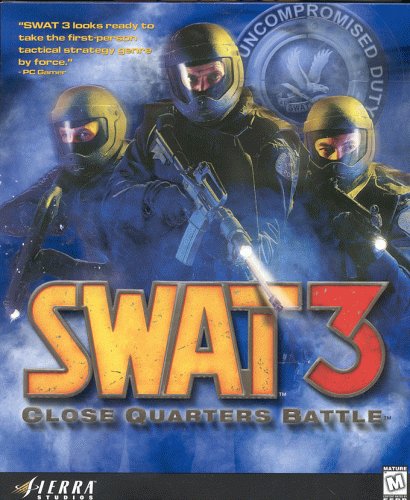
Figure 1: SWAT 3: Close Quarters Battle PC game box art.
2. Configuração e instalação
2.1 Requisitos do sistema
To ensure optimal performance, verify your computer meets the following minimum specifications for SWAT 3: Close Quarters Battle. Please note that these are typical requirements for games released in 1999 and may vary slightly.
- Sistema operacional: Windows 95/98 (Compatibility mode may be required for newer OS versions)
- Processador: Pentium II 266 MHz or equivalent
- BATER: 64 MB
- Placa de vídeo: DirectX 7.0a compatible 3D accelerator with 8 MB VRAM
- Espaço no disco rígido: Approximately 400 MB free
- Placa de som: DirectX 7.0a compatible sound card
- Entrada: Teclado e Mouse
2.2 Etapas de instalação
- Insert the SWAT 3 game CD into your computer's CD-ROM drive.
- If the installer does not launch automatically, navigate to "My Computer" or "This PC", right-click on the CD-ROM drive icon, and select "Open" or "Explore". Locate and double-click the "Setup.exe" or "Install.exe" file.
- Follow the on-screen prompts to complete the installation process. This typically includes accepting the End User License Agreement, choosing an installation directory, and selecting components.
- Once installation is complete, you may be prompted to restart your computer. It is recommended to do so.
- After restarting, locate the SWAT 3 shortcut on your desktop or in the Start Menu to launch the game.
3. Operando o Jogo
3.1 Basic Gameplay Mechanics
SWAT 3 focuses on tactical engagement and team management. As the element leader, you control your character directly while issuing commands to your AI-controlled squad members. Missions involve various objectives such as rescuing hostages, apprehending suspects, disarming bombs, and securing locations. Success often depends on careful planning, coordinated entry, and adherence to SWAT protocols.
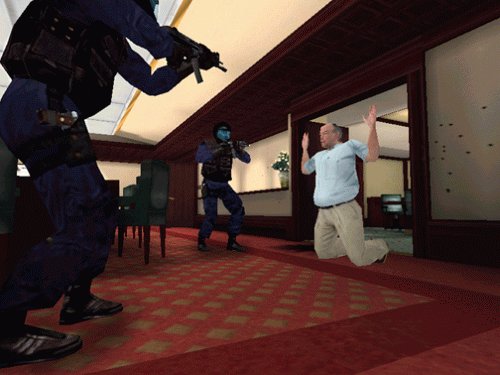
Figure 2: SWAT team members securing a surrendering suspect. Non-lethal apprehension is a key gameplay element.
3.2 Controles
The game utilizes standard first-person shooter controls with additional keys for tactical commands.
- Movimento: W, A, S, D keys
- Olhar: O movimento do mouse
- Fire Weapon: Botão esquerdo do mouse
- Aim/Zoom: Botão direito do mouse
- Recarregar: Tecla R
- Crouch: Tecla C
- Sprint: Tecla Shift
- Interact/Use: Tecla E
- Command Menu: Spacebar (or designated key) - used to issue orders to your squad.
- Opti-Wand: A specialized tool for peeking around corners without exposing yourself.
- Cuff Suspects: After a suspect surrenders, approach them and use the designated key to cuff them.
- Radio for Pickup: After cuffing, use the command menu to call for backup to extract the suspect.

Figure 3: A SWAT team element moving cautiously through a building. Effective team movement is crucial for mission success.
3.3 Tactical Commands
The command system allows you to direct your team with precision. Point your reticle at a door, enemy, or location, then open the command menu to select an action. Commands include:
- Breach and Clear: Order your team to open a door and enter a room.
- Flashbang/Gas: Deploy tactical grenades before entry.
- Cover Area: Assign team members to cover specific sectors.
- Empilhar: Position your team at a door or corner, ready for entry.
- Prender prisão: Command your team to apprehend a surrendering suspect.
- Relatório: Radio in status updates or request suspect pickups.

Figure 4: SWAT team members executing a room clear. Coordinated entry and target acquisition are vital.
3.4 Enemy Engagement and Environment
Players will encounter various enemy types in diverse environments. Careful observation and strategic engagement are necessary to neutralize threats while minimizing harm to civilians.
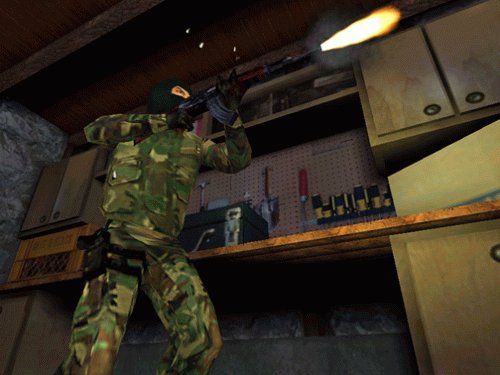
Figure 5: An armed suspect engaging in combat. Players must assess threats and respond appropriately.
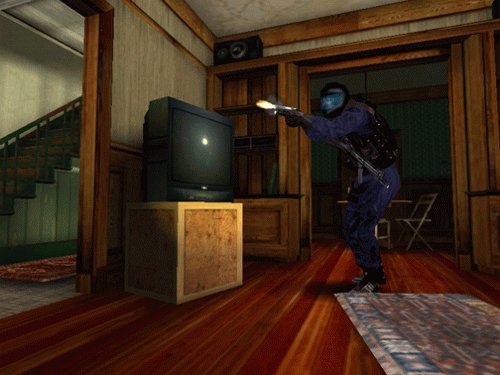
Figure 6: A SWAT officer surveying an environment, demonstrating interaction with in-game objects.
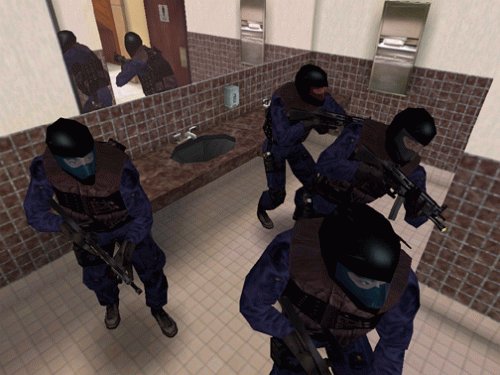
Figure 7: A SWAT team navigating a bathroom environment, highlighting varied mission locations.
4. Manutenção
While SWAT 3 is an older title, proper system maintenance can help ensure a smooth gaming experience.
- Atualizações de Driver: Ensure your graphics and sound card drivers are up to date, especially if playing on a modern operating system.
- Game Patches: Check official Sierra or fan community websites for any available patches or unofficial fixes that might improve compatibility or performance on newer systems.
- Disk Care: If using a physical game CD, keep it clean and free of scratches to prevent read errors.
- Save Game Management: Regularly save your game progress. Consider backing up your save game files periodically, typically found in the game's installation directory.
5. Solução De Problemas
Encountering issues? Here are some common problems and potential solutions for SWAT 3.
5.1 Problemas e soluções comuns
- Game Crashes or Freezes:
- Certifique-se de que seu sistema atenda aos requisitos mínimos.
- Update graphics and sound drivers.
- Try running the game in compatibility mode for Windows 95 or 98. Right-click the game executable, go to "Properties", then "Compatibility".
- Reduza as configurações gráficas do jogo.
- Sem som ou áudio distorcido:
- Verify your sound card drivers are updated.
- Check in-game audio settings and your system's volume mixer.
- Ensure DirectX is properly installed and updated.
- Poor Performance (Low Frame Rate):
- Feche outros aplicativos que estejam sendo executados em segundo plano.
- Lower the game's resolution and detail settings.
- Ensure your graphics card drivers are current.
- Erros de instalação:
- Clean the game CD and try installing again.
- Ensure you have sufficient free hard drive space.
- Temporarily disable antivirus software during installation (re-enable immediately after).
6. Especificações
| Recurso | Detalhe |
|---|---|
| Plataforma de Computador | PC |
| Data de lançamento | 16 de novembro de 1999 |
| Número do modelo do item | 70830 |
| UPC | 020626708302 |
| Fabricante | Vivendi Universal |
| Classificado | Maduro |
| Physical Item Weight | 3.2 onças |
| Dimensões da embalagem | 5.5 x 4.8 x 0.4 polegadas |
7. Garantia e Suporte
For information regarding product warranty or technical support, please refer to the documentation included with your original game purchase or visit the official Sierra Entertainment (now part of Activision Blizzard) support website. As this is an older title, direct manufacturer support may be limited. Online communities and fan-made patches may offer additional resources for compatibility and troubleshooting on modern systems.


