Introdução
This manual provides comprehensive instructions for the setup, operation, and maintenance of your VTech t2451 2.4 GHz Analog Cordless Phone with Answering System and Caller ID. Please read this manual thoroughly before using your new phone system to ensure proper functionality and to take full advantage de suas características.
Key features of your VTech t2451 include:
- 2.4 GHz analog reception for clear communication.
- Digital answering system with 3 mailboxes and 15 minutes of recording time.
- 50 name/number phonebook directory for easy contact management.
- 99 name/number Caller ID history to review chamadas perdidas.
- Headset compatibility (2.5 mm jack) for hands-free operation.
- Hold function, page/handset locator, and selectable ring tones.
- Wall-mountable design for flexible placement.
Configurar
Follow these steps to set up your VTech t2451 cordless phone system.
- Desembalagem: Carefully remove all components from the packaging. Ensure you have the cordless handset, base unit, AC power adapter, telephone line cord, and battery pack.
- Instalação da bateria: Open the battery compartment on the back of the cordless handset. Connect the battery pack connector to the jack inside the compartment, ensuring correct polarity. Place the battery pack into the compartment and close the cover.
- Conectando a Unidade Base:
- Connect one end of the telephone line cord to the TEL LINE jack on the base unit and the other end to a telephone wall jack.
- Connect the small end of the AC power adapter to the DC IN 9V jack on the base unit. Plug the large end of the AC power adapter into a standard electrical outlet.
- Carregando o aparelho: Place the cordless handset in the base unit's charging cradle. The charge indicator on the handset should illuminate, indicating that the battery is charging. Allow the handset to charge for at least 12 hours before initial use.
- Montagem na parede (opcional): The base unit is designed to be wall-mountable. Refer to the included wall-mount bracket and instructions for secure installation.
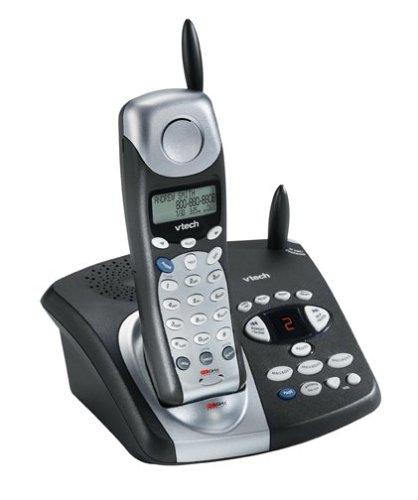
Image: The VTech t2451 cordless phone system, showing the black base unit with the silver and black handset docked in its charging cradle. The base unit features an integrated digital answering system with controls and a display.
Instruções de operação
Fazendo e recebendo chamadas
- Fazer uma ligação: Pressione o FALAR button, wait for a dial tone, then dial the phone number.
- Para receber uma chamada: Quando o telefone tocar, pressione o FALAR button or any key on the keypad (Any Key Answer).
- Para encerrar uma chamada: Pressione o FIM pressione o botão ou coloque o aparelho de volta na base.
- Função de retenção: Durante uma chamada, pressione o SEGURAR botão para colocar a chamada em espera. Pressione FALAR novamente para retomar a chamada.
Sistema de Atendimento Digital
Your phone system includes a digital answering system with 3 mailboxes and 15 minutes of recording time.
- Mensagens de reprodução: Pressione o JOGAR Botão na unidade base para ouvir novas mensagens.
- Gravação de mensagem de saída (OGM): Follow the voice prompts to record a personalized outgoing message.
- Mailbox Management: The system supports up to 3 distinct mailboxes. Refer to the detailed instructions in the full user guide for setting up and accessing individual mailboxes.
Identificador de chamadas e agenda telefônica
- Identificador de chamadas: When subscribed to Caller ID service, the handset display will show the caller's name and number. Press the CID botão para review the 99-name/number Caller ID history.
- Diretório da agenda telefônica: Store up to 50 names and numbers in the phonebook. Use the navigation buttons to scroll through entries and the MENU/SELECIONAR button to add or edit entries.
Outras funções
- Page/Handset Locator: Pressione o PÁGINA button on the base unit to locate a misplaced handset.
- Ringer Tones: Customize your phone's ringer by selecting from various available tones. Refer to the handset settings menu.
- Headset Use: Connect a 2.5 mm compatible headset to the headset jack on the side of the handset for hands-free communication.
Manutenção
Proper care ensures the longevity of your VTech t2451 phone system.
- Limpeza: Limpe o telefone e a base com um pano macio e seco.amp pano. Não use produtos químicos agressivos ou produtos de limpeza abrasivos.
- Cuidados com a bateria:
- Sempre coloque o aparelho de volta na base quando não estiver em uso para garantir que ele permaneça carregado.
- Se o telefone não for usado por um longo período, remova a bateria do aparelho.
- Replace the battery when its performance significantly degrades. Use only the specified replacement battery pack.
- Condições ambientais: Evite expor o telefone a temperaturas extremas, luz solar direta ou umidade.
Solução de problemas
If you experience issues with your VTech t2451, try these common troubleshooting steps.
| Problema | Solução |
|---|---|
| Não esta dando sinal. |
|
| Má recepção ou estática. |
|
| O aparelho não carrega. |
|
| A secretária eletrônica não está gravando mensagens. |
|
Especificações
| Recurso | Detalhe |
|---|---|
| Marca | VTech |
| Número do modelo | T2451 |
| Tipo de telefone | Sem fio |
| Freqüência | Analógico de 2.4 GHz |
| Tipo de sistema de atendimento | Digital |
| Capacidade de Gravação | 15 minutos |
| Mailboxes | 3 |
| Lista telefônica | 50 names/numbers |
| Memória de identificação de chamadas | 99 names/numbers |
| Compatibilidade de fone de ouvido | Conector de 2.5 mm |
| Fonte de energia | Elétrico com fio |
| Dimensões do produto | 7.1 x 8.5 x 5.1 polegadas |
| Peso do item | 2.19 libras |
| Fabricante | Vtech |
Garantia e Suporte
For warranty information, please refer to the warranty card included with your product packaging or visit the official VTech website. VTech provides customer support for product inquiries, technical assistance, and service. Contact information can typically be found on the VTech website ou na documentação original do produto.
Fabricante: VTech


