1. Introdução
Obrigado pela compra.asing the SANYO DC-M1 Stereo System. This manual provides essential information for the safe and efficient operation of your new audio system. Please read it thoroughly before use and retain it for future reference.
The SANYO DC-M1 is a full logic micro component stereo system featuring a high-quality 2-way speaker design, delivering 15W total output. It supports CD-R/RW playback and MP3 files, and includes full remote control functionality.
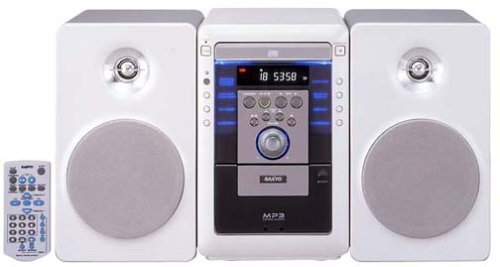
Image of the SANYO DC-M1 stereo system, showcasing its compact design and two-way speakers.
2. Configuração
2.1 Desembalagem
Retire cuidadosamente todos os componentes da embalagem. Certifique-se de que todos os itens listados abaixo estejam presentes:
- Main Unit (DC-M1)
- Duas unidades de alto-falantes
- Controle remoto
- Cabo de alimentação
- Cabos de alto-falante
- Manual do usuário (este documento)
2.2 Conexão de alto-falante
- Connect the speaker cables to the speaker terminals on the rear of the main unit. Ensure correct polarity (red to red, black to black) for each speaker.
- Position the speakers on a stable, flat surface, ensuring they are equidistant from the listening position for optimal sound.
2.3 Conexão de Energia
- Insert the power cord into the AC IN socket on the rear of the main unit.
- Conecte a outra extremidade do cabo de alimentação a uma tomada elétrica padrão.
2.4 Inicialização Inicial
Pressione o PODER button on the front panel or the remote control to turn on the system. The display will illuminate.
3. Instruções de operação
3.1 Controles Básicos
- Botão de energia: Liga ou desliga o sistema.
- VOLUME Knob/Buttons: Adjusts the sound output level. Turn clockwise to increase, counter-clockwise to decrease.
- FUNCTION/SOURCE Button: Selects the input source (CD, AUX).
3.2 Reprodução de CD
- Pressione o ABRIR/FECHAR botão para abrir a bandeja do CD.
- Place a CD (audio CD, CD-R/RW with audio or MP3 files) with the label side up into the tray.
- Imprensa ABRIR/FECHAR novamente para fechar a bandeja.
- Pressione o REPRODUZIR/PAUSAR botão para iniciar a reprodução.
- Use o PULAR botões (|< / >> |) para navegar entre as faixas.
- Imprensa PARAR para finalizar a reprodução.
3.3 Entrada auxiliar (AUX)
To connect an external audio device (e.g., smartphone, MP3 player):
- Connect an audio cable (not supplied) from the headphone jack or line-out of your external device to the AUX IN jack on the SANYO DC-M1.
- Pressione o FUNCTION/SOURCE Pressione o botão até que "AUX" apareça no visor.
- Start playback on your external device. Adjust the volume on both the external device and the DC-M1 for optimal sound.
3.4 Uso do controle remoto
The included remote control provides full functionality for the stereo system. Ensure batteries are correctly inserted. Point the remote control towards the main unit's front panel sensor.
4. Manutenção
4.1 Limpeza
- Desconecte o cabo de alimentação antes de limpar.
- Limpe a parte externa da unidade com um pano macio e seco. Para sujeira persistente, use um pano levemente umedecido.ampened with water, then wipe dry.
- Do not use abrasive cleaners, benzene, alcohol, or other chemical solvents, as these may damage the finish.
4.2 Cuidados com o CD
- Manuseie os CDs pelas bordas para evitar marcas de dedos na superfície de reprodução.
- Store CDs in their cases to protect them from dust and scratches.
- If a CD is dirty, wipe it gently from the center outwards with a soft, lint-free cloth.
4.3 Armazenamento
If the unit will not be used for an extended period, disconnect the power cord from the wall outlet and store it in a cool, dry place away from direct sunlight and extreme temperatures.
5. Solução De Problemas
Before seeking service, please check the following points:
- Sem energia:
- Ensure the power cord is securely plugged into both the unit and the wall outlet.
- Check if the wall outlet is functioning by plugging in another device. - Sem som:
- Check that the volume is not set to minimum or muted.
- Ensure speaker cables are correctly connected to both the main unit and speakers, with correct polarity.
- If using AUX input, verify the external device's volume and connection. - CD Not Playing / Disc Error:
- Ensure the CD is inserted correctly with the label side up.
- Clean the CD if it appears dirty or scratched.
- Try a different CD to rule out a disc-specific issue.
- Ensure the disc type is compatible (audio CD, CD-R/RW with audio or MP3). - Controle remoto não funciona:
- Check and replace the batteries if necessary.
- Ensure there are no obstructions between the remote control and the unit's sensor.
- Make sure you are pointing the remote directly at the unit.
6. Especificações
- Número do modelo: DC-M1
- Dimensões do produto (C x L x A): 18.82 x 9.65 x 10.31 polegadas
- Peso do item: 16.28 libras
- Tecnologia de conectividade: Auxiliar
- Tipo de alto-falante: Components (2-way)
- Potência de saída: 15W (Total)
- Formatos de disco suportados: Audio CD, CD-R/RW (Audio, MP3)
7. Garantia e Suporte
SANYO products are manufactured to high-quality standards. For warranty information, please refer to the warranty card included with your purchase or visit the official SANYO webConsulte o site para obter detalhes específicos da sua região.
For technical support or service inquiries, please contact your local SANYO authorized service center or refer to the contact information provided on the official SANYO website.


