1. Introdução
Obrigado pela compra.asing the SANYO DC-M1(S) Set Stereo. This compact audio system is designed to provide high-quality sound with versatile playback options, including CD-R/RW and MP3 support, and features a powerful deep bass output. This manual provides essential information for the safe and efficient operation of your stereo system. Please read it thoroughly before use and retain it for future reference.
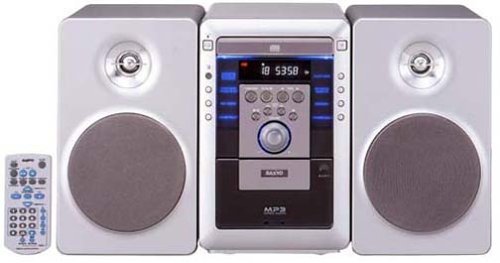
Figure 1: SANYO DC-M1(S) Set Stereo (Silver) front view. This image shows the SANYO DC-M1(S) Set Stereo in silver, featuring its main unit with a CD tray, display, and control buttons, along with two matching speakers.
3. Configuração
3.1 Desembalagem
Carefully remove all components from the packaging. Retain the packaging materials for future transport or storage. Ensure all items listed below are present:
- Main Unit (CD Player/Amplifier/Tuner)
- Speaker Units (2)
- Controle remoto
- Cabo de alimentação
- Manual do usuário (este documento)
3.2 Conexões dos alto-falantes
Connect the speaker wires to the corresponding terminals on the main unit and the speakers. Ensure correct polarity (+ to + and - to -) for optimal sound quality. Incorrect polarity can result in poor bass response.
- Localize os terminais das caixas de som na parte traseira da unidade principal e em cada caixa de som.
- Strip approximately 1 cm of insulation from the ends of the speaker wires.
- Connect the red wire to the red (+) terminal and the black wire to the black (-) terminal on both the main unit and the speakers.
- Ensure the wires are securely fastened and no stray strands are touching other terminals.
3.3 Conexão de Energia
After all other connections are made, plug the power cord into the AC IN socket on the rear of the main unit, then plug the other end into a suitable wall outlet.
3.4 Inicialização Inicial
Pressione o PODER button on the front panel or the remote control to turn on the unit. The display will illuminate, indicating the system is ready for use.
4. Instruções de operação
4.1 Controles Básicos
- Poder: Pressione o PODER botão para ligar ou desligar a unidade.
- Volume: Use o VOLUME +/- Botões na unidade ou no controle remoto para ajustar o nível de som.
- Função/Fonte: Pressione o FUNÇÃO or FONTE button to switch between CD, Tuner, and other available inputs.
4.2 Operação do Leitor de CD
The SANYO DC-M1(S) supports playback of standard audio CDs, CD-R/RW discs, and MP3 files stored on CD-R/RW discs.
- Pressione o FUNÇÃO botão para selecionar a fonte do CD.
- Pressione o ABRIR/FECHAR botão para abrir a bandeja do CD.
- Coloque um CD com a etiqueta voltada para cima na bandeja.
- Pressione o ABRIR/FECHAR botão novamente para fechar a bandeja.
- A reprodução geralmente inicia automaticamente. Caso contrário, pressione o REPRODUZIR/PAUSAR botão.
- Use o PULAR botões (<< / >>) para navegar entre as faixas.
- For MP3 discs, the system will display folder and track information. Use navigation buttons to browse.
4.3 Operação do sintonizador de rádio
The unit includes an FM/AM tuner for radio reception.
- Pressione o FUNÇÃO button to select the TUNER source.
- Use o SINTONIZAR +/- botões para sintonizar manualmente uma estação.
- Pressione e segure SINTONIZAR +/- for automatic scanning to the next strong station.
- Para pré-definir estações, sintonize a estação desejada e pressione MEMÓRIA seguido por um botão de número predefinido.
4.4 Uso do controle remoto
The included remote control provides full logic control over all functions of the stereo system. Ensure batteries are correctly inserted (not included). Point the remote control directly at the main unit's remote sensor for optimal response.
4.5 Deep Bass Output
The SANYO DC-M1(S) features a deep bass output function for enhanced low-frequency sound. This feature is automatically engaged or can be toggled using a dedicated button on the remote control or front panel (refer to specific button labels on your unit for "BASS" or "DBASS").
5. Manutenção
5.1 Limpeza
To maintain the appearance and performance of your stereo system:
- Sempre desconecte o cabo de alimentação antes de limpar.
- Use um pano macio e seco para limpar as superfícies externas.
- Para manchas teimosas, d levementeampMolhe o pano com água ou um detergente suave e não abrasivo e, em seguida, seque-o imediatamente.
- Do not use abrasive pads, scouring powder, or solvents such as alcohol or benzene, as these can damage the finish.
- Clean the CD lens periodically with a commercially available CD lens cleaner disc.
5.2 Armazenamento
If you plan to store the unit for an extended period, disconnect the power cord and store it in a cool, dry place, away from direct sunlight and extreme temperatures. It is recommended to use the original packaging for protection.
8. Garantia e Suporte
SANYO products are manufactured to the highest quality standards. For warranty information, please refer to the warranty card included with your product or visit the official SANYO website for details specific to your region. For technical support or service inquiries, please contact your local SANYO authorized service center.
You can find contact information and further support resources on the official SANYO website: www.sanyo.com (Nota: Este é um espaço reservado) URLConsulte a documentação do seu produto para obter informações sobre a região correta. weblocal).


