Introdução
This manual provides comprehensive instructions for the setup, operation, maintenance, and troubleshooting of your RCA RS2650 Bookshelf Stereo System with 5-Disc CD Changer. Please read this manual thoroughly before using the system to ensure proper operation and to maximize your listening experience. Keep this manual for future reference.
Informações de segurança
Ao utilizar este produto, siga sempre as precauções básicas de segurança para reduzir o risco de incêndio, choque elétrico e ferimentos. Isso inclui, mas não se limita a:
- Não exponha este aparelho à chuva ou umidade.
- Não bloqueie nenhuma abertura de ventilação.
- Não instale perto de fontes de calor.
- Proteja o cabo de alimentação para que não seja pisado ou comprimido.
- Utilize somente acessórios/anexos especificados pelo fabricante.
- Deixe toda a manutenção a cargo de pessoal qualificado.
Conteúdo da embalagem
Verifique se todos os itens estão presentes na embalagem:
- RCA RS2650 Bookshelf Stereo System Main Unit
- Dois (2) alto-falantes estéreo
- Controle remoto (com pilhas)
- Antena de circuito AM
- Antena de fio FM
- Manual do usuário (este documento)
Configurar
1. Desembalagem e colocação
Carefully remove all components from the packaging. Place the main unit on a stable, flat surface. Position the speakers on either side of the main unit, ensuring they are at an equal distance for optimal stereo sound. Allow adequate ventilation around the unit.
2. Conectando os alto-falantes
Connect the speaker wires from the main unit to the corresponding terminals on the back of each speaker. Ensure that the positive (+) and negative (-) terminals are matched correctly for each speaker to maintain proper audio phasing.
3. Conectando Antenas
- Antena FM: Connect the supplied FM wire antenna to the FM antenna terminal on the rear of the main unit. Extend the wire for best reception.
- Antena AM: Assemble the AM loop antenna and connect it to the AM antenna terminals on the rear of the main unit. Rotate the antenna for optimal AM reception.
4. Conexão de energia
Plug the AC power cord into a standard wall outlet. The system is now ready for operation.
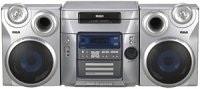
Figura 1: Frente view of the RCA RS2650 Bookshelf Stereo System, showing the main unit with its 5-disc CD changer tray and control panel, flanked by two stereo speakers. This image illustrates the typical setup configuration.
Instruções de operação
1. Ligar/desligar
Pressione o PODER Botão no painel frontal ou no controle remoto para ligar ou desligar o sistema.
2. Operação do Leitor de CD
The system features a 5-disc CD changer compatible with CD, CD-R, CD-RW, MP3, and WMA formats.
- Pressione o ABRIR/FECHAR botão para abrir a bandeja do CD.
- Place up to five discs onto the disc trays, label side up.
- Imprensa ABRIR/FECHAR novamente para fechar a bandeja.
- Pressione o CD button to select the CD function.
- Imprensa REPRODUZIR/PAUSAR para iniciar a reprodução.
- Use o PULAR buttons to navigate between tracks or discs.
- Programação: Enquanto estiver no modo de parada, pressione PROGRAMA to create a custom playback sequence.
- Reprodução aleatória: Imprensa ALEATÓRIO to play tracks in a random order.
- Repetir a reprodução: Imprensa REPITA to repeat the current track, current disc, or all discs.
3. Operação do sintonizador AM/FM
The digital AM/FM tuner allows you to listen to your favorite radio stations.
- Pressione o SINTONIZADOR/BANDA button to select either AM or FM band.
- Pressione o SINTONIZAR +/- botões para sintonizar manualmente uma estação.
- Pressione e segure SINTONIZAR +/- para busca automática de estações.
- Estações predefinidas: The system supports 32 AM/FM presets. To store a station, tune to the desired frequency, then press PROGRAMA followed by a preset number button. To recall a preset, press the corresponding preset number.
4. Equalizer and Bass Boost
Customize your audio experience with the built-in equalizer and bass boost system.
- Pressione o EQ button repeatedly to cycle through 5 preset equalization settings: Rock, Pop, Jazz, Classic, and Flat.
- Pressione o REFORÇO DE GRAVE Botão para realçar sons de baixa frequência. Pressione novamente para desativar.
5. Front A/V Inputs
The front A/V inputs allow you to connect external audio/video devices, such as game consoles or MP3 players, to the stereo system. Connect the audio output of your device to the corresponding input jacks on the front panel. Select the AUX input source to listen to the connected device.
Manutenção
Limpeza da unidade
Limpe a parte externa da unidade com um pano macio e seco. Para manchas persistentes, use um pano levemente umedecido.ampened with water. Do not use abrasive cleaners, waxes, or solvents as they may damage the finish. Ensure the unit is unplugged before cleaning.
Cuidados com CDs
Handle CDs by their edges. Keep them clean and free of scratches. Store discs in their cases when not in use. If a disc is dirty, wipe it gently with a soft, lint-free cloth from the center outwards.
Solução de problemas
If you experience problems with your stereo system, refer to the following table for possible solutions.
| Problema | Possível causa | Solução |
|---|---|---|
| Sem energia | Cabo de alimentação não está conectado corretamente. | Check power cord connection to the wall outlet and the unit. |
| Sem som | Volume is too low or muted. Speakers not connected properly. | Increase volume. Check speaker wire connections. Ensure correct input source is selected. |
| CD não está tocando | Disc is dirty, scratched, or inserted incorrectly. Incorrect format. | Clean the disc. Insert disc label side up. Ensure disc format is compatible (CD, CD-R, CD-RW, MP3, WMA). |
| Má recepção de rádio | Antenna not properly positioned or connected. Interference. | Adjust the position of the AM/FM antennas. Move unit away from other electronic devices. |
Especificações
- Número do modelo: RS2650
- Marca: RCA
- Potência de saída: 100 Watts (Total)
- Trocador de CD: 5-Disc Carousel
- Formatos de disco suportados: CD, CD-R, CD-RW, MP3, WMA
- Sintonizador: Digital AM/FM with 32 Presets
- Equalizer: 5 Preset Modes (Rock, Pop, Jazz, Classic, Flat) + Bass Boost
- Entradas: Front A/V (for MP3 players, game consoles)
- Tipo de alto-falante: Estéreo
- Fonte de energia: AC Cable Electric
- Dimensões do produto (C x L x A): 63.5 x 45.72 x 38.1 cm
- Peso do produto: 12.29 kg
Informações de garantia
This RCA RS2650 Bookshelf Stereo System comes with a Garantia limitada de 1 ano from the date of purchase. This warranty covers manufacturing defects in materials and workmanship under normal use. It does not cover damage caused by misuse, accident, unauthorized modification, or external causes. Please retain your proof of purchase for warranty claims.
Suporte ao cliente
For further assistance, technical support, or warranty service, please contact RCA customer support. Refer to the contact information provided with your product packaging or visit the official RCA website para obter os detalhes de suporte mais atualizados.


