1. Introdução
Welcome to the user manual for your new Singing Machine SMVG-620 CD+G Karaoke System. This system is designed to provide hours of entertainment with its CD+G playback capabilities, built-in camera, 5.5-inch monitor, and AM/FM radio. Please read this manual thoroughly before operating your unit to ensure proper use and to maximize your enjoyment.
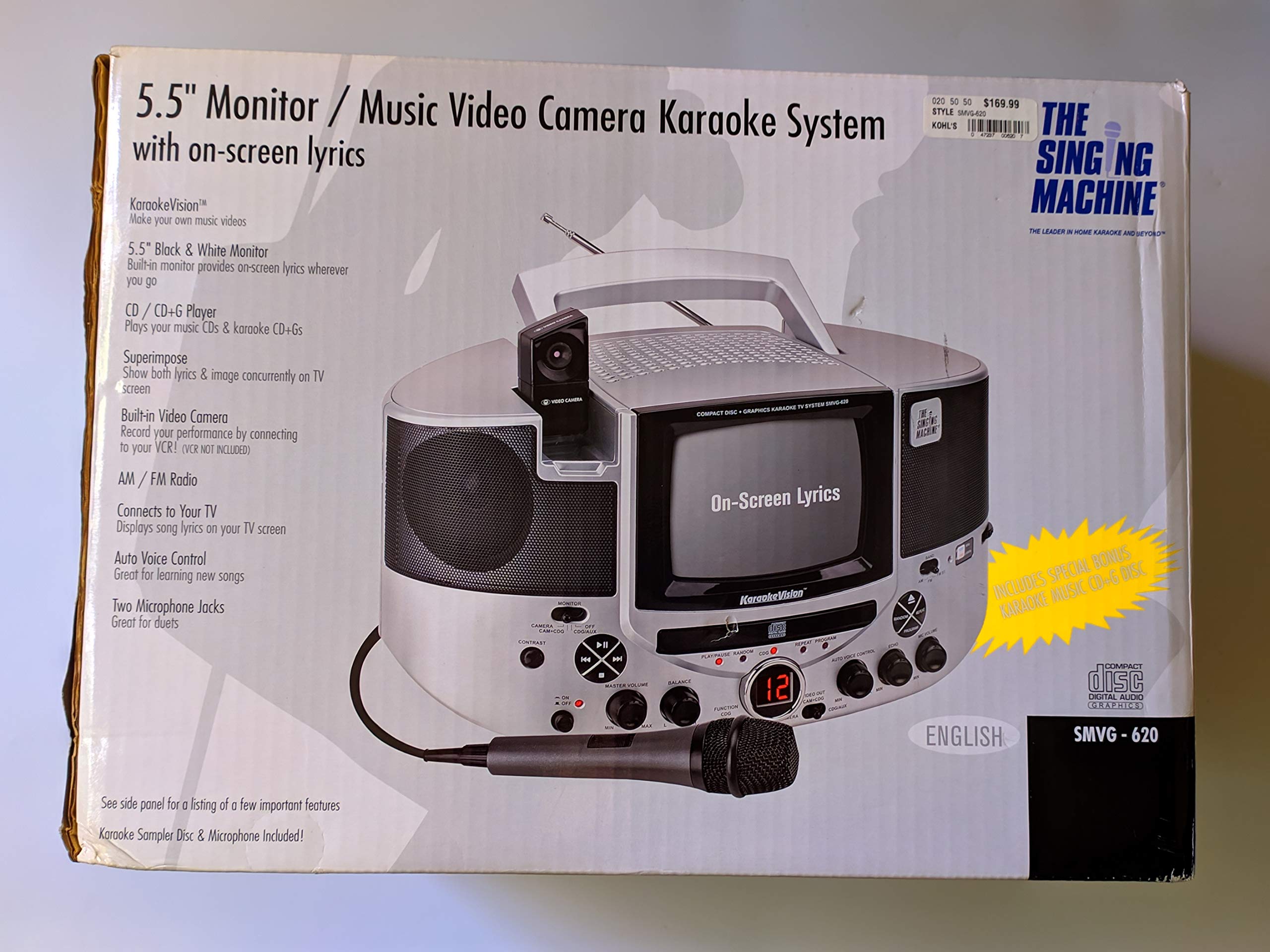
Figura 1.1: The Singing Machine SMVG-620 CD+G Karaoke System.
For optimal performance and safety, always follow the instructions and warnings provided.
2. Informações importantes de segurança
- Leia as instruções: Todas as instruções de segurança e operação devem ser lidas antes de operar o aparelho.
- Instruções de retenção: As instruções de segurança e operação devem ser guardadas para referência futura.
- Atenção aos avisos: Todos os avisos no aparelho e nas instruções de operação devem ser respeitados.
- Siga as instruções: Todas as instruções de operação e uso devem ser seguidas.
- Água e Umidade: Não utilize este aparelho perto de água.
- Limpeza: Limpe apenas com um pano seco.
- Ventilação: Não obstrua as aberturas de ventilação. Instale de acordo com as instruções do fabricante.
- Aquecer: Não instale perto de fontes de calor, como radiadores, registros de calor, fogões ou outros aparelhos (incluindo amplificadores) que produzem calor.
- Proteção do cabo de alimentação: Proteja o cabo de alimentação para que não seja pisado ou comprimido, principalmente nos plugues, nas tomadas de conveniência e no ponto de saída do aparelho.
- Anexos/Acessórios: Utilize somente acessórios/anexos especificados pelo fabricante.
- Raio: Desligue este aparelho durante tempestades com raios ou quando não for utilizado por longos períodos de tempo.
- Manutenção: Encaminhe todos os serviços de manutenção para pessoal de serviço qualificado. A manutenção é necessária quando o aparelho foi danificado de alguma forma.
3. Conteúdo da embalagem
Carefully unpack your Singing Machine SMVG-620 system and ensure all items listed below are present and in good condition.
- SMVG-620 CD+G Karaoke System
- One (1) Microphone
- Sampler CD+G Disc
- Audio/Video RCA Cables
- Adaptador de energia CA
- Manual de instruções

Figura 3.1: Contents of the box, including the microphone, RCA cables, and the instruction manual.
4. Produto acabadoview
Familiarize yourself with the various parts and controls of your SMVG-620 Karaoke System.

Figura 4.1: Traseira view of the product packaging highlighting key features and components of the SMVG-620 system.
Principais características:
- 5.5" Black & White Monitor: For on-screen lyrics from CD+G discs.
- Built-in Color Camera: Allows you to see yourself on the monitor or connected TV.
- Dual Microphone Jacks: Connect two microphones for duets (one microphone included).
- Rádio AM/FM: Sintonize suas estações de rádio favoritas.
- Leitor de CD+G: Plays standard audio CDs and CD+Graphics discs.
- Controle Automático de Voz (AVC): Helps maintain vocal balance by automatically reducing the main vocal track when you sing.
- Controle de eco: Adds depth and resonance to your voice.
- Professional Style Microphone: For clear vocal pickup.
- Saída de áudio/vídeo: Connects to your TV for larger screen display and enhanced audio.
5. Configuração
5.1 Conexão de Energia
- Certifique-se de que a unidade esteja colocada em uma superfície estável e plana.
- Connect the AC power adapter to the DC IN jack on the back of the SMVG-620 unit.
- Conecte a outra extremidade do adaptador de energia CA a uma tomada de parede padrão (CA 120V ~ 60Hz).
5.2 Conectando a uma televisão
Para view lyrics on a larger screen and enhance audio, connect the SMVG-620 to your television using the supplied Audio/Video RCA cables.
- Locate the AUDIO OUT (white and red) and VIDEO OUT (yellow) jacks on the back of the SMVG-620.
- Connect the white plug of the RCA cable to the white AUDIO OUT jack on the karaoke system and to the white AUDIO IN jack on your TV.
- Connect the red plug of the RCA cable to the red AUDIO OUT jack on the karaoke system and to the red AUDIO IN jack on your TV.
- Connect the yellow plug of the RCA cable to the yellow VIDEO OUT jack on the karaoke system and to the yellow VIDEO IN jack on your TV.
- Turn on your TV and select the correct A/V input source (e.g., AV1, Video 1) that corresponds to the jacks you used.
5.3 Conexão do microfone
Plug the microphone into either the MIC 1 or MIC 2 jack on the front of the SMVG-620 unit.
6. Operação
6.1 Ligar/Desligar
Pressione o PODER button located on the front panel to turn the unit ON or OFF.
6.2 CD+G Playback
- Open the CD compartment door and carefully place a CD+G disc (or standard audio CD) onto the spindle with the label side facing up. Close the door.
- Selecione CD+G mode using the FUNCTION selector.
- Pressione o REPRODUZIR/PAUSAR botão para iniciar a reprodução.
- Ajuste o VOLUME PRINCIPAL Ajuste o botão para o nível de audição desejado.
- Use o PULAR botões (<< or >>) para navegar entre as faixas.
- Para pausar, pressione REPRODUZIR/PAUSAR Pressione novamente. Pressione novamente para continuar.
- Para parar a reprodução, pressione o PARAR botão.
6.3 Utilização do microfone
- Ensure the microphone is connected to a MIC jack.
- Ajuste o VOLUME DO MIC Botão para controlar o nível de saída do microfone.
- Vire o ECO Botão para adicionar efeito de eco à sua voz.
- O AUTO VOICE CONTROL (AVC) switch can be toggled ON/OFF. When ON, the original vocal track on a CD+G disc will be reduced when you sing into the microphone.
Rádio AM/FM 6.4
- Selecione AM or FM mode using the FUNCTION selector.
- Estenda a antena de FM para melhor recepção.
- Vire o AFINAÇÃO Botão para selecionar a estação de rádio desejada.
- Ajuste o VOLUME PRINCIPAL botão.
6.5 Camera Function
The built-in camera allows you to display your image on the 5.5-inch monitor or a connected TV.
- Ensure the unit is powered on and connected to a TV if you wish to use an external display.
- The camera feed will automatically display when the unit is in CD+G or Video mode, or when no other video source is active.
7. Manutenção
7.1 Limpando a Unidade
- Sempre desconecte a unidade da tomada antes de limpá-la.
- Use um pano macio e seco para limpar as superfícies externas.
- Não utilize produtos de limpeza abrasivos, ceras ou solventes, pois podem danificar o acabamento.
- Para a lente de CD, utilize um disco de limpeza específico para lentes de CD.
7.2 Cuidados com o CD
- Manuseie os CDs pelas bordas para evitar marcas de dedos na superfície de reprodução.
- Guarde os discos em suas caixas quando não estiverem em uso para evitar arranhões.
- Limpe os discos com um pano macio e sem fiapos, limpando do centro para fora.
8. Solução De Problemas
If you encounter any issues with your SMVG-620, please refer to the following common problems and solutions.
| Problema | Possível causa | Solução |
|---|---|---|
| Sem energia | O cabo de alimentação não está conectado corretamente. | Certifique-se de que o adaptador CA esteja firmemente conectado à unidade e a uma tomada elétrica em funcionamento. |
| Não há som nos alto-falantes | Master Volume is too low. Modo de função incorreto selecionado. | Aumente o VOLUME PRINCIPAL. Select the correct FUNCTION (CD+G, AM, FM). |
| Sem som do microfone | Microfone não conectado. MIC VOLUME is too low. O interruptor do microfone está DESLIGADO. | Plug microphone into MIC 1 or MIC 2 jack. Increase the MIC VOLUME. Ensure microphone switch is ON. |
| No video on TV / No lyrics | Cabos RCA não estão conectados corretamente. Entrada de TV incorreta selecionada. Not a CD+G disc. | Check all RCA cable connections (yellow for video). Select the correct A/V input on your TV. Ensure you are playing a CD+G disc for lyrics. |
| CD skipping | O disco está sujo ou riscado. A unidade está sobre uma superfície instável. | Limpe o disco ou tente usar outro disco. Coloque a unidade sobre uma superfície estável e livre de vibrações. |
9. Especificações
| Número do modelo | SMVG-620 (SIN SMVG620) |
| Fonte de energia | AC 120V ~ 60Hz (via AC Adapter) |
| Monitor | 5.5-inch Black & White |
| Contagem de alto-falantes | 2 |
| Dispositivos compatíveis | Televisão |
| Tipo de mídia | CD, CD+G |
| Dimensões do produto (CxLxA) | 35.8 x 20.8 x 19.3 cm (14.1 x 8.2 x 7.6 polegadas) |
| Peso do item | 3.9 kg (8.6 libras) |
10. Garantia e Suporte
For warranty information and customer support, please refer to the warranty card included with your product or contact The Singing Machine directly. You may also consult your retailer for details regarding their return and warranty policies.
Fabricante: A MÁQUINA DE CANTAR


