Introdução
Obrigado pela compra.asing the Conair SU7 Soothing Sounds and Relaxation Clock Radio. This device is designed to provide a calming environment with a selection of natural sounds, an AM/FM radio, and a dual alarm clock function. Please read this manual carefully to ensure proper use and maintenance.
Instruções importantes de segurança: Always follow basic safety precautions when using electrical appliances. Do not expose the unit to water or excessive moisture. Keep away from heat sources. Use only the provided AC adapter.

Conteúdo da embalagem
- Conair SU7 Soothing Sounds and Relaxation Clock Radio
- Adaptador de energia CA
- Manual do usuário
Produto acimaview: Controls and Display
Familiarize yourself with the buttons and display of your Conair SU7 unit:
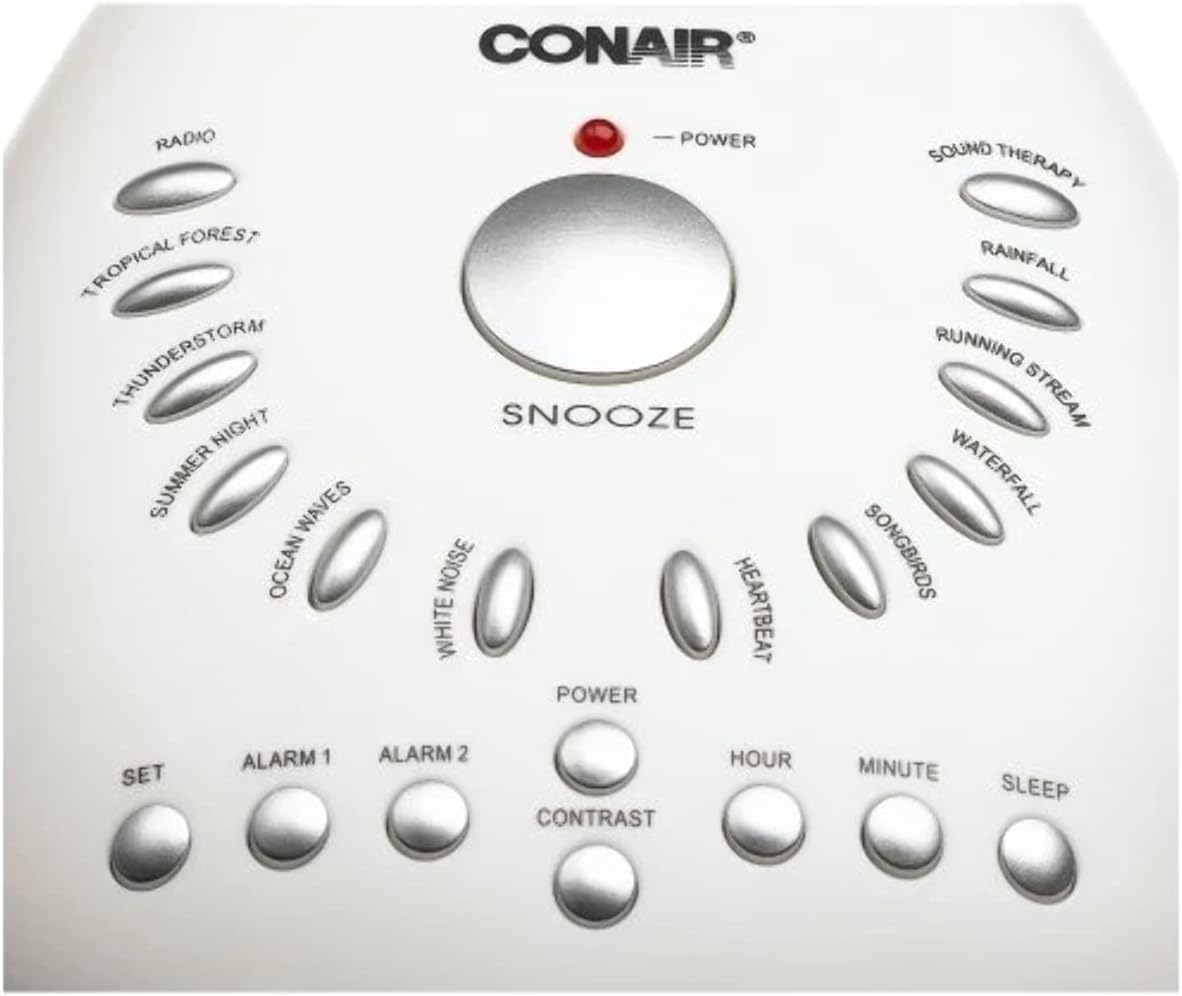
- Botão SONECA: Large button on top for temporary alarm silence.
- Botão de energia: Turns the unit on/off for sounds or radio.
- Botão de configuração: Utilizado para entrar no modo de configuração de hora.
- ALARM 1 / ALARM 2 Buttons: Used to set and activate/deactivate individual alarms.
- CONTRAST Button: Ajusta o brilho da tela.
- HOUR / MINUTE Buttons: Adjusts time and alarm settings.
- Botão de suspensão: Activates the sleep timer for sounds.
- RADIO Button: Activates the AM/FM radio.
- Sound Therapy Buttons: Individual buttons for 10 different soothing sounds (Tropical Forest, Thunderstorm, Summer Night, Ocean Waves, White Noise, Heartbeat, Songbirds, Waterfall, Running Stream, Rainfall).
- Discagem de volume: Located on the side for adjusting sound and radio volume.
- Botão de sintonia: Located on the side for selecting radio stations.

The digital display shows the current time, AM/PM indicators, alarm status, and radio frequency when active.
Configurar
Conexão de energia
Connect the AC adapter to the DC 6V jack on the back of the unit and plug it into a standard wall outlet. For battery backup, insert 4 AA batteries (not included) into the battery compartment on the bottom of the unit. Batteries preserve time and alarm settings during power outages but do not power the unit for normal operation.
Configuração de hora inicial
- Pressione e segure o DEFINIR botão. O visor de tempo piscará.
- Use o HORA button to adjust the hour. Pay attention to the AM/PM indicator.
- Use o MINUTO botão para ajustar os minutos.
- Solte o DEFINIR botão para economizar tempo.
Instruções de operação
Definir o tempo
- Pressione e segure o DEFINIR botão. O visor de tempo piscará.
- Pressione o HORA button repeatedly to adjust the hour. Observe the AM/PM indicator for correct time setting.
- Pressione o MINUTO Pressione repetidamente o botão para ajustar os minutos.
- Solte o DEFINIR botão para salvar a hora atual.
Configurar alarmes (Alarme 1 e Alarme 2)
- Pressione e segure o ALARME 1 botão. O horário do alarme piscará.
- Use o HORA e MINUTO botões para definir a hora do alarme desejada.
- Imprensa ALARME 1 again to cycle through alarm source options: Sound, Radio, or Buzzer. The corresponding indicator will light up.
- Solte o ALARME 1 botão para salvar a configuração.
- Repeat steps 1-4 for ALARME 2 usando o ALARME 2 botão.
Activating/Deactivating Alarms
Pressione o ALARME 1 or ALARME 2 button briefly to toggle the alarm on or off. An indicator light on the display will show when an alarm is active.
Sons calmantes
- Press any of the dedicated sound therapy buttons (e.g., ONDAS DO OCEANO, RAINFOREST) to start playing a sound.
- Adjust the volume using the volume dial located on the side of the unit.
- To turn off the sound, press the PODER botão.
The unit features 10 soothing sounds: Ocean waves, Heartbeat, Summer night, Rain forest, Rainfall, Running stream, Songbirds, White noise, Tropical forest, and Thunderstorm.
Temporizador de sono
While a soothing sound is playing, press the DORMIR button repeatedly to cycle through available sleep timer durations (e.g., 15, 30, 60 minutes, or OFF). The selected sound will automatically turn off after the chosen duration.
Rádio AM/FM
- Pressione o RÁDIO button to turn on the AM/FM radio.
- Use the tuning dial on the side of the unit to select your desired station.
- Ajuste o volume usando o botão de volume.
Função soneca
Quando o alarme tocar, pressione o botão grande. SONECA button on the top of the unit to temporarily silence the alarm for approximately 9 minutes. The alarm will sound again after this period.
Contraste de exibição
Pressione o CONTRASTE button to adjust the brightness level of the digital display to your preference.
Manutenção
Limpeza
Wipe the unit with a soft, dry cloth. Do not use abrasive cleaners, solvents, or harsh chemicals, as these may damage the surface.
Substituição da bateria
If the battery backup indicator appears on the display, or if time and alarm settings are lost during a power outage, it is time to replace the backup batteries. Open the battery compartment on the bottom of the unit and insert 4 new AA batteries (not included), ensuring correct polarity.
Solução de problemas
- Sem energia
- Ensure the AC adapter is securely plugged into the DC 6V jack on the back of the unit and into a working wall outlet. Check if the outlet itself is functional. For battery backup, ensure batteries are correctly installed and not depleted.
- Alarme não soa
- Verify that the alarm (Alarm 1 or Alarm 2) is activated; its indicator light should be on. Check that the alarm time is set correctly and that the alarm volume is not set to minimum.
- Display Too Bright/Dim
- Use o CONTRASTE button to adjust the brightness level of the display to your preference.
- Fraca Recepção de Rádio
- Adjust the unit's position to improve reception. If there is an external antenna wire, try extending or repositioning it.
- Soothing Sound Loops Are Repetitive
- The soothing sounds are designed with continuous loops. If you find a particular sound's loop noticeable, try selecting a different sound from the 10 available options.
Especificações
| Modelo: | SU7 |
| Marca: | Conair |
| Fonte de energia: | AC Adapter (included), 4 AA batteries (not included) for backup |
| Tipo de exibição: | Digital |
| Características especiais: | Alarm, Radio, 10 Soothing Sounds, Dual Alarm, Snooze, Sleep Timer |
| Dimensões do produto: | Approximately 5"W x 2"H (main unit); 1 Pound (weight) |
| Sounds Included: | Ocean waves, Heartbeat, Summer night, Rain forest, Rainfall, Running stream, Songbirds, White noise, Tropical forest, Thunderstorm |
Garantia e Suporte
For detailed warranty information, product registration, or technical support, please refer to the documentation included in your product packaging. You may also visit the official Conair webPara obter mais assistência e informações de contato, visite o site.


