1. Introdução
Obrigado pela compra.asing the JVC KW-AVX810 Vehicle Multimedia Receiver. This unit is designed to provide advanced audio and video entertainment in your vehicle, featuring a 7-inch touch panel monitor, DVD playback, USB connectivity for iPod/iPhone, and Bluetooth readiness. This manual provides essential information for the proper installation, operation, and maintenance of your new multimedia receiver.
2. Informações de segurança
- Instalação profissional recomendada: Devido à complexidade dos sistemas elétricos de veículos, a instalação profissional é altamente recomendada para evitar danos à unidade ou ao seu veículo.
- Fonte de energia: This unit is designed for 12V DC negative ground electrical systems. Ensure correct wiring to avoid short circuits or damage.
- Segurança ao dirigir: Do not operate the unit's advanced features or watch videos while driving. Always prioritize safe driving practices.
- Painel destacável: Handle the detachable faceplate with care. Avoid exposing it to direct sunlight or high temperatures for extended periods.
- Ventilação: Assegure ventilação adequada ao redor do aparelho para evitar superaquecimento. Não obstrua as aberturas de ventilação.
3. Conteúdo da embalagem
Por favor, verifique se todos os itens estão presentes na embalagem:
- JVC KW-AVX810 Multimedia Receiver
- Painel frontal removível
- Chicote de Fiação
- Hardware de montagem
- Controle remoto (se incluído)
- Manual do usuário (este documento)
4. Configuração e instalação
4.1 Conexões de Fiação
Refer to the wiring diagram below for proper connection of the power, speaker, and auxiliary cables. Incorrect wiring can cause damage to the unit or vehicle electrical system.
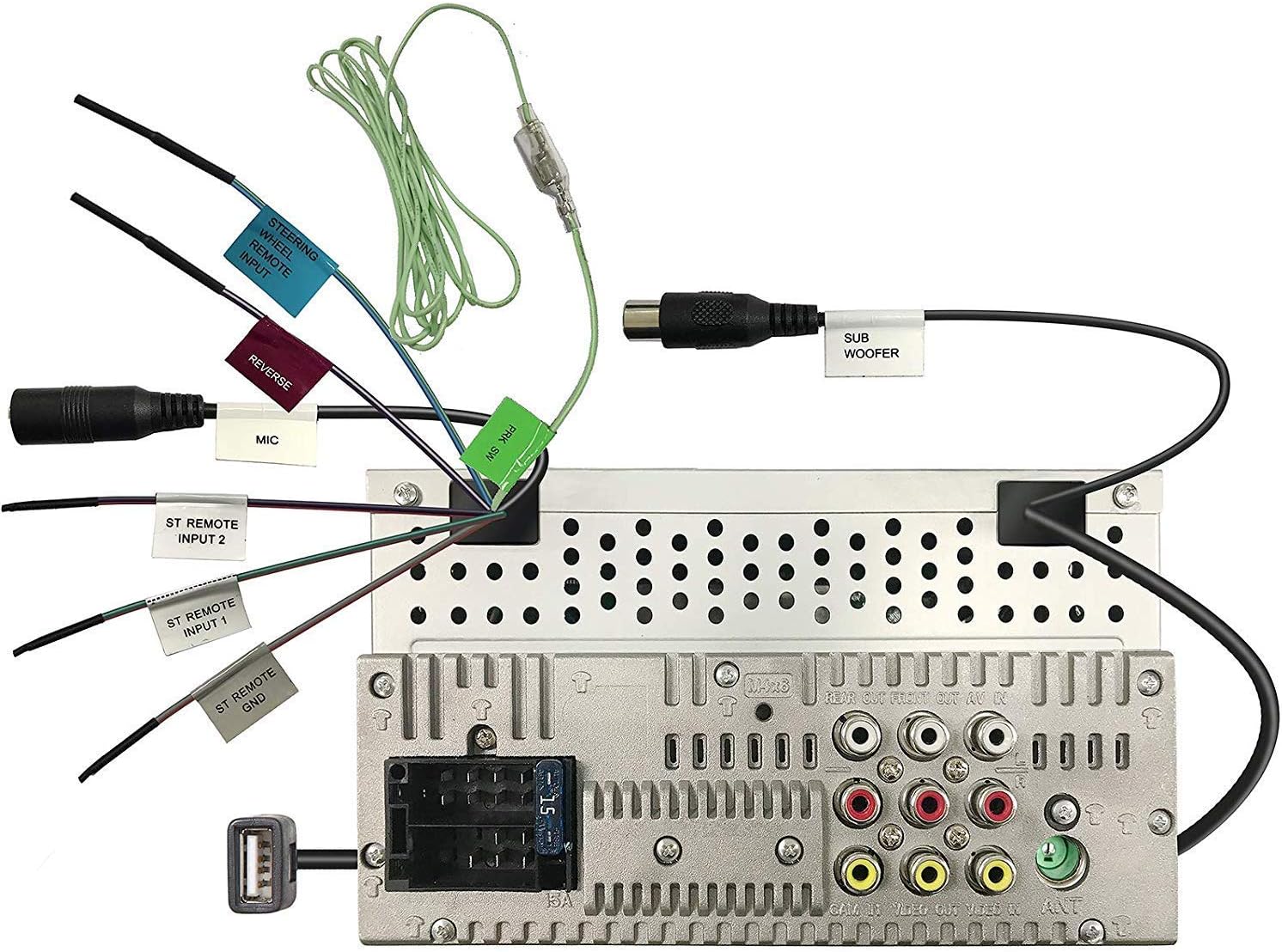
Figure 4.1: Rear panel wiring connections. This image displays the back of the JVC KW-AVX810 unit, illustrating various input and output ports. Key connections include the main power harness, speaker outputs, RCA pre-outs for front, rear, and subwoofer, video input/output, USB port, microphone input, and steering wheel remote input. Each connection is clearly labeled for identification.
- Conexões de energia: Connect the yellow wire to the constant 12V supply, the red wire to the accessory 12V supply, and the black wire to a good chassis ground.
- Conexões do alto-falante: Conecte os fios dos alto-falantes aos respectivos alto-falantes do veículo, garantindo a polaridade correta.
- Entrada USB: The USB port allows connection of compatible devices like iPods/iPhones for audio and video playback, and charging.
- Saídas RCA: Use estes para conectar dispositivos externos. ampAmplificadores para os canais frontais, traseiros e de subwoofer.
- Entrada / Saída de Vídeo: For connecting external video sources or monitors.
- Entrada remota no volante: Connect to a compatible steering wheel control interface (sold separately) for integrated control.
4.2 Montagem da Unidade
The KW-AVX810 is a double-DIN unit. Ensure your vehicle's dashboard opening is compatible. Secure the unit using the provided mounting brackets and screws. After mounting, connect all wiring harnesses before reassembling the dashboard.
5. Instruções de operação
5.1 Controles básicos e visor
The unit features a 7-inch touch panel monitor for intuitive control. The main interface provides access to various functions.

Figure 5.1: Front panel and display. This image shows the JVC KW-AVX810's 7-inch touch panel display, featuring a graphical user interface with icons for various functions such as Tuner, Mirroring, AV-IN, Phone, BT Audio, and Settings. Volume controls and power button are visible on the left bezel. The current time is displayed prominently in the center.
- Ligar/desligar: Press the power button (usually located on the left bezel) to turn the unit on or off.
- Controle de volume: Use the volume up/down buttons or the on-screen controls to adjust the audio level.
- Seleção de fonte: Tap the desired source icon (e.g., Tuner, DVD, USB, BT Audio, AV-IN) on the touch screen to switch between functions.
- Painel destacável: To detach the faceplate, press the release button (refer to the unit's specific mechanism). Always detach the faceplate when leaving the vehicle to deter theft.
5.2 Reprodução de mídia
- Reprodução de DVD/CD: Insert a disc into the slot. The unit will automatically switch to DVD/CD mode. Use the touch screen for playback controls (play, pause, skip, menu).
- USB/iPod/iPhone: Connect your device to the USB port. The unit will detect the device and allow you to browse and play media files. The KS-U20 cable (sold separately) may be required for iPod video functionality.
- Áudio Bluetooth: Pair your Bluetooth-enabled device with the KW-AVX810. Once paired, you can stream audio wirelessly.
- Sintonizador de rádio: Select the Tuner source. Use the touch screen to scan for stations, save presets, and switch between AM/FM bands.
5.3 Configurações e personalização
Access the 'Settings' menu from the main screen to customize various aspects of the unit, including:
- Configurações de áudio: Adjust equalizer (7-Band iEQ), balance, fader, subwoofer levels, and sound effects (Dolby 5.1 headphone surround sound).
- Configurações do visor: Adjust brightness, contrast, and background.
- Configurações do sistema: Language, time, and other general preferences.
- Configurações de Bluetooth: Manage paired devices and connection options.
6. Manutenção
- Limpando a tela: Use a soft, dry cloth to wipe the touch screen. For stubborn smudges, lightly dampLimpe o pano com água ou um produto de limpeza específico para telas eletrônicas. Não use produtos de limpeza abrasivos.
- Limpeza da placa frontal: Wipe the detachable faceplate with a soft, dry cloth. Avoid harsh chemicals.
- Cuidados com o disco: Manuseie os discos pelas bordas. Mantenha-os limpos e sem arranhões. Guarde os discos em seus estojos quando não estiverem em uso.
- Cuidados Gerais: Keep the unit free from dust and moisture. Avoid extreme temperatures.
7. Solução De Problemas
If you encounter problems with your KW-AVX810, refer to the following common issues and solutions:
| Problema | Possível causa | Solução |
|---|---|---|
| Sem energia | Fiação incorreta; Fusível queimado; Problema na bateria do veículo. | Check power connections (yellow, red, black wires). Inspect the unit's fuse and vehicle's fuse box. Ensure vehicle battery is charged. |
| Sem som | Volume muito baixo; Modo mudo ativado; Fiação das caixas de som incorreta; Ampproblema do lificador. | Increase volume. Check if mute is on. Verify speaker connections. If using external ampAmplificador, verifique sua alimentação e conexões. |
| A tela não está funcionando | Faceplate not properly attached; Display settings. | Ensure faceplate is securely attached. Check display brightness/contrast settings. |
| USB/iPod not recognized | Incompatible format; Loose connection; Device issue. | Garantir mídia files are in a supported format. Reconnect the USB device. Try a different USB device. Update iPod/iPhone software if necessary. |
| Problemas de conexão Bluetooth | Device not in pairing mode; Interference; Already paired to another device. | Certifique-se de que o Bluetooth esteja ativado em ambos os dispositivos e no modo de emparelhamento. Exclua os emparelhamentos anteriores e emparelhe novamente. Aproxime-se da unidade. |
Se o problema persistir após tentar essas soluções, entre em contato com o suporte ao cliente da JVC ou com um técnico de serviço qualificado.
8. Especificações
- Dimensões do produto: 18.39 x 17.81 x 10.01 cm; 2.6 kg
- Número do modelo do item: KWM150BT+XV95BK+MAGNET
- Marca: JVC
- Tecnologia de conectividade: Bluetooth, USB
- Tipo de Controlador: Android (compatível)
- Características especiais: Built-In Bluetooth, FM Tuner, Subwoofer Pre-out
- Dispositivos compatíveis: Smartphone
- Total de portas HDMI: 1 (Note: This may refer to an internal component or specific model variant, as the main description does not highlight HDMI)
- Tipo de conector: USB
- Modo de saída de áudio: Cercar
- Configuração do canal de som surround: 4.1
- Fabricante: JVC
9. Garantia e suporte
9.1 Informações de garantia
The JVC KW-AVX810 Vehicle Multimedia Receiver comes with a warranty. For Mobile Products, the warranty covers 1 ano de peças e mão de obra from the date of purchase. Please retain your proof of purchase for warranty claims. The warranty does not cover damage caused by improper installation, accident, misuse, abuse, or unauthorized modification.
9.2 Suporte ao cliente
For technical assistance, service, or warranty inquiries, please contact JVC customer support. Refer to the official JVC webPara obter as informações de contato mais recentes, consulte o site ou a embalagem do produto.


