1. Introdução
The Marshall Acoustic Soloist AS50D is a 50-watt acoustic guitar amplifier designed to provide clear and expressive amplification for acoustic instruments and vocals. It features two independent channels, digital chorus, and reverb effects, making it suitable for various performance and practice environments. This manual provides essential information for the proper setup, operation, and maintenance of your AS50D ampmais vivo.
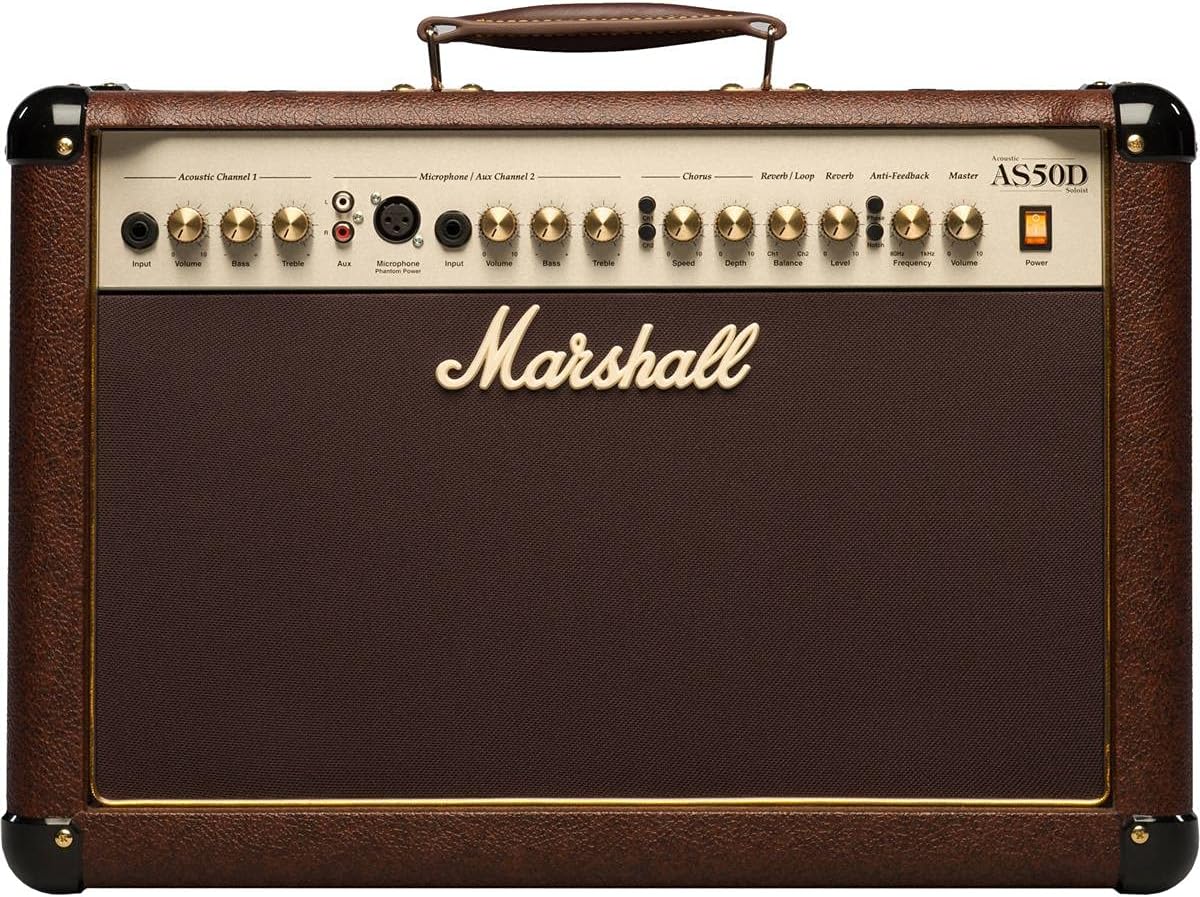
Imagem 1.1: Frente view of the Marshall AS50D Acoustic Soloist Ampamplificador, showcasing its control panel and speaker grille.
2. Configuração
- Desembalagem: Remova cuidadosamente o ampRetire o amplificador da embalagem. Guarde todos os materiais da embalagem para transporte ou armazenamento futuros.
- Colocação: Coloque o ampColoque o amplificador em uma superfície estável e plana. Certifique-se de que haja ventilação adequada ao redor do aparelho para evitar superaquecimento. Evite colocá-lo perto de fontes de calor ou sob luz solar direta.
- Conexão de energia: Garantir o amplifier's power switch is in the 'OFF' position. Connect the supplied power cord to the amplifier's IEC inlet on the rear panel and then to a suitable grounded AC power outlet. The AS50D operates on 220-240V ~ 50Hz or 120V ~ 60Hz depending on the region.
- Initial Connections:
- For acoustic guitars or other instruments, connect a standard 1/4" (6.35mm) instrument cable from your instrument to the 'Input' jack of 'Acoustic Channel 1'.
- For microphones, connect an XLR cable from your microphone to the 'Microphone Input' of 'Microphone / Aux Channel 2'.
- For external audio devices like MP3 players or drum machines, connect them to the 'Aux Input' RCA phono jacks on 'Microphone / Aux Channel 2'.
- Ligar: Once all connections are secure, switch the amplifier's power switch to the 'ON' position. The power indicator light will illuminate.
3. Instruções de operação
The AS50D features a comprehensive control panel designed for intuitive operation. Familiarize yourself with each section:
3.1. Acoustic Channel 1
- Entrada: 1/4" (6.35mm) jack for connecting acoustic instruments.
- Volume: Controls the overall output level of Channel 1.
- Baixo: Adjusts the low-frequency response of Channel 1.
- Agudos: Adjusts the high-frequency response of Channel 1.
3.2. Microphone / Aux Channel 2
- Entrada de microfone: XLR input for connecting condenser or dynamic microphones.
- Poder fantasma: Switch to activate +48V phantom power for condenser microphones. Ensure microphone is connected before activating.
- Input (Aux): 1/4" (6.35mm) jack for connecting instruments.
- Volume: Controls the overall output level of Channel 2.
- Baixo: Adjusts the low-frequency response of Channel 2.
- Agudos: Adjusts the high-frequency response of Channel 2.
- Auxiliar: Stereo RCA phono inputs for connecting external audio devices (e.g., MP3 players).
3.3. Effects Section
- Chorus Speed: Adjusts the rate of the digital chorus effect.
- Chorus Depth: Adjusts the intensity of the digital chorus effect.
- Reverb / Loop Balance: Blends the dry signal with the effects loop return signal.
- Reverb / Loop Level: Controls the overall level of the effects loop and reverb.
- Nível de reverberação: Controls the intensity of the digital reverb effect.
3.4. Seção Mestre
- Anti-Feedback Notch: Activates the notch filter to reduce feedback.
- Anti-Feedback Frequency: Adjusts the frequency range targeted by the notch filter. Rotate to find and eliminate problematic feedback frequencies.
- Volume principal: Controla o volume geral de saída do ampmais vivo.
- Poder: Main power switch for the ampmais vivo.
3.5. Conexões do painel traseiro

Imagem 3.5.1: Traseira view of the Marshall AS50D Acoustic Soloist Amplifier, showing the power input, footswitch, DI out, and effects loop connections.
- Pedal: Input for an optional footswitch to control effects.
- D.I. Out: XLR output for direct connection to a mixing console or recording device.
- Effects Loop Send: Saída para enviar sinal a processadores de efeitos externos.
- Effects Loop Return: Input to receive signal from external effects processors.
4. Manutenção
- Limpeza: Desconecte o amplifier from power before cleaning. Use a soft, dry cloth to wipe down the exterior. Do not use abrasive cleaners or solvents.
- Armazenar: Armazene o amplifier in a dry, temperate environment, away from extreme temperatures and humidity. If possible, use a protective cover to prevent dust accumulation.
- Transporte: Ao mover o amplifier, ensure it is powered off and disconnected. Use the integrated handle for carrying.
- Manutenção: Refer all servicing to qualified service personnel. Do not attempt to open the ampchassi do lificador.
5. Solução De Problemas
- Sem energia:
- Verifique se o cabo de alimentação está firmemente conectado a ambas as tomadas. ampAmplificador e tomada de parede.
- Verifique se a tomada da parede está funcionando.
- Garantir o amplifier's power switch is in the 'ON' position.
- Sem som:
- Check all instrument and microphone cables for secure connections and proper functionality.
- Ensure the 'Volume' controls for the active channel and the 'Master Volume' are turned up.
- Verify that your instrument or microphone is working correctly.
- Distortion at High Volumes:
- Reduce the 'Volume' control for the active channel or the 'Master Volume'.
- Ensure your input signal is not too strong. Adjust the output level of your instrument if possible.
- Check the quality of your instrument cables; faulty cables can introduce noise and distortion.
- Feedback (Howling Sound):
- Engage the 'Anti-Feedback Notch' switch.
- Slowly rotate the 'Anti-Feedback Frequency' knob to find and eliminate the problematic frequency.
- Reduce the 'Volume' of the affected channel or the 'Master Volume'.
- Move further away from the amplifier or change your position relative to the speakers.
6. Especificações
| Recurso | Especificação |
|---|---|
| Número do modelo | M-AS50D-U |
| Potência de saídatage | 50 Watts |
| Contagem de alto-falantes | 2 |
| Tamanho do alto-falante | 8-inch woofers (x2) |
| Canais | 2 (Acoustic, Microphone/Aux) |
| Efeitos | Digital Chorus, Digital Reverb |
| Entradas | 1/4" Jack, XLR, Stereo RCA |
| Saídas | D.I. Out (XLR), Effects Loop Send/Return |
| Phantom Power | +48V (comutável) |
| Anti-feedback | Notch Filter with Frequency Control |
| Peso do item | 35.3 libras (16 kg) |
| Dimensões do produto | 21.34 x 10.28 x 16.38 polegadas (54.2 x 26.1 x 41.6 cm) |
| Tipo de material | Metal |
| Fonte de energia | Elétrico com fio |
7. Garantia e Suporte
This Marshall amplifier is covered by a manufacturer's warranty. Please refer to the warranty card included with your product for specific terms and conditions, including coverage duration and limitations. For technical support, service, or warranty claims, please contact your authorized Marshall dealer or visit the official Marshall Amplificação website para informações de contato em sua região.
Guarde o comprovante de compra para validação da garantia.


