1. Introdução
This manual provides instructions for the SanDisk MobileMate MS+ USB 2.0 Mobile Card Reader/Writer, model SDDR-107-A10M. This device facilitates the transfer of files between various memory cards and your computer. It supports Memory Stick, Memory Stick Duo, Memory Stick PRO, and Memory Stick PRO Duo formats, offering a Hi-Speed USB 2.0 interface for efficient data transfer.
2. Conteúdo da embalagem
Verifique se todos os itens estão presentes no seu pacote:
- SanDisk MobileMate MS+ USB 2.0 Mobile Card Reader/Writer (SDDR-107-A10M)
- 3-inch type Installation CD
- Cabo de extensão USB
- Clear protective caps (2)

Figure 2.1: SanDisk MobileMate MS+ Card Reader, USB extension cable, and protective caps.
3. Configuração
3.1 Requisitos do sistema
Certifique-se de que seu computador atenda aos seguintes requisitos mínimos:
- Computador: Windows 98SE/ME/2000/XP, supported memory cards, USB 2.0 port (for Hi-Speed transfer), CD-ROM drive.
- Macintosh: Mac OS 9.2.x+, OS X v10.1.2+, supported memory cards, USB 2.0 port (for Hi-Speed transfer), CD-ROM drive.
3.2 Instalação do driver
- Insert the provided 3-inch Installation CD into your computer's CD-ROM drive.
- Follow the on-screen instructions to install any necessary drivers or the TransferMate application.
- Se solicitado, reinicie o computador após a instalação.
3.3 Conectando o Leitor de Cartões
- Localize uma porta USB disponível em seu computador.
- Plug the SanDisk MobileMate MS+ directly into the USB port. If the port is difficult to access or crowded, use the provided USB extension cable.
- Your computer should detect the device automatically.
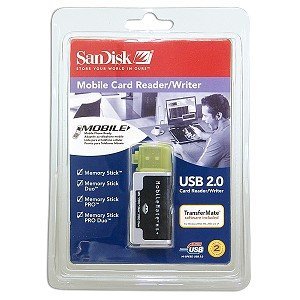
Figure 3.1: SanDisk MobileMate MS+ Card Reader with protective cap.
4. Instruções de operação
4.1 Inserindo um cartão de memória
- Identify the correct slot on the MobileMate MS+ for your memory card type (Memory Stick, Memory Stick Duo, Memory Stick PRO, or Memory Stick PRO Duo).
- Gently insert the memory card into the appropriate slot until it is fully seated. Do not force the card.
4.2 Acessando Files
- Once the card reader is connected and a memory card is inserted, your computer should recognize it as a removable drive.
- Open "My Computer" (Windows) or "Finder" (Mac) and locate the new removable drive.
- Double-click the drive icon to view the contents of the memory card.
4.3 Transferindo Files
- Using Drag-and-Drop: Selecione o files or folders you wish to transfer from the memory card and drag them to a desired location on your computer's hard drive. Conversely, drag files from your computer to the memory card drive to transfer them to the card.
- Using TransferMate Application: If installed, launch the TransferMate application for additional features such as easy transfer, printing, emailing, and displaying images. Refer to the TransferMate application's help documentation for detailed instructions.
4.4 Safely Removing the Device
Before disconnecting the MobileMate MS+ from your computer, always safely eject the device to prevent data corruption:
- Windows: Click the "Safely Remove Hardware" icon in the system tray, then select the MobileMate MS+ device. Wait for the "Safe to Remove Hardware" message.
- Macintosh: Drag the removable drive icon to the Trash or right-click (Control-click) the drive icon and select "Eject."
Once safely ejected, you can physically disconnect the card reader from the USB port.
5. Manutenção
- Limpeza: Use um pano macio, seco e sem fiapos para limpar a parte externa do leitor de cartões. Não use produtos de limpeza líquidos ou solventes.
- Armazenar: When not in use, store the MobileMate MS+ with its protective caps in a clean, dry environment away from extreme temperatures and direct sunlight.
- Manuseio: Evite deixar cair o dispositivo ou submetê-lo a impactos fortes.
6. Solução De Problemas
| Problema | Possível causa | Solução |
|---|---|---|
| Dispositivo não reconhecido pelo computador. |
|
|
| Velocidades de transferência de dados lentas. |
|
|
| Cannot read or write to memory card. |
|
|
7. Especificações
| Número do modelo | SDDR-107-A10M |
| Dimensões do produto | 6.1 x 4.8 x 1.2 polegadas (aproximadamente) |
| Peso do item | 2.89 onças (aproximadamente) |
| Tecnologia de Conectividade | USB Tipo A |
| Interface | Hi-Speed USB 2.0 (compatible with USB 1.1) |
| Tipos de mídia suportados | Memory Stick, Memory Stick Duo, Memory Stick PRO Duo, Memory Stick Pro |
| Cor | Preto |
| Aprovações regulatórias | FCC, CE, C-Marca |
8. Garantia e Suporte
For information regarding product warranty, technical support, or service, please refer to the documentation included with your purchase or visit the official SanDisk webAs informações de contato para suporte ao cliente geralmente podem ser encontradas no site do fabricante. website.
Fabricante: SanDisk