1. Introdução e maisview
The Mitel 5312 IP Phone is a versatile and user-friendly communication device designed for modern office environments. It features a full-duplex handsfree speakerphone, a multi-line backlit display, and programmable feature keys, providing intuitive access to advanced call handling and converged applications supported by Mitel's IP communication platforms.
This manual provides comprehensive instructions for setting up, operating, maintaining, and troubleshooting your Mitel 5312 IP Phone, ensuring optimal performance and user experience.
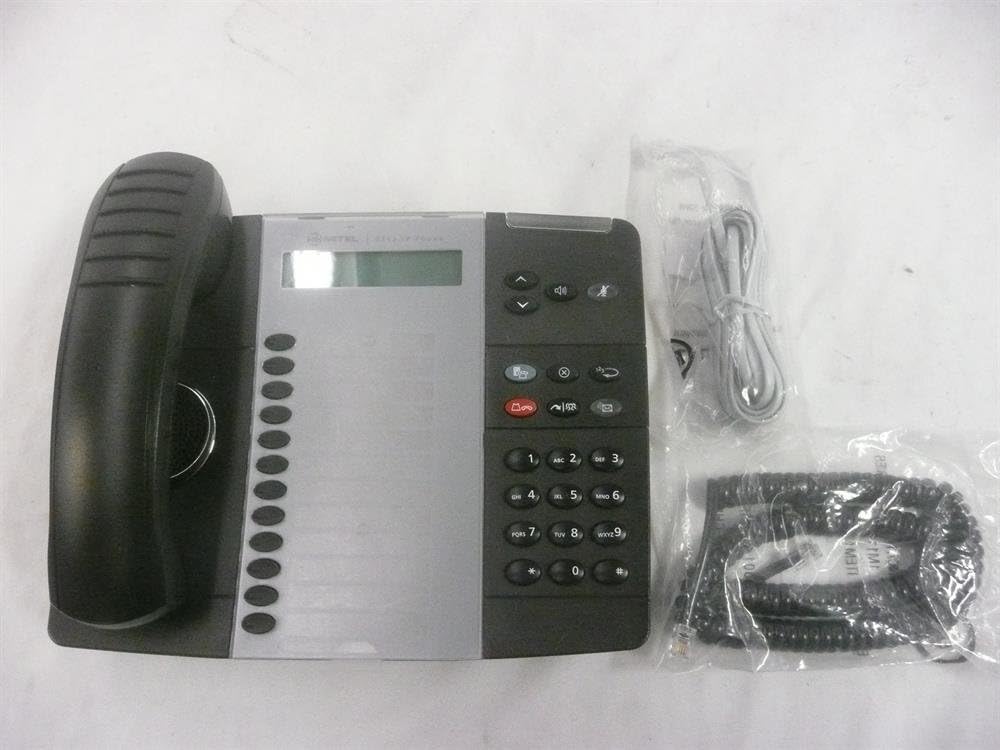
Figure 1: Mitel 5312 IP Phone with included accessories.
2. Principais características
- Mostrar: Two-line by 20-character white, backlit, graphics display with contrast control and auto-dimming.
- Teclas Programáveis: Twelve multi-function keys with dual-color LED indicators for speed dialing, line appearances, and feature access.
- Teclas de função: Dedicated keys for Hold, Menu, Message, Speaker, Mute, Transfer/Conference, Redial, and Cancel.
- Viva voz: Full duplex handsfree speakerphone operation.
- Personalização: Browser-based desktop user tool programming for easy access to telephone system features.
3. Guia de configuração
3.1 Conteúdo da embalagem
Antes de começar, certifique-se de que todos os componentes estejam presentes:
- Unidade de telefone IP Mitel 5312
- Aparelho e cabo espiralado
- Cabo Ethernet
- Adaptador de energia (caso não esteja utilizando Power over Ethernet - PoE)
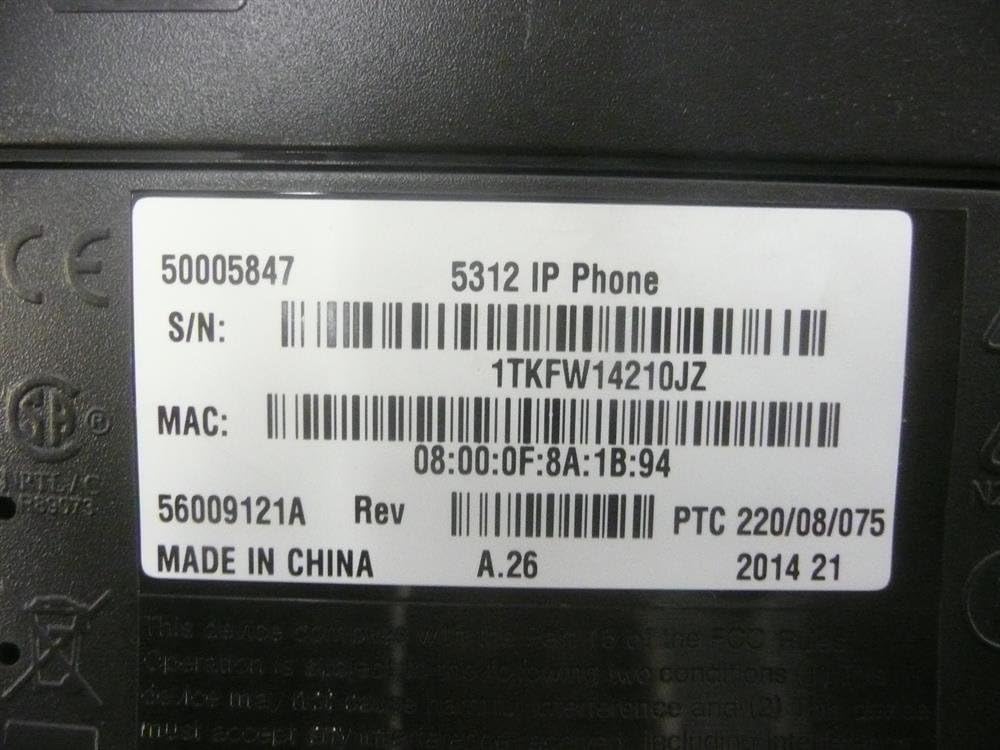
Figure 2: Mitel 5312 IP Phone and its primary accessories.
3.2 Conectando o telefone
- Conecte o aparelho: Conecte uma extremidade do cabo espiralado ao monofone e a outra extremidade à porta do monofone na base do telefone.
- Conecte-se à rede:
- If using Power over Ethernet (PoE), connect one end of the Ethernet cable to the LAN port on the phone and the other end to a PoE-enabled network switch or router.
- If not using PoE, connect one end of the Ethernet cable to the LAN port on the phone and the other end to your network switch/router. Then, connect the power adapter to the phone's power port and plug it into a power outlet.
- Optional PC Connection: Se desejar conectar um computador através do telefone, conecte um cabo Ethernet do seu computador à porta PC do telefone.
- Inicialização do sistema: The phone will power on and begin its boot-up sequence. This may take a few moments as it obtains network configuration and registers with your IP communications platform.
4. Instruções de operação
4.1 Funções básicas de chamada
- Fazer uma chamada: Lift the handset, press a line key, or press the Speaker button. Dial the number.
- Atender uma chamada: Lift the handset, press the flashing line key, or press the Speaker button.
- Finalizando uma chamada: Replace the handset, or press the Speaker button if using speakerphone.
- Segurar: Durante uma chamada, pressione o Segurar key. To retrieve, press the flashing line key.
- Mudo: Pressione o Mudo Pressione a tecla para silenciar o microfone durante uma chamada. Pressione novamente para ativar o som.
- Viva voz: Pressione o Palestrante key to activate or deactivate the speakerphone.
4.2 Recursos avançados
- Transferência: Durante uma chamada, pressione o Transfer/Conference key. Dial the transfer destination, then press Transfer/Conference again to complete (blind transfer) or wait for an answer and announce the call (supervised transfer).
- Conferência: Durante uma chamada, pressione o Transfer/Conference key. Dial the number of the third party. Once connected, press Transfer/Conference Novamente, para unir todos os partidos.
- Remarcação: Pressione o Rediscagem tecla para ligar para o último número discado.
- Message Access: Pressione o Mensagem Chave para acessar seu correio de voz.
- Teclas Programáveis: The twelve programmable keys can be configured for speed dialing, line appearances, or quick access to system features. Consult your system administrator for specific programming details.
5. Manutenção
Proper care and maintenance will extend the life of your Mitel 5312 IP Phone.
- Limpeza: Use um pano macio e levementeamp cloth to clean the phone's surface. Avoid abrasive cleaners, solvents, or strong chemicals. Do not spray liquids directly onto the phone.
- Ambiente: Keep the phone in a dry environment, away from direct sunlight, excessive heat, or extreme cold. Ensure proper ventilation.
- Manuseio: Handle the phone and its components with care. Avoid dropping the handset or pulling excessively on cords.
6. Solução De Problemas
Esta seção aborda problemas comuns que você pode encontrar com seu telefone IP Mitel 5312.
| Problema | Possível causa | Solução |
|---|---|---|
| No dial tone / Phone not registering | Network cable disconnected, no power (if not PoE), incorrect network configuration, server issue. | Check Ethernet cable connection. Ensure power adapter is plugged in (if applicable). Verify network settings with your IT administrator. Restart the phone by unplugging and replugging the power/Ethernet cable. |
| A tela está em branco ou ilegível. | No power, display settings, hardware fault. | Check power connection. Adjust display contrast (if available). If the issue persists, contact support. |
| Não consigo ouvir quem está ligando / Quem está ligando não consegue me ouvir. | Volume too low, Mute activated, faulty handset/speakerphone, network quality. | Adjust volume. Check if Mute is active. Try speakerphone or handset to isolate the issue. Check network connection quality. |
If you continue to experience issues, please contact your IT support or Mitel customer service. Be prepared to provide the model number and serial number of your device.
7. Especificações
Detailed technical specifications for the Mitel 5312 IP Phone (Model: 50005847).
| Recurso | Detalhe |
|---|---|
| Número do modelo | 50005847 |
| Marca | Mitel |
| Peso do item | 3 libras |
| Cor | Preto, Prata |
| Tipo de telefone | Corded |
| Material | Plástico |
| Fonte de energia | Elétrico com fio |
| Tipo de discador | Teclado único |
| Tipo de sistema de atendimento | Digital |
| Dispositivos compatíveis | Mitel's IP communications platforms, VoIP services, PSTN networks |
| Capacidade de chamada em conferência | Básico |
| Primeira data disponível | 4 de agosto de 2009 |

Figure 3: Product label with identification details.
Extracted details from label:
Número de série: 1TKFW14210JZ, FSABV9236
Endereço MAC: 08:00:0F:8A:1B:94, 08-00-0F-3B-E5-DA
Revisão: A.26, A.2
8. Suporte e garantia
For technical assistance, troubleshooting beyond this manual, or warranty inquiries, please contact Mitel customer support or your authorized Mitel reseller.
When contacting support, please have your product model number (50005847) and serial number ready. The serial number can be found on the label at the bottom of your phone unit (refer to Figure 3).
Information regarding protection plans and return policies may be available from your point of purchase.


