1. Introdução
Thank you for choosing the Taylor #1523 Indoor/Outdoor Thermometer & Humidity Guide. This device is designed to provide accurate indoor and outdoor temperature readings, along with indoor humidity levels. Please read this manual carefully to ensure proper setup, operation, and maintenance of your thermometer.
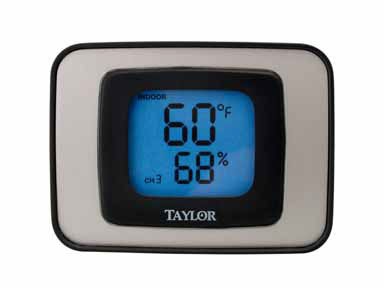
Image 1: Taylor #1523 Indoor/Outdoor Thermometer and Humidity Guide. This image shows the front view of the thermometer unit, displaying temperature and humidity readings.
2. Recursos do Produto
- Simultaneous display of indoor and outdoor temperature.
- Displays indoor humidity levels.
- Switchable temperature units (Celsius or Fahrenheit).
- Records and displays minimum and maximum temperature/humidity readings.
- Backlight for easy reading in low light conditions.
- Versatile placement: desktop stand or wall-mountable.
3. Conteúdo da embalagem
- Taylor #1523 Thermometer Unit
- Outdoor Temperature Sensor (wired)
- Manual do usuário
Note: One AAA battery is required for operation and is not typically included.
4. Configuração
4.1 Instalação da bateria
- Localize o compartimento da bateria na parte traseira da unidade.
- Remova a tampa do compartimento da bateria.
- Insert one (1) AAA battery, ensuring correct polarity (+ and -).
- Recoloque a tampa do compartimento da bateria.
4.2 Colocação do Sensor
- Unidade interna: Place the main thermometer unit indoors in a location away from direct sunlight, heat sources, or drafts that could affect temperature and humidity readings. It can be placed on a desktop using its integrated stand or mounted on a wall using the keyhole slot on the back.
- Sensor externo: Route the wired outdoor temperature sensor outside. For accurate readings, place the sensor in a shaded area, protected from direct sunlight and precipitation. Ensure the cable is not pinched or damaged.
5. Operação
The control buttons are located on the back of the unit, except for the backlight button which is on the top.
5.1 Leituras do visor
- The display will show the current indoor temperature, outdoor temperature, and indoor humidity.
5.2 Changing Temperature Units (C/F)
- Pressione o C / F button on the back of the unit to toggle between Celsius and Fahrenheit temperature displays.
5.3 Viewing Minimum/Maximum Readings (MIN/MAX)
- Pressione o MÍNIMO MÁXIMO button on the back of the unit to cycle through current, minimum, and maximum recorded values for temperature and humidity.
5.4 Clearing Minimum/Maximum Readings (CLEAR)
- Enquanto viewing the MIN/MAX readings, press the CLARO button on the back of the unit to reset the recorded minimum and maximum values.
5.5 Luz de fundo
- Press the button located on the top of the unit to activate the backlight for a few seconds, improving visibility in dark environments.
6. Manutenção
- Limpeza: To clean the unit, wipe it with a soft, damp pano. Não utilize produtos de limpeza abrasivos ou solventes, pois estes podem danificar o plástico.asing ou exibição.
- Substituição da bateria: Replace the AAA battery when the display becomes dim or stops functioning. Ensure proper polarity during installation.
- Armazenar: If storing the unit for an extended period, remove the battery to prevent leakage.
7. Solução De Problemas
| Problema | Possível causa | Solução |
|---|---|---|
| Sem imagem ou imagem fraca | Bateria fraca ou descarregada; instalação incorreta da bateria. | Substitua a pilha AAA, certificando-se da polaridade correta. |
| Leituras imprecisas de temperatura/umidade | Unit or sensor placed in direct sunlight, near heat/cold sources, or in drafts. | Relocate the unit and/or outdoor sensor to a more appropriate, stable environment. Ensure the outdoor sensor is in shade. |
| Outdoor temperature not displayed | Outdoor sensor cable is disconnected or damaged. | Check the connection of the outdoor sensor cable to the main unit. Inspect the cable for any visible damage. |
8. Especificações
- Modelo: #1523
- Dimensões: 6.5 x 5.9 x 1.8 polegadas (Embalagem do Item)
- Peso: 4 onças (Peso da embalagem)
- Material: Plástico
- Fonte de energia: 1 pilha AAA (não incluída)
- Código UPC: 077784015230
- Instruções de cuidados: Limpe
9. Garantia e Suporte
Taylor provides a limited warranty for its products. For specific warranty details, technical support, or service inquiries, please refer to the warranty card included with your product or visit the official Taylor website. You may also contact Taylor customer service directly for assistance.
Taylor Customer Service: www.taylorusa.com/support


