Introdução
This manual provides essential information for the proper setup, operation, and maintenance of your Fender '65 Princeton Reverb Guitar Amplifier. The '65 Princeton Reverb is a 15-watt all-tube amplifier designed for versatile use in various settings, from home practice to recording studios and small live performances. It features classic Fender tube tone, dynamic clean and overdriven sounds, and integrated long-spring reverb and tube vibrato effects.
Os principais recursos incluem:
- 15-watt all-tube amplification with tube rectification.
- Equipped with a 1-10" Jensen C-10R, 8 Ohm, 40 Watt Speaker with Ceramic Magnet.
- Integrated long-spring Fender reverb and tube vibrato effects.
- Inclui um amplifier cover and a 2-button footswitch for remote control of reverb and vibrato.

Figura 1: Frente view of the Fender '65 Princeton Reverb Guitar Ampamplificador, showcasing its classic black Tolex finish and silver grille cloth.
Configurar
- Desembalagem: Remova cuidadosamente o ampRetire o amplificador da embalagem. Guarde todos os materiais da embalagem para transporte ou armazenamento futuros.
- Colocação: Posicione o ampColoque o amplificador em uma superfície estável e nivelada. Garanta ventilação adequada ao redor do aparelho para evitar superaquecimento. Evite colocar o amplificador em locais onde ele esteja instalado. ampAmplificador próximo a fontes de calor ou sob luz solar direta.
- Conexão de energia: Garantir o amplifier's power switch is in the 'OFF' position. Connect the supplied power cord to the amplifier's AC inlet and then to a grounded electrical outlet. Verify that the outlet provides the correct voltage para sua região.
- Conexão do instrumento: Connect your guitar or other instrument to one of the 'INSTRUMENTS' input jacks (Input 1 or Input 2) using a high-quality instrument cable. Input 1 typically offers higher sensitivity than Input 2.
- Conexão para pedal (opcional): If using the included 2-button footswitch, connect it to the 'FOOTSWITCH' jack on the amplifier's rear panel. This allows remote activation of the Reverb and Vibrato effects.
Instruções de operação
Familiarize-se com o amplifier's front panel controls:
- Interruptor de alimentação: Transforma o amplifier ON or OFF. Allow a brief warm-up period after turning on.
- Volume: Controla o nível de saída geral do ampmais vivo.
- Agudos: Adjusts the high-frequency response. Turn clockwise for brighter tones, counter-clockwise for warmer tones.
- Baixo: Adjusts the low-frequency response. Turn clockwise for more bass, counter-clockwise for less.
- Reverberação: Controla a intensidade do efeito de reverberação de mola integrado.
- Velocidade: Adjusts the rate of the vibrato effect.
- Intensidade: Adjusts the depth or prominence of the vibrato effect.
Inicialização inicial:
- Ensure all volume and effect controls are set to their minimum positions.
- Flip the power switch to the 'ON' position. The pilot light will illuminate.
- Allow approximately 30-60 seconds for the tubes to warm up.
- Slowly increase the 'Volume' control to your desired listening level. Adjust 'Treble' and 'Bass' for tonal preference.
- Experiment with the 'Reverb', 'Speed', and 'Intensity' controls to achieve desired effects.
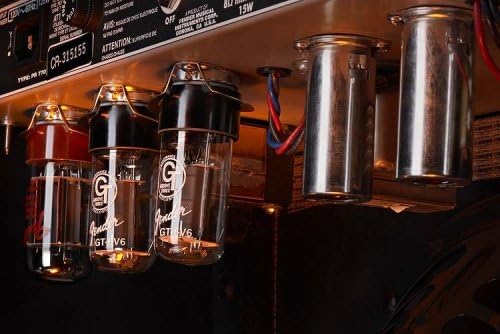
Figura 2: interno view do amplifier, highlighting the vacuum tubes which are crucial for its tonal characteristics.
Manutenção
- Limpeza: Use um pano macio e seco para limpar o ampExterior do amplificador. Evite produtos de limpeza abrasivos ou solventes.
- Cuidados com o tubo: Vacuum tubes have a finite lifespan. If you notice a decrease in performance, unusual noise, or a change in tone, tubes may need replacement. Consult a qualified technician for tube replacement.
- Armazenar: Quando não estiver em uso, armazene o amplifier in a dry, temperature-controlled environment. Use the included amplifier cover to protect it from dust and minor impacts.
- Transporte: Always power off and unplug the amplifier before moving it. Use proper lifting techniques due to its weight.
Solução de problemas
| Problema | Possível causa | Solução |
|---|---|---|
| Nenhuma saída de som | Power cord disconnected, instrument cable faulty, volume set to zero, speaker disconnected. | Check power and instrument cables. Ensure volume is up. Verify speaker connection. |
| Zumbido ou ruído de zumbido | Ground loop, faulty instrument cable, proximity to other electronics, worn tubes. | Try a different outlet. Use shielded cables. Move away from other devices. Consult technician for tube inspection. |
| Som fraco ou distorcido | Worn tubes, incorrect instrument input, speaker damage. | Check instrument input. Consult technician for tube or speaker inspection. |
| Reverb or Vibrato not working | Footswitch disconnected or faulty, effect controls set to zero, internal component failure. | Check footswitch connection and functionality. Ensure effect controls are adjusted. Consult technician. |
If troubleshooting steps do not resolve the issue, contact Fender customer support or a qualified service technician.
Especificações
- Marca: Pára-choque
- Modelo: '65 Princeton Reverb
- Número do modelo do item: 2172000000
- Potência de saídatage: 15 Watts
- Palestrante: 1-10" Jensen C-10R, 8 Ohm, 40 Watt Speaker with Ceramic Magnet
- Dimensões do produto: 28.25 x 22.5 x 12.25 inches (Length x Height x Depth)
- Peso do item: 34 libras
- Cor: Preto
- Material: Metal, Madeira
- Dispositivos compatíveis: Guitarra
- Fabricante: Fender Musical Instruments Corp.

Figure 3: Dimensional diagram of the amplifier, indicating its length, height, and depth.
Garantia e Suporte
Fender products are designed for reliability and performance. For specific warranty information, please refer to the warranty card included with your amplifier or visit the official Fender website. For technical support, service, or replacement parts, please contact Fender customer service through their official channels. Always provide your model number (2172000000) and serial number when seeking support.
Recursos on-line: For additional information, product registration, and support, visit the official Pára-choque website.


