1. Introdução
The Antec TruePower TPQ-1200 is a high-performance 1200-watt power supply designed for demanding computer systems. It features an 80 PLUS Silver certification, indicating high energy efficiency, and provides stable power delivery through its six +12V rails. This manual provides essential information for the safe installation, operation, and maintenance of your TPQ-1200 power supply.
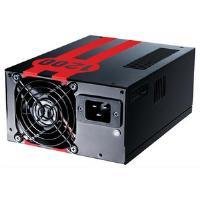
Image 1.1: The Antec TruePower TPQ-1200 Power Supply unit, showcasing its design and modular connectors.
2. Informações de segurança
Please read and understand all safety instructions before installing or operating the power supply. Failure to do so may result in personal injury or damage to your equipment.
- Sempre desconecte o cabo de alimentação da tomada antes de instalar, remover ou limpar a fonte de alimentação.
- Esta fonte de alimentação foi projetada para uso exclusivo em computadores pessoais. Não a utilize para qualquer outra finalidade.
- Não abra a fonte de alimentação casing. Alto volumetages are present inside, and there are no user-serviceable parts. Opening the casinO uso do g anulará a garantia.
- Assegure-se de que seu sistema de computador esteja devidamente aterrado.
- Avoid operating the power supply in high humidity or extreme temperature environments.
- Keep the power supply away from liquids and sources of heat.
3. Conteúdo da embalagem
Verifique se seu pacote contém os seguintes itens:
- Antec TruePower TPQ-1200 Power Supply Unit
- Modular Cable Set (PCIe, SATA, Molex, Floppy)
- Cabo de alimentação CA
- Parafusos de montagem
- Manual do usuário (este documento)
If any items are missing or damaged, please contact your retailer or Antec customer support.
4. Características
The Antec TruePower TPQ-1200 power supply offers advanced features for reliable and efficient performance:
- Potência contínua de 1200 watts: Fornece ample power for high-end gaming and workstation systems.
- 80 PLUS Silver Certified: Achieves up to 88% efficiency, reducing heat generation and operating costs.
- Six +12V Rails: Delivers stable and clean power to critical components.
- Gerenciamento avançado de cabos: Semi-modular design allows for cleaner builds and improved airflow.
- PowerCache High Performance Capacitors: Enhances stability and transient response.
- Ultra-Quiet Pulse Width Modulation (PWM) Fan: Provides efficient cooling with minimal noise.
- Industrial Grade Protection Circuitry: Inclui proteção contra sobrecorrente (OCP) e sobretensão (OV).tage Proteção (OVP), Sob Voltage Protection (UVP), Short Circuit Protection (SCP), Over Power Protection (OPP), and Over Temperature Protection (OTP).
5. Configuração e instalação
Follow these steps carefully to install your Antec TruePower TPQ-1200 power supply.
5.1 Lista de verificação de pré-instalação
- Ensure your computer case supports an ATX power supply.
- Reúna as ferramentas necessárias: chave de fenda Phillips.
- Unplug your computer from the wall outlet and discharge any residual power by pressing the power button.
5.2 Montagem da Fonte de Alimentação
- Carefully place the power supply into the designated PSU bay in your computer case. Ensure the fan is oriented correctly (typically facing down for bottom-mounted PSUs, or according to case design for top-mounted).
- Alinhe os orifícios dos parafusos na fonte de alimentação com os da caixa.
- Secure the power supply using the provided mounting screws. Do not overtighten.
5.3 Conectando cabos de alimentação
Connect the necessary cables to your motherboard and components. The TPQ-1200 features both fixed and modular cables.
- 24-Pin ATX Motherboard Power: Connect the main 24-pin connector to the corresponding port on your motherboard. Ensure it clicks into place.
- 8-Pin EPS12V (CPU) Power: Connect the 8-pin (or 4+4 pin) EPS12V connector to the CPU power port on your motherboard.
- PCIe (Graphics Card) Power: For graphics cards requiring additional power, connect the appropriate 6-pin or 6+2 pin PCIe modular cables from the power supply to your graphics card(s).
- Alimentação SATA: Connect SATA modular cables to your SATA hard drives, SSDs, and optical drives.
- Molex (Peripheral) Power: Use Molex modular cables for older peripherals or case fans that require this connector type.
- Gerenciamento de cabos: Organize os cabos cuidadosamente atrás da bandeja da placa-mãe ou em outras áreas designadas do seu gabinete para melhorar o fluxo de ar e a estética.
5.4 Inicialização
- Certifique-se de que todas as conexões estejam seguras.
- Connect the AC power cord to the power supply and then to a grounded wall outlet.
- Ligue o interruptor de alimentação na parte traseira da fonte de alimentação para a posição 'LIGADO' (I).
- Ligue o seu computador.
6. Instruções de operação
The Antec TruePower TPQ-1200 is designed for continuous operation within its specified limits. Ensure adequate ventilation around your computer case to prevent overheating. The intelligent PWM fan will adjust its speed based on the power supply's temperature to maintain optimal cooling and noise levels.
Always shut down your computer properly through the operating system before turning off the power supply switch or unplugging the AC cord.
7. Manutenção
A manutenção regular ajuda a garantir a longevidade e o desempenho ideal da sua fonte de alimentação.
- Limpeza de pó: Periodically (e.g., every 6-12 months), disconnect the power supply from the wall outlet and use compressed air to gently clean dust from the fan grille and ventilation openings. Do not open the power supply casing.
- Inspeção de cabos: Verifique ocasionalmente todas as conexões dos cabos de alimentação para garantir que estejam seguras e sem danos.
8. Solução De Problemas
If you encounter issues with your power supply, refer to the following troubleshooting guide:
| Problema | Possível causa | Solução |
|---|---|---|
| O computador não liga. | AC power cord not connected or loose. Power supply switch is OFF. Faulty power supply. | Ensure AC cord is firmly connected. Flip PSU switch to 'ON' (I). Test with another power supply if possible. |
| O sistema liga, mas desliga imediatamente. | Overload, short circuit, or overheating. | Check for short circuits (e.g., loose screws). Ensure adequate ventilation. Disconnect non-essential components to check for overload. |
| System instability or random reboots. | Insufficient power, faulty component, or power supply issue. | Verify all power connectors are secure. Ensure total system wattage does not exceed PSU capacity. Test components individually if possible. |
| Ruído alto da ventoinha da fonte de alimentação. | Dust accumulation, fan malfunction, or high load. | Clean dust from the fan grille. If noise persists and is excessive, contact support. |
If troubleshooting steps do not resolve the issue, contact Antec customer support for further assistance.
9. Especificações
Detailed technical specifications for the Antec TruePower TPQ-1200 power supply:
- Nome do modelo: TruePower TPQ-1200
- Potência de saídatage: 1200 Watts
- Fator de forma: ATX12V
- Tipo de conector: ATX
- Eficiência: 80 PLUS Silver Certified
- Método de resfriamento: Air (PWM Fan)
- Contagem de fãs: 1
- Dispositivos compatíveis: Computador pessoal
- Peso do item: 4.96 libras (2.25 kg)
- Dimensões da embalagem: 12.91 x 9.84 x 5.59 polegadas (32.8 x 25 x 14.2 cm)
- Data da primeira disponibilidade: 17 de abril de 2012
10. Garantia e Suporte
For warranty information and technical support, please refer to the official Antec webou entre em contato diretamente com o serviço de atendimento ao cliente. Os termos e condições da garantia podem variar conforme a região e a data da compra.
Antec Oficial Website: www.antec.com


