Introdução
The Logitech Z906 is a 5.1 surround sound speaker system designed to deliver an immersive audio experience. Certified by THX and featuring digital decoding for Dolby Digital and DTS encoded soundtracks, this system provides powerful and detailed sound for various entertainment needs. It offers versatile connectivity options and integrated controls for a customizable listening experience.
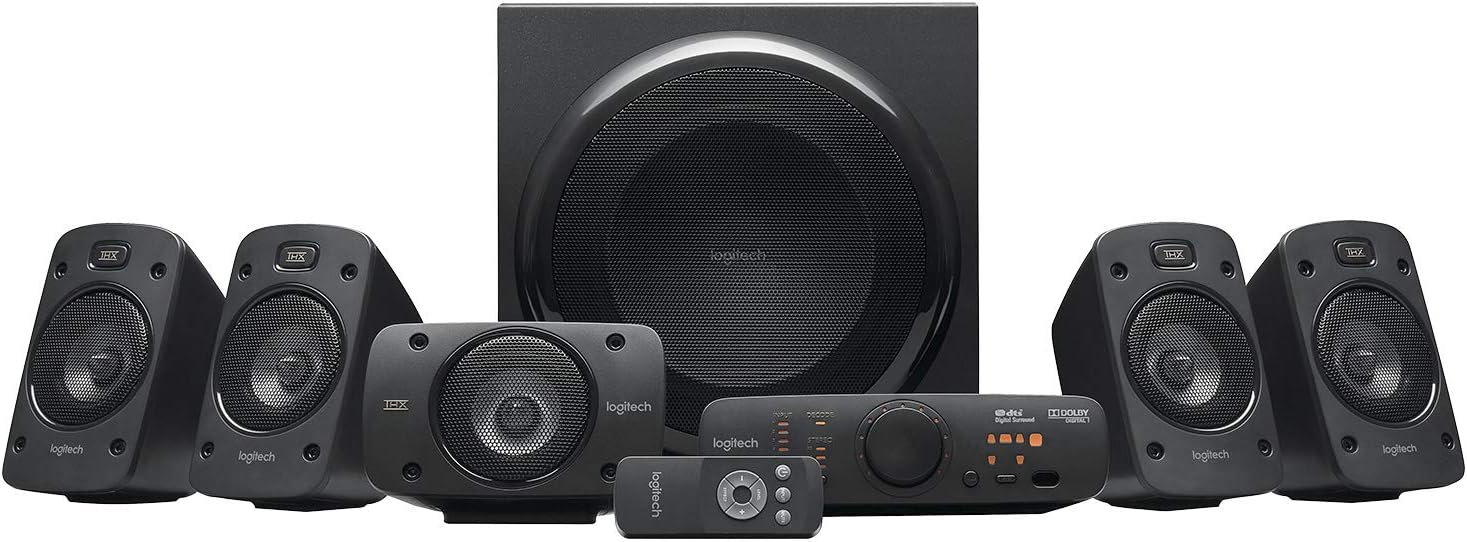
Figura 1: Overview of the Logitech Z906 5.1 Surround Sound Speaker System, including the subwoofer, five satellite speakers, control console, and wireless remote.
Configurar
Follow these steps to correctly set up your Logitech Z906 speaker system.
1. Desembalagem e componentes
Carefully remove all components from the packaging. The box contains:
- 1 subwoofer
- 5 Satellite Speakers (4 for surround, 1 for center)
- 1 Control Console
- 1 Wireless Remote Control (requires 3 AAA batteries)
- Cabos de alto-falante
- Audio Cables (e.g., 3.5mm, RCA)

Figure 2: All components included in the Logitech Z906 package.
2. Posicionamento do alto-falante
For optimal 5.1 surround sound, position the speakers as follows:
- Alto-falante central: Directly in front of your listening position, usually above or below your display.
- Alto-falantes frontais esquerdo/direito: To the left and right of your display, equidistant from the center speaker and your listening position.
- Alto-falantes traseiros esquerdo/direito: To the left and right of your listening position, slightly behind you.
- Subwoofer: On the floor, preferably in a corner or near a wall for enhanced bass response. Experiment with placement for best results.

Figura 3: Example of a 5.1 surround sound speaker setup with the Logitech Z906 system.
3. Conectando os alto-falantes
Connect the satellite speakers to the subwoofer using the provided color-coded speaker cables. Ensure correct polarity (red to red, black to black) for each speaker.

Figure 4: Rear panel of the Z906 subwoofer showing speaker terminals and input connections. Connect the satellite speakers to the corresponding terminals.
4. Conectando fontes de áudio
The Z906 system offers multiple input options for various devices:
- Óptica Digital: For high-quality audio from TVs, Blu-ray/DVD players, game consoles.
- Cabo coaxial digital: Another digital option for compatible devices.
- Six-Channel Direct: For connecting to a 5.1 sound card in a PC.
- RCA: Standard stereo connection for various audio devices.
- 3.5mm Auxiliary: For connecting smartphones, tablets, or other portable devices.
Connect your desired audio sources to the corresponding inputs on the control console or directly to the subwoofer's rear panel.

Figure 5: The Z906 control console with various input options for connecting multiple devices.
5. Conexão de energia
Connect the subwoofer's power cable to a wall outlet. The system is now ready for operation.
Vídeo de unboxing
Video 1: An unboxing demonstration of the Logitech Z906 speaker system, showing the contents and initial setup steps.
Operacional
1. Control Console Functions
The control console provides easy access to all system functions:
- Botão de energia: Liga ou desliga o sistema.
- Seleção de entrada: Cycle through available audio inputs (Optical, Coaxial, Six-Channel Direct, RCA, Aux).
- Controle de volume: Large rotary knob to adjust overall system volume.
- Seleção de efeitos: Choose between various sound effects like Stereo 3D, 4.1, 2.1, or no effect.
- Ajuste de nível: Adjust individual speaker levels (front, rear, center, subwoofer) for balanced surround sound.
- Botão Mudo: Ativa ou desativa o som do áudio.

Figure 6: Close-up of the Z906 control console, highlighting the main controls and indicators.
2. Controle remoto sem fio
The included wireless remote provides convenient control from a distance. It duplicates most functions available on the control console, including power, volume, input selection, and sound effects.

Figure 7: The wireless remote control for the Logitech Z906 system.
3. Utilização de fones de ouvido
A headphone jack is available on the control console for private listening. Plugging in headphones will automatically mute the speakers and divert audio to your headphones.
Manutenção
To ensure the longevity and optimal performance of your Logitech Z906 speaker system, follow these maintenance guidelines:
- Limpeza: Use a soft, dry cloth to clean the speaker surfaces. Avoid abrasive cleaners or solvents.
- Colocação: Keep speakers away from direct sunlight, heat sources, and excessive moisture. Ensure adequate ventilation for the subwoofer.
- Gerenciamento de cabos: Certifique-se de que todos os cabos estejam firmemente conectados e não estejam presos ou tensionados.
- Baterias remotas: Replace AAA batteries in the wireless remote when performance degrades.
Solução de problemas
If you encounter issues with your Z906 system, refer to the following common solutions:
- Sem som:
- Check all cable connections, including power, speaker wires, and audio input cables.
- Certifique-se de que a fonte de entrada correta esteja selecionada no console de controle.
- Verify that the system is not muted and the volume is turned up.
- If using a PC, check your computer's sound settings and ensure the Z906 is selected as the output device.
- Distorted Sound/Static:
- Reduce the volume of the audio source or the speaker system.
- Verifique se há conexões de cabo soltas.
- Ensure the audio source is not sending a distorted signal.
- If static occurs when adjusting the volume knob, this may indicate wear over time.
- Sem som surround:
- Ensure your audio source is providing a 5.1 signal (e.g., Dolby Digital, DTS).
- Select the appropriate sound effect mode on the control console (e.g., Stereo 3D, 4.1, 2.1).
- Verify correct speaker placement and connections.
- Controle remoto não funciona:
- Substitua as pilhas AAA.
- Certifique-se de que não haja obstruções entre o controle remoto e o console de controle.
Especificações
| Recurso | Especificação |
|---|---|
| Marca | Logitech |
| Nome do modelo | Z906 |
| Número do modelo do item | 980-000469 |
| Tipo de alto-falante | Som surround 5.1 |
| Total Watts (RMS) | 500 W |
| Potência de pico | 1000 Watts |
| Resposta de frequência | 20 Hz - 20 kHz |
| Sinal-Ruído | 6E+1 dB |
| Tecnologia de Conectividade | Optical, Coaxial, Six-Channel Direct, RCA, 3.5mm |
| Método de controle | Remoto |
| Tecnologia de comunicação sem fio | Bluetooth (Note: Product specifications list Bluetooth, but primary connectivity is wired for 5.1 audio) |
| Diâmetro do subwoofer | 29.2 centímetros (11.5 polegadas) |
| Peso do item | 8.54 quilogramas (18.79 libras) |
| Dimensões do produto | 11.02"P x 13.78"L x 11.5"A |
| Pilhas necessárias | 3 pilhas AAA (para o controle remoto) |

Figure 8: The Logitech Z906 system is capable of 1000 Watts Peak Power output.

Figure 9: The Logitech Z906 speaker system is THX Certified for premium sound quality.
Garantia e Suporte
For warranty information, technical support, or service inquiries, please refer to the official Logitech website or contact Logitech customer support directly. Keep your purchase receipt for warranty claims.


