1. Introdução
Obrigado pela compra.asing the Dual MP 301 Mini Stereo System. This versatile audio system combines modern and classic audio technologies, allowing you to enjoy music from various sources including CDs, vinyl records, cassette tapes, MP3 files via USB/SD, and radio. This manual provides essential information for the safe and efficient operation of your device. Please read it thoroughly before use and retain it for future reference.
2. Instruções de segurança
- Certifique-se de que a fonte de alimentação voltage corresponde à classificação indicada na etiqueta da unidade.
- Não exponha o aparelho à chuva ou umidade para evitar incêndio ou choque elétrico.
- Não obstrua as aberturas de ventilação. Mantenha espaço suficiente ao redor do aparelho para garantir a circulação adequada do ar.
- Evite colocar o aparelho perto de fontes de calor ou sob luz solar direta.
- Não abra o casing. Encaminhe todos os serviços de manutenção para pessoal qualificado.
- Desligue a unidade durante tempestades com raios ou quando não for utilizada por longos períodos.
3. Conteúdo da embalagem
Verifique se todos os itens estão presentes na embalagem:
- Main Unit (Dual MP 301)
- Antena FM
- 2 x Speakers (with cables)
- Controle remoto (pilhas não incluídas)
- Manual do usuário
4. Produto acabadoview
4.1. Frente View do sistema
This image displays the complete Dual MP 301 Mini Stereo System, including the central unit and two external speakers. The central unit features a control panel, display, CD changer, dual cassette deck, and front-facing USB/SD card slots. The speakers are two-way, designed to deliver balanced audio output.

4.2. Painel de controle e exibição
This close-up shows the main control panel of the Dual MP 301. It features an LCD display, various function buttons (e.g., CD/USB, Tape, Tuner/Band, Phono), volume knob, and navigation controls. The display provides information on the current mode, track, station, and time.

4.3. Dual Cassette Deck
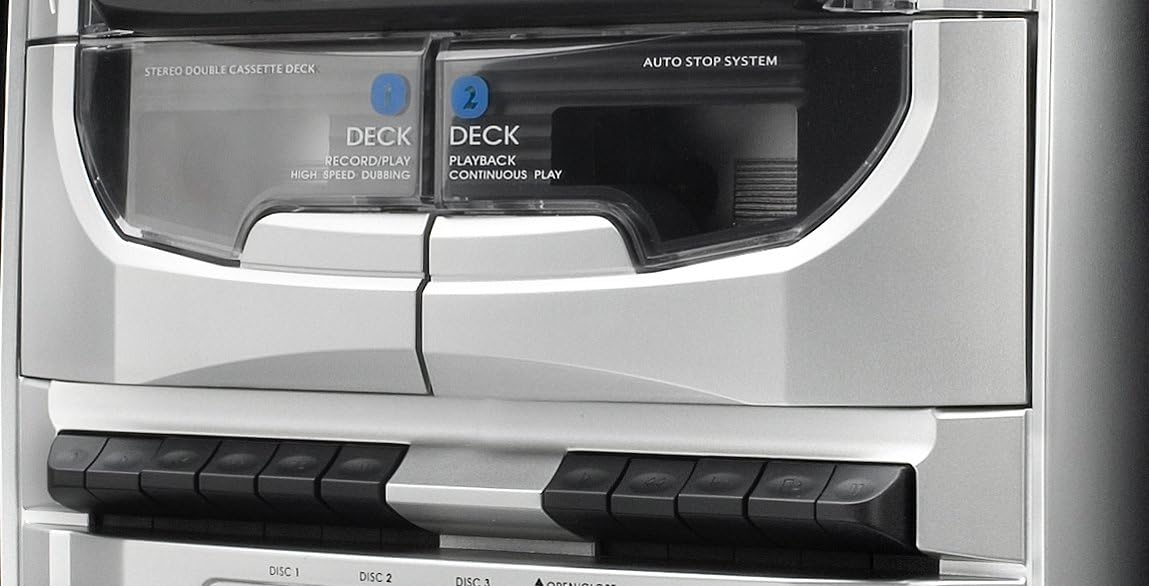
This image highlights the dual mechanical cassette deck. Deck 1 is for record/play and high-speed dubbing, while Deck 2 is for playback and continuous play. The 'Auto Stop System' ensures tape protection. Below the decks are the control buttons for cassette operations.
4.4. CD Changer and USB/SD Ports
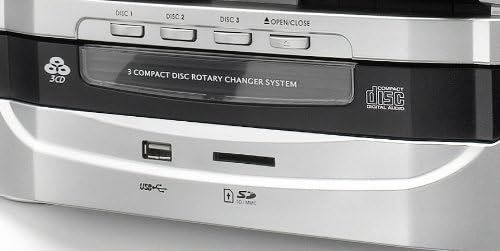
Um detalhado view of the 3-compact disc rotary changer system, allowing multiple CDs to be loaded. Below the CD tray, the front panel includes a USB port and an SD/MMC card slot for playing MP3 files and recording audio.
4.5. Controle remoto
This image shows the remote control unit for the Dual MP 301. It provides convenient access to all major functions, including power, source selection, volume, playback controls, radio tuning, and special features like EQ and sleep timer.

5. Configuração
5.1. Conectando as caixas de som
- Locate the speaker terminals on the rear of the main unit.
- Connect the speaker wires from the left speaker to the 'L' terminals and from the right speaker to the 'R' terminals. Ensure correct polarity (positive to positive, negative to negative).
5.2. Conectando a antena FM
- Connect the supplied FM antenna to the 75-ohm antenna connection port on the rear of the unit.
- Estenda a antena completamente e posicione-a para obter a melhor recepção.
5.3. Conexão de energia
- Certifique-se de que todas as conexões estejam seguras.
- Conecte o cabo de alimentação a uma tomada adequada.
6. Operação
6.1. Ligar/desligar e seleção de modo
- Pressione o EM ESPERA button on the unit or remote to power on or off.
- Use o FUNÇÃO or source buttons (e.g., CD / USB, FITA, SINTONIZADOR/BANDA, TELEFONE) to select the desired audio source.
6.2. Operação do Leitor de CD
- Pressione o ABRIR/FECHAR botão para abrir a bandeja do CD.
- Place up to three CDs onto the respective disc trays (DISC 1, DISC 2, DISC 3).
- Imprensa ABRIR/FECHAR novamente para fechar a bandeja.
- Selecione CD mode. The system will automatically detect and play the first CD.
- Usar SALTAR DISCO to switch between loaded CDs.
- Usar REPRODUZIR/PAUSAR, PARAR, PULAR PARA CIMA/PARA BAIXO para controle de reprodução.
- The system supports CD, CD-R/RW, and MP3 CD formats.
6.3. Operação do Leitor de Cassetes
- Pressione o FITA botão para selecionar o modo de cassete.
- Open the cassette deck door by pressing the ABRIR botão.
- Insert a cassette tape into Deck 1 (Record/Play) or Deck 2 (Playback).
- Use the playback controls (Play, Stop, Fast Forward, Rewind) located below the decks.
- To record, ensure a blank tape is in Deck 1, select the desired source (Radio, CD, USB/SD, Phono), and press the REGISTRO botão no deck 1.
- For high-speed dubbing, insert the source tape into Deck 2 and a blank tape into Deck 1, then follow the dubbing instructions in the full manual.
6.4. Operação da plataforma giratória
- Levante a tampa do prato giratório.
- Coloque um disco de vinil no prato.
- Selecione a velocidade apropriada (33, 45 ou 78 RPM) usando a chave seletora de velocidade.
- Move the tone arm to the desired position on the record. The turntable will start automatically (auto-stop feature).
- At the end of the record, the turntable will stop automatically.
6.5. Operação de rádio
- Pressione o SINTONIZADOR/BANDA button to select FM or MW radio.
- Use o AFINAÇÃO +/- Botões para sintonizar manualmente uma estação ou pressione e segure para busca automática.
- To save a station, press MEMÓRIA, então use PRE-UP/DN Para selecionar um número predefinido, pressione MEMÓRIA novamente para confirmar.
- The RDS function provides station information where available.
6.6. USB/SD Playback and Recording
- Insert a USB flash drive or SD/MMC card into the respective slot.
- Selecione USB or SD mode. The system will automatically play compatible MP3 files.
- To record from Vinyl, Cassette, or CD to USB/SD, select the source, then press the REC button while in USB/SD mode.
6.7. Funções de relógio e alarme
- The LCD display shows the current time. Refer to the full manual for detailed instructions on setting the clock.
- The integrated alarm and timer functions allow you to set the system to turn on at a specific time, for example, to wake up to radio or CD music.
6.8. Uso de fones de ouvido
- Connect 3.5mm headphones to the headphone jack on the front panel for private listening.
- Ajuste o volume para um nível confortável.
7. Manutenção
- Limpeza: Use um pano macio e seco para limpar o aparelho. Não use produtos de limpeza líquidos ou aerossóis.
- Pó: Regularly dust the turntable and cassette deck areas to prevent accumulation that could affect performance.
- Lente de CD: Use um limpador de lentes de CD específico caso ocorram problemas de reprodução.
- Caneta: Handle the turntable stylus with care. Replace it if worn to prevent damage to records.
8. Solução De Problemas
- Sem energia: Check if the power cord is securely plugged in and the wall outlet is functional.
- Sem som: Ensure speakers are correctly connected, volume is up, and the correct source is selected. Check headphone connection if applicable.
- CD/Cassette/Vinyl Not Playing: Ensure the media is inserted correctly and is clean. For vinyl, check stylus condition and tone arm placement.
- Recepção de rádio deficiente: Adjust the FM antenna position. Check for local interference.
- Controle remoto não funciona: Check battery polarity and replace batteries if necessary. Ensure no obstacles are between the remote and the unit's sensor.
9. Especificações
| Marca | Dual |
| Número do modelo | MP 301 |
| Cor | Prata |
| Tecnologia de Conectividade | USB |
| Características especiais | CD Recorder, Integrated Speaker (Note: Product description indicates external speakers, 'Integrated Speaker' might refer to the system's audio output capability) |
| Dispositivos compatíveis | Smartphone, tablet, reprodutor de MP3 |
| Tipo de alto-falante | Stereo (2-way speakers) |
| Fonte de energia | AC Power (Product description mentions 'Alimenté par batterie' which is 'Battery powered', but this is likely an error given the 100W output and typical mini-system design. Assumed AC power.) |
| Potência de saída | Up to 100 Watts (peak) |
| Padrões Suportados | MP3 |
| Compatibilidade Bluetooth | Não |
| Formatos de áudio suportados | CD, Vinyl Records |
| Velocidades do toca-discos | 33/45/78 rpm |
| Sintonizador de rádio | RDS-PLL-FM/MW (30 FM, 10 MW presets) |


