Introdução
This manual provides essential instructions for the safe and efficient operation of your I-TEC T2404 Universal Wireless Bluetooth Portable Sound System (Model BTO-SPEAKRST). Please read this manual thoroughly before using the device and retain it for future reference.
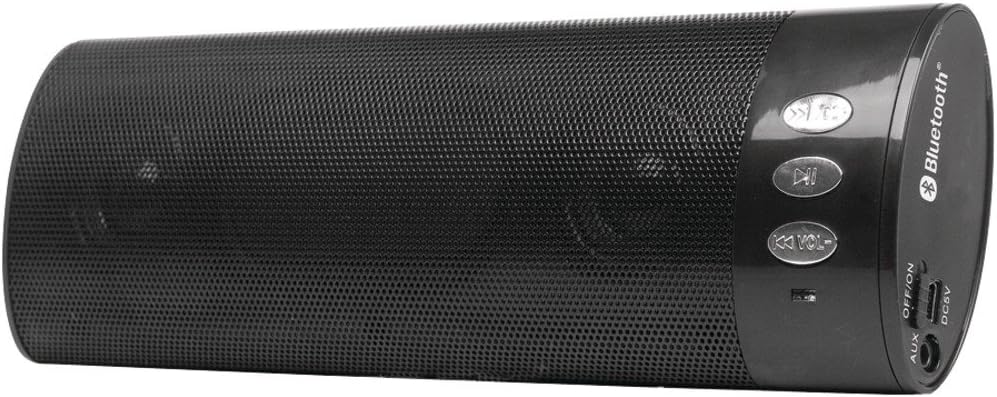
Figura 1: I-TEC T2404 Universal Wireless Bluetooth Portable Sound System. This image shows the cylindrical black speaker with a perforated metal grille, control buttons on one end, and input/output ports on the other end.
Configurar
1. Desembalagem
Carefully remove the sound system from its packaging. Verify that all components are present. If any items are missing or damaged, contact your retailer.
2. Ligando o dispositivo
The I-TEC T2404 is powered via a DC 5V input. Connect a standard USB power adapter (not included) to the DC5V port on the speaker using a compatible USB cable. Ensure the power source provides 5V DC.
3. Ligar/desligar
Locate the "OFF/ON" switch on the side panel of the speaker. Slide the switch to the "ON" position to power on the device. Slide it to the "OFF" position to power off.
Figura 2: Close-up of the control panel and ports. This image highlights the buttons for track control and volume, the Bluetooth logo, and the AUX, OFF/ON switch, and DC5V ports on the side of the speaker.
Instruções de operação
1. Emparelhamento Bluetooth
- Ensure the speaker is powered on. It will automatically enter Bluetooth pairing mode, indicated by a flashing LED light (location not specified in product data, assume standard behavior).
- Activate Bluetooth on your mobile device (smartphone, tablet, computer).
- Procurar available Bluetooth devices. The speaker will appear as "I-TEC T2404" or a similar name.
- Selecione a caixa de som na lista para emparelhar. Um sinal sonoro de confirmação ou uma luz LED acesa indicará que o emparelhamento foi bem-sucedido.
- Após o emparelhamento, você poderá reproduzir áudio do seu dispositivo através da caixa de som.
2. Operação da entrada AUX
Para usar a entrada AUX:
- Conecte uma extremidade de um cabo de áudio de 3.5 mm (não incluído) à porta AUX da caixa de som.
- Connect the other end of the 3.5mm audio cable to the headphone jack or audio output of your external audio device.
- The speaker should automatically switch to AUX mode. If not, ensure no Bluetooth device is actively connected or try cycling the power.
3. Botões de controle
The speaker features several control buttons:
- Botão Reproduzir/Pausar: Press to play or pause audio playback.
- Previous Track / Volume Down (K<< VOL-): Press briefly to skip to the previous track. Press and hold to decrease the volume.
- Next Track / Volume Up (>>K VOL+): Press briefly to skip to the next track. Press and hold to increase the volume.
Manutenção
1. Limpeza
Wipe the exterior of the speaker with a soft, dry cloth. Do not use abrasive cleaners, waxes, or solvents as they may damage the finish. Avoid getting moisture into any openings.
2. Armazenamento
When not in use for extended periods, store the speaker in a cool, dry place, away from direct sunlight and extreme temperatures. Disconnect it from the power source.
Solução de problemas
| Problema | Possível causa | Solução |
|---|---|---|
| Sem energia | Speaker is off; power cable not connected; power source issue. | Ensure the "OFF/ON" switch is in the "ON" position. Verify the DC5V power cable is securely connected to a working power source. |
| Não é possível emparelhar via Bluetooth. | Speaker not in pairing mode; Bluetooth disabled on device; device too far; interference. | Ensure the speaker is on and in pairing mode (flashing LED). Enable Bluetooth on your device. Move the device closer to the speaker. Turn off other Bluetooth devices to reduce interference. |
| Sem som | Volume too low; incorrect input mode; audio source issue. | Increase the volume on both the speaker and your connected device. Ensure the correct input mode (Bluetooth or AUX) is active. Check if the audio source is playing correctly. |
| Distorção sonora | Volume too high; weak Bluetooth signal; damaged audio cable. | Reduce the volume. Move the Bluetooth device closer to the speaker. If using AUX, try a different audio cable. |
Especificações
- Marca: i-tec
- Modelo: BTO-SPEAKRST (T2404 Series)
- Tecnologia de conectividade: Bluetooth, Sem fio
- Conectividade do alto-falante: Bluetooth
- Características especiais: Portátil
- O quetage: 4 watts
- Tipo de montagem: Mesa
- Entrada de energia: DC 5V (via USB)
- Peso do item: 268 g
- Dimensões da embalagem: 23.62 x 9.4 x 4.57 cm
- Primeira data disponível: 29 de agosto de 2022
Garantia e Suporte
For warranty information or technical support, please refer to the documentation provided with your purchase or visit the official i-tec website. Guarde o comprovante de compra para solicitações de garantia.


