1. Introdução e maisview
This manual provides detailed instructions for the installation, operation, and maintenance of your Speco PBM-30 30W Contractor Series PA Amplifier. Designed for professional audio applications, this amplifier offers robust performance and versatile connectivity options.
The PBM-30 is a 30W contractor series PA amplifier featuring two independent channels, an auto-mute function, and manual muting contacts. It is UL Listed, ensuring compliance with safety standards. The amplifier accepts inputs from two distinct sound sources and provides a variety of output choices, including 4, 8, and 16 ohm, as well as 70 and 25 volt line outputs. Additionally, it includes a music-on-hold output with separate level control and a 600 ohm telephone line input with its own level control.
2. Principais características
- 30W Contractor Series PA Ampmais vivo
- Listado pela UL para segurança e confiabilidade
- Two independent input channels
- Automatic mute function for seamless audio management
- Music on hold output with dedicated level control (600 ohm line and one watt 8 ohm)
- 600 ohm telephone line input with adjustable level control
- Manual muting contacts for external control
- Accepts inputs from two distinct sound sources
- Versatile output options: 4, 8, and 16 ohm, plus 70 and 25 volt line outputs
3. Instruções de segurança
Please read and follow all safety instructions carefully to prevent injury or damage to the ampliifier. Guarde este manual para referência futura.
- Fonte de energia: Conecte o ampAmplificador apenas para a tensão de alimentação especificada.tage. Verifique se o cabo de alimentação não está danificado ou preso.
- Ventilação: Do not block any ventilation openings. Install in accordance with the manufacturer's instructions, ensuring adequate airflow around the unit.
- Água e Umidade: Não exponha este aparelho à chuva ou umidade. Não coloque objetos contendo líquidos, como vasos, sobre o aparelho.
- Aquecer: Não instale perto de fontes de calor, como radiadores, registros de calor, fogões ou outros aparelhos (incluindo amplificadores) que produzem calor.
- Manutenção: Não tente reparar este produto por conta própria. Encaminhe todos os serviços de manutenção para pessoal qualificado. A manutenção é necessária quando o aparelho tiver sido danificado de alguma forma, como por exemplo, se o cabo de alimentação ou a ficha estiverem danificados, se tiver sido derramado líquido ou se objetos tiverem caído dentro do aparelho, se o aparelho tiver sido exposto à chuva ou humidade, se não funcionar normalmente ou se tiver sofrido uma queda.
- Limpeza: Desligue este produto da tomada antes de limpá-lo. Não use limpadores líquidos ou em aerossol. Use adamp pano para limpeza.
4. Configuração e conexões
Before connecting any components, ensure the amplifier is powered off and unplugged from the mains supply. Refer to the diagram below for a visual guide to the front panel controls.
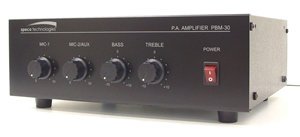
Figura 4.1: painel frontal View of Speco PBM-30 PA Amplifier, showing MIC 1, MIC 2/AUX, BASS, TREBLE, and POWER controls.
4.1 Conexões de Entrada
- Microphone/Auxiliary Inputs: O amplifier accepts inputs from two sound sources. Connect your microphones or auxiliary devices (e.g., CD player, media player) to the designated input jacks on the rear panel. Ensure proper cable types (e.g., XLR for microphones, RCA for auxiliary) are used.
- Telephone Line Input: Connect a 600 ohm telephone line to the dedicated input. This input has its own level control for adjusting the volume of telephone audio.
4.2 Conexões de Saída
- Saídas de alto-falante: Connect your speakers to the appropriate output terminals on the rear panel. The amplifier supports 4, 8, and 16 ohm speaker loads. Ensure the impedance of your speakers matches the selected output terminals.
- Vol constantetage Saídas: For distributed audio systems, connect speakers to the 70 volt or 25 volt line outputs as required. Ensure all speakers in a constant voltage system are compatible with the chosen voltage.
- Music on Hold Output: Connect your music on hold system to this output. It provides both a 600 ohm line output and a one watt 8 ohm output, each with separate level control.
4.3 Conexão de Energia
Once all audio connections are made, connect the amplifier's power cord to a suitable AC power outlet. Ensure the power switch on the front panel is in the OFF position before plugging in.
5. Instruções de operação
This section details the functions of the front panel controls and key features of the PBM-30 ampmais vivo.
5.1 Controles do painel frontal
- Chave POWER: This is the main power switch for the amplifier. Press to turn the unit ON or OFF. The indicator light will illuminate when the unit is powered on.
- MIC 1 Control: Adjusts the volume level for the microphone connected to Input 1.
- MIC 2/AUX Control: Adjusts the volume level for the microphone connected to Input 2 or the auxiliary audio source.
- Controle de BAIXO: Adjusts the low-frequency (bass) response of the audio output. Turn clockwise to increase bass, counter-clockwise to decrease.
- Controle de agudos: Adjusts the high-frequency (treble) response of the audio output. Turn clockwise to increase treble, counter-clockwise to decrease.
5.2 Auto Mute Function
The auto-mute function automatically mutes background music or other audio when a signal is detected on a priority input (e.g., a microphone input for announcements). This ensures that announcements are clear and audible without interference from other audio sources. The sensitivity and priority of the auto-mute function may be configured via internal jumpers or rear panel controls, if available (refer to detailed wiring diagrams for specific setup).
5.3 Manual Muting Contacts
O amplifier includes manual muting contacts, allowing for external control of the muting function. These contacts can be wired to an external switch or control system to manually mute audio output when activated. Consult the wiring diagram in the full technical manual for proper connection of these contacts.
5.4 Music on Hold (MOH) Output
The dedicated Music on Hold output allows you to feed background music to a telephone system's MOH input. Use the separate level control to adjust the volume of the music being sent to the telephone system.
6. Manutenção
Proper maintenance ensures the longevity and optimal performance of your Speco PBM-30 ampmais vivo.
- Limpeza: Limpe regularmente a parte externa do amplifier with a soft, dry cloth. For stubborn dirt, use a slightly damp cloth and then dry thoroughly. Do not use harsh chemicals, abrasive cleaners, or solvents.
- Ventilação: Ensure that the ventilation openings are clear of dust and debris. Periodically check that nothing is obstructing the airflow around the unit.
- Armazenar: Se armazenar o ampSe não for usar o amplificador por um período prolongado, desligue-o da tomada, limpe-o e guarde-o em local fresco e seco, longe da luz solar direta e de temperaturas extremas.
- Inspeção: Periodically inspect power cords and audio cables for any signs of damage. Replace damaged cables immediately.
7. Solução De Problemas
Se você encontrar problemas com seu amplifier, refer to the following common troubleshooting steps. If the problem persists, contact qualified service personnel.
| Problema | Possível causa | Solução |
|---|---|---|
| Sem energia | Power cord unplugged; Power switch off; Blown fuse; Power outlet fault. | Ensure power cord is securely plugged in; Turn power switch ON; Check and replace fuse if necessary (refer to service manual); Test power outlet with another device. |
| Sem saída de som | Volume controls too low; Incorrect input selected; Speaker connections loose or incorrect; Mute function active. | Increase MIC/AUX volume controls; Verify input source is active; Check all speaker wiring for secure and correct connections; Check manual muting contacts or auto-mute settings. |
| Som distorcido | Input signal too high (clipping); Speaker impedance mismatch; Damaged speaker or cable. | Reduce input signal level; Ensure speaker impedance matches amplifier output; Test with different speakers or cables to isolate the issue. |
| Zumbido/Ruído de zumbido | Circuito de aterramento; conexões soltas; interferência de outros componentes eletrônicos. | Ensure all equipment is on the same electrical circuit; Check all audio cable connections; Move ampMantenha o amplificador longe de outros dispositivos eletrônicos. |
8. Especificações
| Recurso | Detalhe |
|---|---|
| Modelo | PBM-30 |
| Potência de saída | 30 Watts |
| Canais | Dois |
| Saídas de alto-falante | 4 Ohm, 8 Ohm, 16 Ohm, 25V Line, 70V Line |
| Music on Hold Output | 600 Ohm Line, 1 Watt 8 Ohm (with separate level control) |
| Telephone Line Input | 600 Ohm (with level control) |
| Funções especiais | Auto Mute, Manual Muting Contacts |
| Certificações | Listado pela UL |
| Peso do item | 12 libras |
| Fabricante | Especificação |
| ASIN | B005H59JKA |
| Data da primeira disponibilidade | 14 de setembro de 2011 |
9. Garantia e Suporte
Speco Technologies products are designed for reliability and performance. For information regarding warranty coverage, please refer to the warranty card included with your product or visit the official Speco Technologies website.
For technical support, troubleshooting assistance beyond this manual, or service inquiries, please contact Speco Technologies customer support. Contact details can typically be found on the manufacturer's website ou na embalagem do produto.
Recursos on-line: For the most up-to-date information, FAQs, and additional resources, please visit the official Speco Technologies website: www.specotech.com


