Introdução
This manual provides essential information for the safe and effective use of your Sony Cyber-shot DSC-WX50 digital camera. Please read it thoroughly before operating the camera and retain it for future reference. The DSC-WX50 is a compact digital camera featuring a 16.2 MP Exmor R CMOS sensor, 5x optical zoom, and Full HD 1080/60i video recording capabilities.
O que está na caixa
Carefully unpack your camera and ensure all items are present. The standard package contents include:
- Sony Cyber-shot DSC-WX50 Digital Camera
- Pacote de bateria recarregável
- Adaptador CA
- Cabo de conexão USB
- Alça de pulso
- Manuais de instruções e documentação
- HDMI Cable (Built-in Media)

Image: All contents of the Sony Cyber-shot DSC-WX50 package, including the camera, cables, and documentation, laid out.

Imagem: Mais de perto view of the included accessories, such as the charger and USB cable, within their packaging.
Configurar
1. Carregando a bateria
Before first use, fully charge the supplied battery pack. Connect the camera to the AC adaptor using the USB cable, then plug the AC adaptor into a wall outlet. The charge lamp Acende durante o carregamento e apaga quando estiver completo.
2. Inserindo a bateria e o cartão de memória
Open the battery/memory card cover on the bottom of the camera. Insert the charged battery pack firmly until it locks into place. Insert a compatible memory card (SD/SDHC/SDXC or Memory Stick Duo/Pro Duo/Pro-HG Duo) into the memory card slot until it clicks. Close the cover securely.

Imagem: Frente view of the Sony Cyber-shot DSC-WX50 camera, showing the lens and flash.
3. Configurações iniciais
When you turn on the camera for the first time, you will be prompted to set the date, time, and time zone. Follow the on-screen instructions to complete these settings.
Operando a câmera
Ligar/Desligar
Pressione o PODER button to turn the camera on or off. The lens will extend when powered on.
Basic Still Image Shooting (Intelligent Auto Mode)
- Ligue a câmera.
- Ajuste o seletor de modo para Automático Inteligente (green camera icon).
- Frame your subject on the 2.7-inch LCD screen.
- Pressione o botão do obturador até a metade para focar. O indicador de foco ficará verde quando o foco for alcançado.
- Pressione o botão do obturador completamente para tirar a foto.
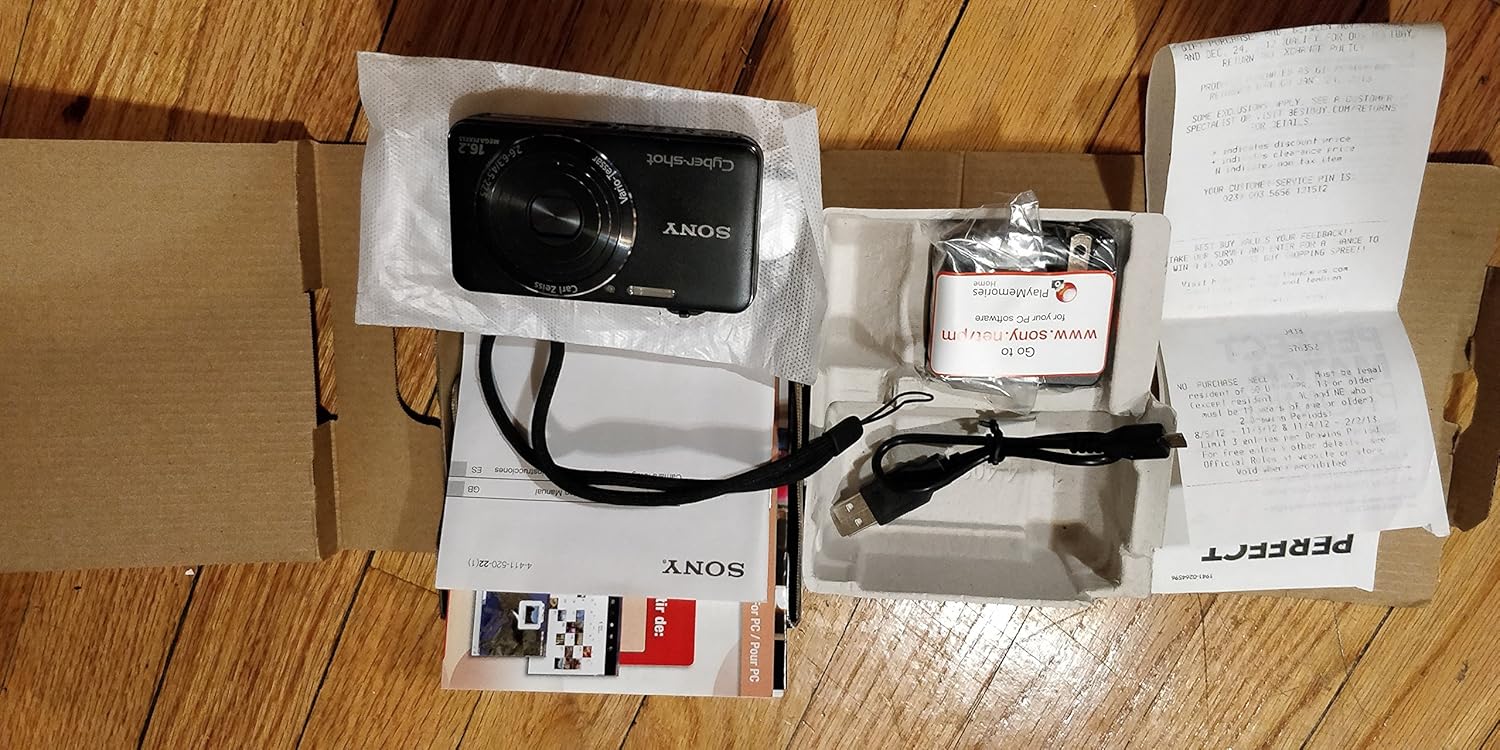
Imagem: Traseira view of the Sony Cyber-shot DSC-WX50, highlighting the 2.7-inch LCD screen and control buttons.
Função Zoom
Use the zoom lever around the shutter button to adjust the focal length. The camera features 5x optical zoom and Clear Image Zoom for enhanced magnification without significant quality loss.
Video Recording (Full HD 1080/60i)
To record movies, press the dedicated FILME button. Press it again to stop recording. The camera supports Full HD 1080/60i video in AVCHD format, allowing for high-quality video capture with Optical SteadyShot Active Mode for reduced blur.
Special Shooting Modes and Features
- Modo automático superior: Automatically detects 33 scenes and optimizes settings for dynamic pictures with reduced noise and improved clarity.
- Intelligent Sweep Panorama HR: Capture wide panoramic images by sweeping the camera. The camera stitches multiple frames automatically.
- 3D Still Image & 3D Sweep Panorama: Create 3D images for viewing on compatible 3D displays.
- Efeito de imagem: Apply creative filters to your photos, such as Toy Camera, Pop Color, Partial Color, and more.
- Desfoque de fundo: Blurs the background to emphasize your subject, similar to DSLR effects.
- Modo Pele Suave: Enhances portraits by reducing the appearance of blemishes and wrinkles.
- Face Detection & Smile Shutter: Automatically detects faces and can trigger the shutter when a smile is detected.
- Função anti-piscada: Helps prevent photos with subjects blinking by capturing multiple shots.
- Flash natural: Corrects colors for more lifelike images when using flash.
- Detecção de movimento: Ajusta o ISO e a velocidade do obturador para reduzir o desfoque em objetos em movimento.
- Modo de varredura multiângulo: Captura 15 imagens em ângulos diferentes para criar um efeito 3D. view on the camera's LCD when tilted.
Manutenção
Limpando a câmera
- Corpo da câmera: Limpe com um pano macio e seco. Para sujeira persistente, use um pano levemente umedecido.ampEnxágue com água ou detergente neutro e, em seguida, seque com um pano.
- Lente: Use um pincel para lentes para remover a poeira e, em seguida, limpe suavemente com um pano de limpeza de lentes. Evite tocar na superfície da lente com os dedos.
- Tela LCD: Limpe delicadamente com um pano macio e seco. Evite pressionar a tela com força.
Cuidados com a bateria
Para prolongar a vida útil da bateria, evite expô-la a temperaturas extremas. Guarde a bateria em local fresco e seco quando não estiver em uso. Se a câmera não for usada por um longo período, remova a bateria.
Memory Card Care
Always format new memory cards in the camera before first use. Avoid removing the memory card while the camera is writing data (indicated by a flashing access lamp) to prevent data corruption.
Solução de problemas
Se você encontrar problemas com sua câmera, consulte as seguintes soluções comuns:
| Problema | Solução |
|---|---|
| A câmera não liga. |
|
| "Writing to Memory card was incomplete" error. |
|
| As imagens estão desfocadas. |
|
| O flash não dispara. |
|
For further assistance, please contact Sony customer support.
Especificações
| Recurso | Detalhe |
|---|---|
| Resolução Estática Efetiva | 16.2 MP |
| Tecnologia de sensor fotográfico | BSI CMOS |
| Zoom óptico | 5x |
| Zoom Digital | 20x |
| Tamanho da tela | 2.7 polegadas |
| Tipo de exibição | LCD |
| Estabilização de Imagem | SteadyShot Óptico |
| Resolução de vídeo | Full HD 1080p (1080/60i AVCHD) |
| Suportado File Formatar | JPEG (Exif 2.3), 3D: MPF, Video: MPEG-4, AVCHD |
| Compatibilidade de cartão de memória | SD/SDHC/SDXC, Memory Stick Duo/Pro Duo/Pro-HG Duo |
| Conectividade | HDMI, USB |
| Distância focal mínima | 25 milímetros |
| Distância focal máxima | 125 milímetros |
| Abertura Máxima | f/6.3 |
| Velocidade mínima do obturador | 4 segundos |
| Velocidade máxima do obturador | 1/1600 segundos |
| Peso do item | 0.26 libras |
Garantia e Suporte
Para informações sobre garantia e suporte ao cliente, consulte a documentação incluída com o seu produto ou visite o site oficial de suporte da Sony. website. Guarde o comprovante de compra para solicitações de garantia.
Suporte oficial da Sony: www.sony.com/electronics/support