1. Introdução
The SIIG Analog to Digital Audio Converter (Model CE-CV0111-S1) is designed to convert analog left/right stereo audio input into simultaneous Coaxial and Toslink digital audio outputs. This device facilitates the integration of analog audio sources with modern digital audio systems, ensuring clear and reliable audio transmission.
Os principais recursos incluem:
- Converts analog L/R stereo audio to Coaxial and Toslink digital outputs simultaneously.
- Supports audio sampling rate at 48KHz.
- Provides uncompressed 2-channel LPCM digital audio output.
- Features a durable metal housing for enhanced RF shielding.
2. Conteúdo da embalagem
Por favor, verifique se todos os itens estão presentes em sua embalagem:
- SIIG Analog to Digital Audio Converter (CE-CV0111-S1)
- Adaptador de alimentação 5V DC
- Manual do usuário
3. Diagrama do Produto
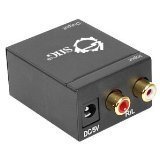
Figura 1: Frente view of the SIIG Analog to Digital Audio Converter. This image displays the DC 5V power input port on the left and the red (Right) and white (Left) RCA analog audio input ports on the right.
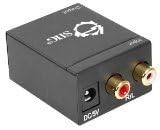
Figura 2: Traseira view of the SIIG Analog to Digital Audio Converter. This image shows the digital audio output ports: a Coaxial port and a Toslink (optical) port.
4. Configuração e instalação
Connecting the Audio Converter
- Connect Analog Audio Input: Using an RCA stereo audio cable (not included), connect the analog L/R audio output from your source device (e.g., TV, DVD player, game console) to the L/R RCA input ports on the SIIG Analog to Digital Audio Converter. Ensure the red connector goes to the 'R' (Right) input and the white connector goes to the 'L' (Left) input.
- Connect Digital Audio Output: Choose one or both digital output options:
- Saída coaxial: Connect a Coaxial audio cable (not included) from the Coaxial output port on the converter to the Coaxial digital audio input on your amplifier, receiver, or soundbar.
- Toslink (Optical) Output: Connect a Toslink optical audio cable (not included) from the Toslink output port on the converter to the optical digital audio input on your amplifier, receiver, or soundbar.
- Conecte a energia: Plug the included 5V DC power adapter into the 'DC 5V' input port on the converter. Then, plug the power adapter into a standard electrical outlet. The converter will power on automatically.
- Verifique as conexões: Certifique-se de que todos os cabos estejam firmemente conectados às suas respectivas portas.
5. Instruções de operação
Once all connections are made and the converter is powered on, the device operates automatically. It will continuously convert the incoming analog L/R stereo audio signal into both Coaxial and Toslink digital audio signals simultaneously.
- Ensure your source device is playing audio through its analog L/R outputs.
- Select the appropriate digital input (Coaxial or Toslink) on your receiving audio device (amplifier, receiver, etc.) to hear the converted audio.
- The converter supports uncompressed 2-channel LPCM audio at a 48KHz samptaxa de crescimento.
6. Solução De Problemas
| Problema | Possível causa | Solução |
|---|---|---|
| Sem saída de áudio | 1. Loose cable connections. 2. Incorrect input/output selection on receiving device. 3. Power adapter not connected or faulty. 4. Source device not outputting analog audio. | 1. Check all RCA, Coaxial, and Toslink cable connections. 2. Garanta seu amplifier/receiver is set to the correct digital input (Coaxial or Optical). 3. Verify the power adapter is securely connected and the power outlet is functional. 4. Confirm the source device's analog audio output is active and functioning. |
| Qualidade de áudio distorcida ou ruim | 1. Poor quality audio cables. 2. Interferência de outros dispositivos eletrônicos. 3. Volume levels too high on source or receiving device. | 1. Use high-quality shielded audio cables. 2. Ensure the converter is placed away from strong electromagnetic interference sources. 3. Adjust volume levels on both the source and receiving devices to prevent clipping or distortion. |
| Only one digital output works | Faulty Coaxial or Toslink cable/port. | Test with a different cable for the non-working output. If the issue persists, the port may be faulty. |
7. Especificações
- Modelo: CE-CV0111-S1
- Entrada: Analog L/R Stereo Audio (RCA)
- Saída: Coaxial Digital Audio, Toslink (Optical) Digital Audio
- Áudio SampTaxa de ling: 48 kHz
- Formato de áudio: Uncompressed 2-channel LPCM
- Dimensões (C x L x A): 1.57 x 1.97 x 1.38 polegadas (40 x 50 x 35 mm)
- Peso: 9.6 onças (272 gramas)
- Fonte de energia: 5V DC (included adapter)
- Habitação: Metal
- Fabricante: SIIG Inc.
- ASIN: B006ZB2LJ6
- Código UPC: 662774014524, 745449847037
8. Informações de segurança
- Não exponha este dispositivo à água ou umidade excessiva.
- Não tente abrir ou modificar o dispositivo. Não há peças que possam ser reparadas pelo usuário em seu interior.
- Use only the provided 5V DC power adapter. Using an incorrect power adapter may damage the device and void the warranty.
- Coloque o dispositivo em uma área bem ventilada para evitar superaquecimento.
- Mantenha fora do alcance de crianças.
9. Garantia e Suporte Técnico
SIIG Inc. products are designed for reliability and performance. For warranty information or technical assistance, please refer to the official SIIG website or contact their customer support directly. Please have your product model number (CE-CV0111-S1) and purchase details available when seeking support.
For the most current support information, visit the SIIG Store on Amazon or the official SIIG website.


