Introdução
This manual provides comprehensive instructions for the installation, operation, and maintenance of your Audiovox VE927 9-inch LCD Drop-Down TV with Built-in DVD Player and Clock Radio. Please read this manual thoroughly before using the product to ensure proper function and safety.
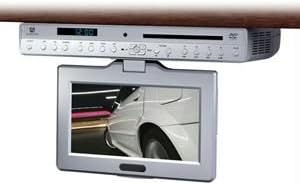
Figura 1: Audiovox VE927 unit with the 9-inch LCD screen in the extended, viewing position. The main unit is mounted under a cabinet, and the screen swivels down for use.
Conteúdo da embalagem
Verifique se todos os itens estão presentes na embalagem:
- Audiovox VE927 9-inch LCD Drop-Down TV/DVD Player Unit
- Mounting Stand/Bracket
- Controle remoto
- Adaptador de energia
- Manual do usuário (este documento)
Configuração e instalação
1. Montagem da Unidade
The VE927 is designed for under-cabinet mounting. Ensure the mounting surface is sturdy and capable of supporting the unit's weight (approximately 6 pounds). Use appropriate screws and tools for secure installation.
- Identify a suitable location under a cabinet, ensuring sufficient clearance for the screen to swivel down (270° swivel capability).
- Attach the mounting stand/bracket to the underside of the cabinet using appropriate fasteners.
- Securely attach the VE927 unit to the installed mounting stand/bracket. Refer to the detailed mounting diagram in the separate installation guide for precise instructions.
2. Conexão de energia
Connect the provided power adapter to the DC input port on the VE927 unit, then plug the adapter into a standard electrical outlet.
3. Ligação inicial
Press the Power button on the unit or the remote control to turn on the device. The initial setup wizard may appear for language selection and time setting.
Instruções de operação
1. Ajuste de tela
The 9-inch LCD screen can swivel up to 270 degrees. Gently adjust the screen to your desired viewing angle. Avoid excessive force.
2. Operação do Leitor de DVD
- Insert a DVD disc into the disc slot on the front of the unit. The unit will automatically detect the disc and begin playback.
- Use the remote control for playback functions such as Play, Pause, Stop, Fast Forward, Rewind, and Chapter Skip.
- Access the DVD menu for language, subtitle, and multi-angle selections.
3. TV Tuner Operation (ATSC/NTSC)
- Ensure an antenna is connected to the TV antenna input (if applicable).
- Press the "TV" button on the remote control to switch to TV mode.
- Perform a channel scan to find available digital (ATSC) and analog (NTSC) channels in your area. Refer to the on-screen menu for scanning options.
- Use the Channel Up/Down buttons to navigate between channels.
4. AM/FM Clock Radio
- Press the "Radio" button to switch to radio mode.
- Use the "Band" button to select between AM and FM frequencies.
- Tune to desired stations using the tuning buttons or by performing an auto-scan.
- Set the clock using the menu options.
5. Cooking Timer
The unit includes a cooking timer function. Access the timer settings through the main menu or a dedicated button on the remote control. Set the desired countdown time, and an alarm will sound upon completion.
6. Conectividade USB
The unit features USB connectivity. Insert a USB flash drive into the USB port to play compatible media files (e.g., photos, music, videos). Navigate fileusando o controle remoto.
Manutenção
Limpeza da unidade
- Sempre desconecte o adaptador de energia antes de limpar.
- Use um pano macio e seco para limpar a parte externa da unidade.
- Para a tela LCD, use um pano macio e sem fiapos, próprio para telas eletrônicas. Não use produtos de limpeza abrasivos ou solventes.
- Evite pulverizar líquidos diretamente sobre o aparelho.
Cuidados com o disco
- Manuseie os discos pelas bordas para evitar marcas de dedos.
- Keep discs clean and free from scratches. Use a soft cloth to wipe discs from the center outwards.
Solução de problemas
| Problema | Possível causa | Solução |
|---|---|---|
| Sem energia | Power adapter not connected; outlet not functioning. | Ensure power adapter is securely connected to the unit and a working electrical outlet. |
| Sem imagem/som do DVD | Disc is dirty or scratched; disc inserted incorrectly; incorrect input selected. | Clean the disc; reinsert the disc correctly; ensure DVD mode is selected. |
| Má recepção de TV | Antenna not connected or positioned incorrectly; weak signal. | Connect and adjust the antenna; perform a channel scan; consider a stronger antenna. |
| Controle remoto não funciona | As pilhas estão descarregadas ou inseridas incorretamente; existe alguma obstrução entre o controle remoto e a unidade. | Replace batteries; ensure correct polarity; remove obstructions; point remote directly at the unit. |
Especificações
- Modelo: VE927
- Tamanho da tela: 9 polegadas
- Tipo de exibição: LCD
- Proporção da tela: 16:9
- Swivel Screen: 270°
- Tipo de mídia: SD, DVD, USB
- Tecnologia de conectividade: USB
- Sintonizador: ATSC/NTSC Digital Tuner
- Rádio: Rádio Relógio AM / FM
- Características especiais: Cooking Timer, Stereo Speakers, Language/Sub-Title/Multi-Angle Selection
- Peso do item: 6 libras
- Fabricante: Áudiovox
- Primeiro disponível: 27 de abril de 2011
Garantia e Suporte
For warranty information, please refer to the warranty card included with your product or visit the official Audiovox website. For technical support or service inquiries, please contact Audiovox customer service directly. Keep your purchase receipt as proof of purchase.


