Introdução
This user manual provides comprehensive instructions for the installation, operation, and maintenance of your RCA RTS736W 30-Inch Streaming Soundbar. Please read this manual thoroughly before using the product to ensure proper functionality and to prevent damage.
The RCA RTS736W is designed to enhance your home audio experience with its 3.0 channel sound and integrated Wi-Fi for streaming online content.
Principais características
- Wi-Fi Built-In for streaming video content to a TV.
- 3.0 Channel Left/Center/Right audio configuration.
- HDMI 1080p Output for high-definition connectivity.
- Includes 1 Rear Analog Audio-in Jack and 1 Side Line-in Jack for various audio sources.
- Flexible placement options: includes table or wall mounting brackets.
Conteúdo da embalagem
Verifique se todos os itens estão presentes na embalagem:
- RCA RTS736W 30-Inch Streaming Soundbar
- Controle remoto
- Adaptador de energia
- Table or Wall Mounting Brackets
- Manual do usuário (este documento)
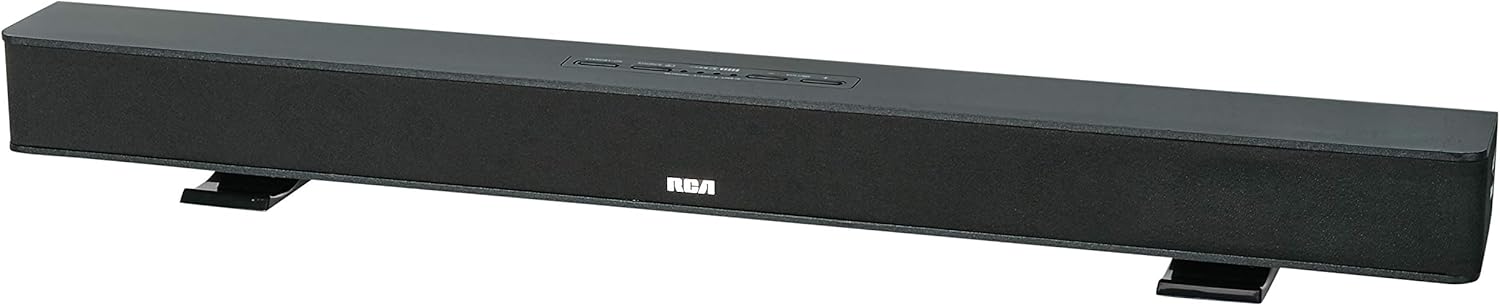
Image: The RCA RTS736W 30-Inch Streaming Soundbar, shown with its sleek black design and integrated controls.
Configurar
1. Opções de posicionamento
The soundbar offers flexible placement:
- Colocação na mesa: Place the soundbar on a flat, stable surface in front of your television. Ensure there is adequate ventilation around the unit.
- Montagem na parede: Use the included wall mounting brackets to secure the soundbar to a wall. Refer to the separate wall mounting template (if provided) for detailed instructions. Ensure the wall can support the weight of the soundbar.

Image: The RCA RTS736W soundbar positioned on a TV stand, demonstrating a typical home theater setup with various streaming service icons displayed on the television screen.
2. Conectando à energia
- Connect the power adapter to the DC IN 13.5V port on the back of the soundbar.
- Conecte a outra extremidade do adaptador de energia em uma tomada de parede.
3. Conexões de áudio
Choose one of the following methods to connect the soundbar to your audio source:
- Saída HDMI: Connect an HDMI cable from the HDMI OUT port on the soundbar to an HDMI input on your television. This connection supports 1080p video output from the soundbar's streaming functions.
- Analog Audio-in (AUX 1 / AUX 2): Use RCA audio cables to connect your TV or other audio devices to the AUX 1 or AUX 2 input jacks on the back of the soundbar. Match the red and white connectors.
- Side Line-in Jack: For portable devices like smartphones or tablets, connect a 3.5mm audio cable from your device's headphone jack to the Line-in jack located on the side of the soundbar.

Imagem: Um close-up view of the rear panel of the RCA RTS736W soundbar, highlighting the AUX 1, AUX 2, DC IN 13.5V, HDMI OUT, and VIDEO OUT ports for various connections.
4. Conexão de rede (Wi-Fi)
To utilize the streaming features, connect the soundbar to your home Wi-Fi network. This process is typically guided by on-screen prompts when the soundbar is first powered on and connected to a TV via HDMI.
- Ensure your TV is connected to the soundbar via HDMI and powered on.
- Follow the on-screen instructions to select your Wi-Fi network and enter the password.
Instruções de operação
1. Ligar/desligar
Pressione o Poder Botão na barra de som ou no controle remoto para ligar ou desligar o aparelho.
2. Seleção de entrada
Pressione o Entrada button on the remote control or the soundbar to cycle through available audio sources: HDMI, AUX 1, AUX 2, Line-in, and Wi-Fi streaming.
3. Controle de volume
Use o Es eseseses eseses eseseses e volume - buttons on the remote control or the soundbar to adjust the audio level.
Pressione o Mudo botão para silenciar temporariamente o áudio.
4. Conteúdo de streaming
Once connected to Wi-Fi and your TV via HDMI, you can access various streaming applications. Navigate using the directional buttons and OK botão no controle remoto.
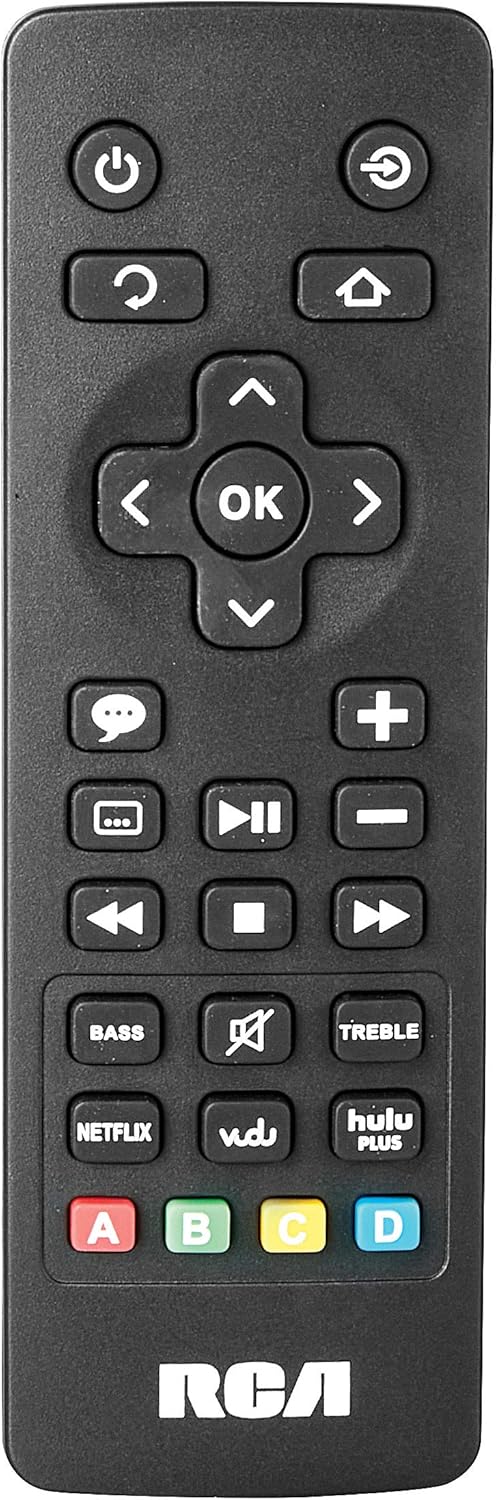
Image: The remote control for the RCA RTS736W soundbar, featuring dedicated buttons for power, volume, input selection, navigation, and direct access to streaming services like Netflix, Vudu, and Hulu Plus.
Dedicated buttons for services like Netflix, Vudu, and Hulu Plus may be available on the remote for direct access.
5. Ajustes de áudio
Use o BASS e AGUDOS buttons on the remote control to fine-tune the audio output to your preference.
Manutenção
- Limpeza: Disconnect the soundbar from the power outlet before cleaning. Use a soft, dry cloth to wipe the exterior surfaces. Do not use liquid cleaners or abrasive materials.
- Ventilação: Certifique-se de que as aberturas de ventilação da barra de som não estejam bloqueadas. Uma boa circulação de ar evita o superaquecimento.
- Armazenar: Se for guardar a barra de som por um longo período, desligue-a da tomada e guarde-a em local fresco e seco, longe da luz solar direta e de temperaturas extremas.
Solução de problemas
Sem energia
- Check if the power adapter is securely connected to the soundbar and a working wall outlet.
- Verifique se a tomada está funcionando testando-a com outro aparelho.
Sem som
- Verifique se a fonte de entrada correta está selecionada na barra de som.
- Check all audio cable connections between the soundbar and your audio source (TV, etc.).
- Ensure the volume on both the soundbar and the connected audio source is turned up and not muted.
- If using HDMI, confirm that your TV's audio output settings are configured to send audio to the soundbar.
Streaming Issues (Buffering, Freezing)
- Check your Wi-Fi network connection. Ensure the signal strength is adequate.
- Reinicie o roteador e o modem da sua casa.
- Restart the soundbar by unplugging it from the power outlet for a few minutes, then plugging it back in.
- Ensure your internet service is active and performing correctly.
Controle remoto não funciona
- Substitua as pilhas do controle remoto.
- Certifique-se de que não haja obstruções entre o controle remoto e o sensor da barra de som.
- Aponte o controle remoto diretamente para a barra de som.
Especificações
| Número do modelo | RTS736W |
| Tipo de alto-falante | Barra de som |
| Canais | 3.0 (Left/Center/Right) |
| Conectividade | HDMI, RCA, Wi-Fi |
| Tecnologia sem fio | Wi-fi |
| Saída HDMI | 1080p |
| Entradas de áudio | 2x Analog Audio-in (RCA), 1x Side Line-in (3.5mm) |
| Tamanho do alto-falante | 30 polegadas |
| Potência máxima de saída | 150 Watts |
| Impedância | 8 Ohms |
| Fonte de energia | Elétrico com fio |
| Dimensões do produto (C x L x A) | 33.5 x 6.5 x 5.5 polegadas |
| Peso do item | 5.55 libras |
| Fabricante | Alco Electronics Ltd. |
Informações de garantia
Specific warranty details for the RCA RTS736W Soundbar are typically provided with the product packaging or can be found on the official RCA website. Guarde o comprovante de compra para solicitações de garantia.
For warranty service, contact RCA customer support with your model number and purchase date.
Suporte ao cliente
For further assistance, technical support, or service inquiries, please refer to the contact information provided in your product's original documentation or visit the official RCA support website.
Recursos on-line: Visite a loja da RCA na Amazon.
Documentos relacionados - RTS736W
 |
Guia de Precauções de Segurança e Primeiros Passos para Smart TVs RCA Ultra HD Informações completas sobre precauções de segurança, instruções importantes, lista de acessórios e guia de primeiros passos para TVs RCA Ultra HD Smart, incluindo informações sobre o controle remoto e a bateria. |
 |
Manual de instruções da Smart TV 4K UHD de 58 polegadas RCA RNSMU5836 Manual de instruções completo para a Smart TV 4K UHD de 58 polegadas RCA RNSMU5836. Abrange configuração, conexões, recursos inteligentes, opções de menu e solução de problemas para uma experiência ideal do usuário. |
 |
Manual do usuário e guia de configuração da barra de som RCA SBT17015B Manual do usuário completo para a barra de som RCA SBT17015B, detalhando configuração, conexões, emparelhamento Bluetooth, ajustes de áudio, precauções de segurança e informações sobre a garantia. |
 |
RCA Universal Rechargeable 3-Device Streaming Remote Control Quick Start Guide Step-by-step instructions for setting up and programming your RCA Universal Rechargeable 3-Device Streaming Remote Control, including charging, device pairing, and code entry. |
 |
Projetor HD padrão RCA RPJ135 com Roku Streaming Stick - Manual do usuário Manual de instruções do projetor RCA RPJ135 Standard HD, incluindo informações sobre configuração, operação, solução de problemas e garantia do projetor e do dispositivo de streaming Roku integrado. |
 |
Manual do usuário da TV LCD LED HD de 32 polegadas RCA RS32H2-EU Manual do usuário completo para a TV LCD LED HD de 32 polegadas RCA RS32H2-EU, abrangendo instruções de segurança, configuração, operação, especificações e solução de problemas. |