Introdução
This manual provides detailed instructions for the installation, operation, maintenance, and troubleshooting of the Ranco ETC-211000-000 Electronic Temperature Control. Please read this manual thoroughly before installation and operation to ensure proper use and to prevent damage to the unit or injury.
The Ranco ETC-211000-000 is designed for precise electronic temperature control in various industrial and scientific applications. It features a robust design and user-friendly interface for reliable performance.
Informações de segurança
Observe sempre as seguintes precauções de segurança:
- AVISO: Disconnect all power before installing or servicing this control.
- Installation must be performed by a qualified technician in accordance with all local and national electrical codes.
- Do not operate the control with damaged wiring or if the casing está comprometido.
- Garanta um aterramento adequado para evitar choque elétrico.
- Este dispositivo está em conformidade com a Parte 15 das Regras da FCC. A operação está sujeita às duas condições a seguir: (1) Este dispositivo não pode causar interferência prejudicial e (2) Este dispositivo deve aceitar qualquer interferência recebida, incluindo interferência que possa causar operação indesejada.
- Este aparelho digital Classe A está em conformidade com o ICES-003 canadense. Este aparelho numérico da classe A está em conformidade com a norma NMB-003 do Canadá.
Produto acimaview
The Ranco ETC-211000-000 is an electronic temperature controller designed for accurate temperature management. It features a digital display and intuitive buttons for setting and monitoring temperature parameters.

Figura 1: Frente view of the Ranco ETC-211000-000 Electronic Temperature Control. The image shows the grey casing, a digital display, and three control buttons labeled "SET", "Up arrow", and "Down arrow". Handwritten labels "1st Stage" and "inlet water temp" are visible on the casing.
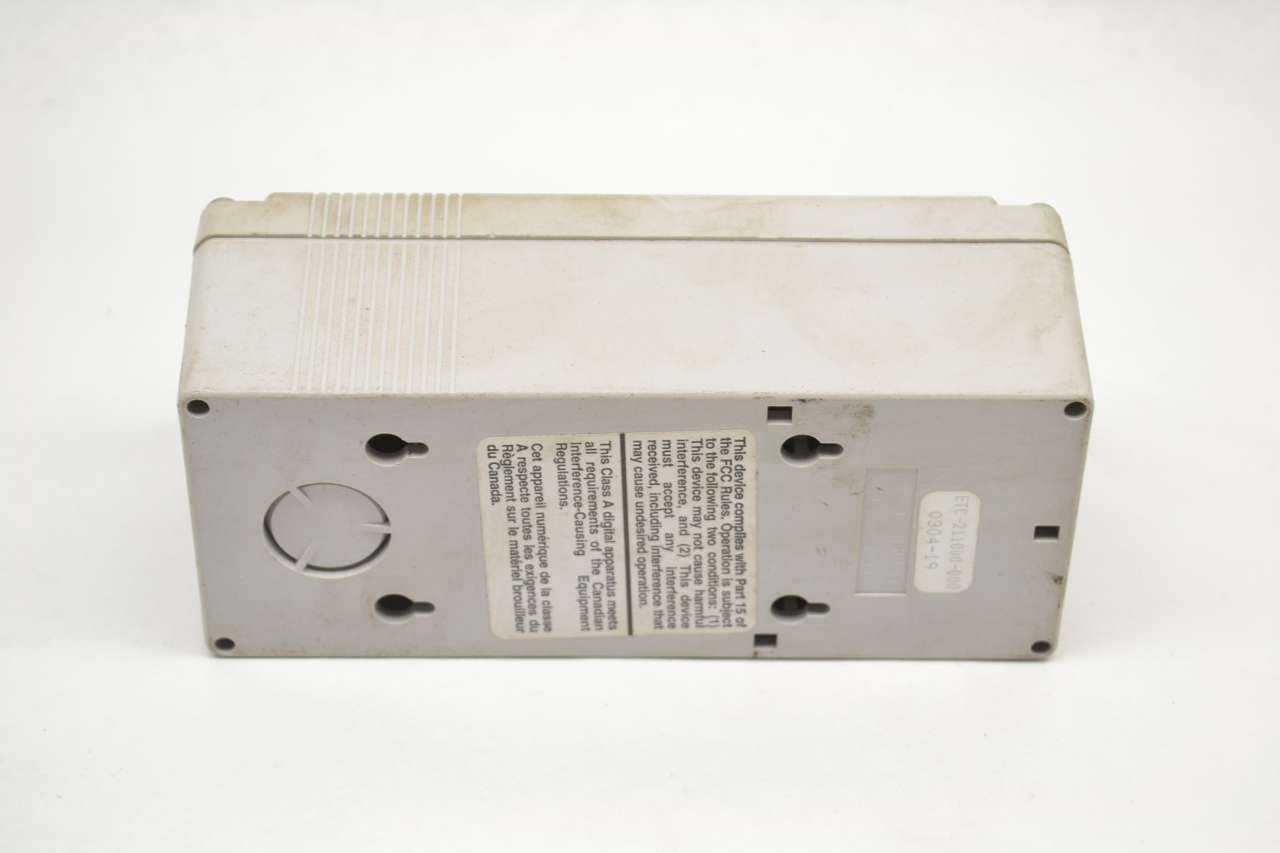
Figura 2: Voltar view of the Ranco ETC-211000-000 Electronic Temperature Control. This view highlights the mounting points and regulatory compliance text, including FCC and ICES-003 statements.

Figura 3: Close-up of the label on the back of the Ranco ETC-211000-000. The label clearly displays the model number "ETC-211000-000" and indicates "ASSEMBLED IN MEXICO".

Figura 4: Product packaging label for the Ranco ETC-211000-000. The label specifies "RANCO ETC-211000-000 ETC TWO STAGE ELECTRONIC -30-220F 120/240V-AC TEMPERATURE CONTROLLER" and includes a barcode with the number B492158.
Configuração e instalação
Proper installation is crucial for the optimal performance and longevity of your Ranco ETC-211000-000. Follow these steps carefully:
- Montagem: Select a suitable location for mounting the control, away from direct heat sources or excessive vibration. Use appropriate fasteners to secure the unit through the mounting holes on the back casing (refer to Figure 2).
- Fiação:
- Certifique-se de que toda a energia esteja desligada antes de fazer a fiação.
- Connect the power supply (120V/240V AC) to the designated terminals. Refer to the wiring diagram provided with your unit for specific terminal assignments.
- Connect the temperature sensor to the sensor input terminals. Ensure the sensor is placed in the area where temperature is to be controlled.
- Connect the load (e.g., heating or cooling device) to the output relay terminals.
- Verifique se todas as conexões estão seguras e devidamente isoladas.
- Inicialização inicial: Once all wiring is complete and verified, restore power to the unit. The display should illuminate, indicating the current temperature.
Instruções de operação
The Ranco ETC-211000-000 is designed for straightforward operation. Use the front panel buttons to adjust settings.
Setting the Temperature Setpoint:
- Pressione o DEFINIR button once. The display will show the current setpoint temperature.
- Use o Seta para cima (↑) ou Seta para baixo (↓) buttons to adjust the setpoint to your desired temperature.
- Pressione o DEFINIR button again to save the new setpoint and return to the normal operating display. If no button is pressed for several seconds, the unit will automatically save the setting and return to the normal display.
ViewTemperatura atual:
In normal operation, the display continuously shows the current temperature measured by the sensor.
Advanced Settings (if applicable):
For advanced settings such as differential, calibration, or alarm limits, refer to the detailed programming guide specific to your model's firmware version. Typically, these settings are accessed by pressing and holding the DEFINIR button for a few seconds until a menu appears.
Manutenção
The Ranco ETC-211000-000 is designed for low maintenance. However, regular checks can ensure continued reliable operation.
- Limpeza: Limpe periodicamente a parte externa do controle com um pano macio e seco.amp cloth. Do not use abrasive cleaners or solvents. Ensure no liquid enters the casing.
- Conexões: Inspecione anualmente todas as conexões elétricas para verificar se estão bem apertadas e se há sinais de corrosão. Reaperte-as, se necessário.
- Verificação do sensor: Verify the temperature sensor is clean and free from debris that might affect its accuracy. Ensure its placement is still optimal for the controlled environment.
- Condições ambientais: Ensure the operating environment remains within the specified temperature and humidity ranges to prevent damage to the internal components.
No user-serviceable parts inside. Refer all servicing to qualified personnel.
Solução de problemas
This section provides solutions to common issues you might encounter with your Ranco ETC-211000-000.
| Problema | Possível causa | Solução |
|---|---|---|
| Display está em branco | Sem alimentação elétrica; Fiação solta; Falha interna. | Check power source and circuit breaker. Verify all power connections are secure. If problem persists, contact support. |
| Leitura incorreta de temperatura | Sensor com defeito; Sensor mal conectado; Sensor posicionado incorretamente. | Check sensor wiring. Ensure sensor is clean and correctly positioned. Replace sensor if damaged. |
| Control not activating load | Setpoint not reached; Load wiring issue; Faulty relay. | Verify setpoint and current temperature. Check load wiring and ensure load device is functional. Contact support if relay is suspected faulty. |
| A unidade exibe o código de erro. | Erro interno específico. | Refer to the full product manual for a list of error codes and their meanings. Power cycle the unit. If error persists, contact technical support. |
Especificações
Key technical specifications for the Ranco ETC-211000-000 Electronic Temperature Control:
- Modelo: ETC-211000-000
- Tipo: Dois Stage Electronic Temperature Controller
- Faixa de temperatura: -30°F a 220°F
- Volumetage: 120 V/240 V CA
- Dimensões: Aproximadamente 9 x 5 x 5 polegadas (22.86 x 12.7 x 12.7 cm)
- Peso: 1.2 libras (0.54 kg)
- Fabricante: Ranco, Invensys, Robertshaw
- ASIN: B009KMLBP2
- Número de estoque nacional: 5930-01-477-8295
- Primeiro disponível: 20 de maio de 2010
Garantia e Suporte
For warranty information, please refer to the documentation included with your purchase or contact Ranco customer service directly. Warranty terms typically cover manufacturing defects for a specified period from the date of purchase.
For technical support, troubleshooting assistance beyond this manual, or to inquire about replacement parts, please contact Ranco customer support. Have your model number (ETC-211000-000) and purchase details ready when contacting support.
You may also find additional resources and FAQs on the official Ranco website.


