1. Introdução
This manual provides comprehensive instructions for the installation, operation, and maintenance of your Hertz HDP4 4-Channel 1000W Max D-Class Amplifier. Please read this manual thoroughly before attempting installation or operation to ensure proper function and safety.
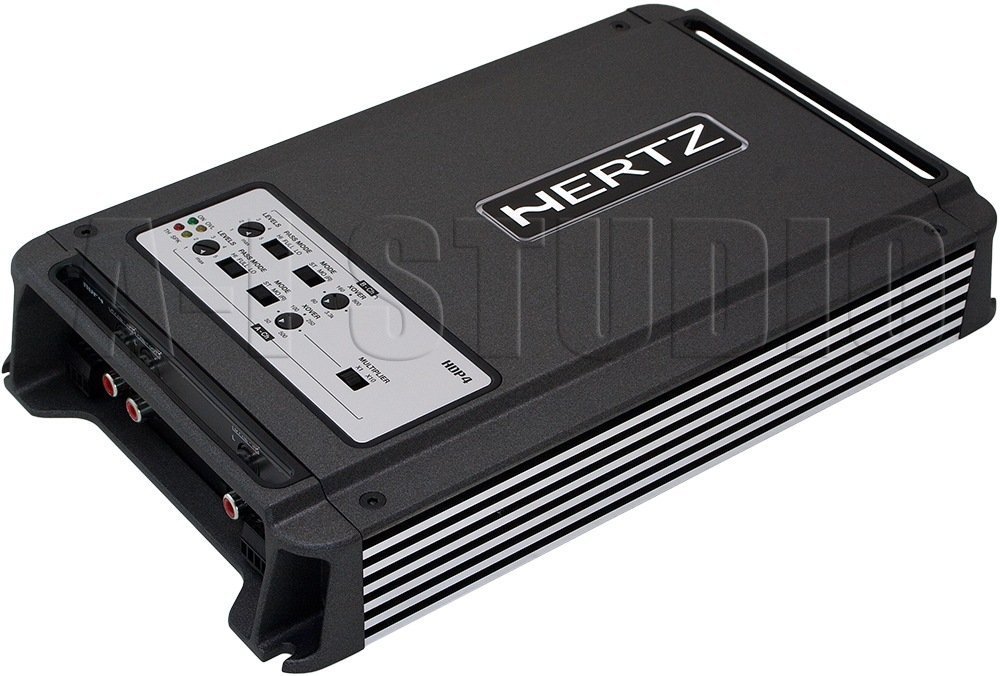
Figura 1.1: Vista de cima para baixo em ângulo view of the Hertz HDP4 ampamplificador, showcasing seu compacto preto casing and control panel on the top surface. The Hertz logo is visible on the main body.
2. Informações de segurança
Observe sempre as seguintes precauções de segurança:
- Disconnect the vehicle's battery before any installation or wiring.
- Certifique-se de que toda a fiação esteja devidamente isolada para evitar curtos-circuitos.
- Monte o amplifier securely in a well-ventilated area, away from moisture and direct heat.
- Utilize fios com a bitola adequada para as conexões de energia e aterramento, conforme especificado na seção de instalação.
- Consulte um instalador profissional se tiver dúvidas sobre qualquer parte do processo de instalação.
3. Conteúdo da embalagem
Verifique se todos os itens estão presentes na embalagem:
- Hertz HDP4 AmpUnidade de Lider
- Acessórios de montagem (parafusos, suportes)
- Manual do usuário (este documento)
4. Configuração e instalação
4.1 Montagem do Ampmais vivo
Choose a suitable location for mounting the amplifier. It should be a dry, well-ventilated area, protected from direct sunlight and excessive vibration. Ensure there is sufficient space around the amplifier para circulação de ar.

Figura 4.1: parte superior view of the Hertz HDP4 amplifier, illustrating its compact design and potential mounting points. The amplifier features a textured black finish with the Hertz logo prominently displayed.
- Coloque o amplifier in the desired mounting location and mark the screw holes.
- Drill pilot holes if necessary, ensuring not to damage any vehicle components.
- Proteja o amplifier using the provided mounting screws.
4.2 Conexões de Fiação
Proper wiring is critical for performance and safety. Refer to the diagram below for power, ground, remote, and speaker connections.

Figure 4.2: Rear panel of the Hertz HDP4 amplifier, detailing the power input (BATT), ground (GND), remote turn-on (REM) terminals, and speaker output terminals (L/R mono for channels A and B). Two 40A fuses are also visible.
- Potência (BATT): Connect a fused power cable (minimum 8 AWG recommended) directly from the vehicle's positive battery terminal to the BATT terminal on the ampmais vivo.
- Terra (GND): Connect a ground cable of the same gauge as the power cable from the GND terminal to a clean, unpainted metal point on the vehicle chassis.
- Remoto (REM): Connect a remote turn-on wire from your head unit's remote output to the REM terminal.
- Saídas de alto-falante: Connect your speakers to the appropriate L (left) and R (right) terminals for each channel (A and B). Ensure correct polarity. The amplifier supports mono bridging for increased power output to a single speaker or subwoofer.
- Fusíveis: O amplifier is equipped with two 40A fuses. Replace only with fuses of the same type and rating.
4.3 Input Connections and Controls
O amplifier offers both RCA (low-level) and High-Level inputs, along with various crossover and gain controls.

Figure 4.3: Input and control panel of the Hertz HDP4 amplifier. This panel includes RCA pre-inputs (A PRE-IN, B PRE-IN), high-level inputs (A HI-IN, B HI-IN), and various adjustment knobs for levels, pass mode, and crossover settings. A switch for HI-IN AUTO TURN-ON is also present.
- RCA Pre-Inputs (A PRE-IN, B PRE-IN): Connect your head unit's RCA outputs to these inputs for low-level signal.
- High-Level Inputs (A HI-IN, B HI-IN): If your head unit does not have RCA outputs, connect speaker-level signals directly to these inputs. The amplifier features an auto turn-on function for high-level inputs.
- Níveis: Adjust the input sensitivity (gain) to match the output of your head unit. Start with the gain at minimum and slowly increase until desired volume is achieved without distortion.
- Modo de Passe: Select the desired crossover mode (e.g., Full, HPF, LPF) for each channel pair.
- Crossover Frequency (XOVER): Adjust the frequency point for the selected crossover mode.
- Multiplicador: Use this switch to multiply the crossover frequency setting by 1 or 10, depending on your system requirements.
5. Instruções de operação
5.1 Inicialização
- After all connections are made and verified, reconnect the vehicle's battery.
- Ligue o aparelho de som. amplifier should power on automatically (if remote wire is connected or HI-IN AUTO TURN-ON is active).
- Start with the head unit volume low and gradually increase it, listening for clear audio.
5.2 Ajustando as configurações de áudio
Ajuste o amplifier's settings for optimal sound quality:
- Gain Matching: Ajuste o amplifier's gain controls (LEVELS) to match the output voltage of your head unit. This is crucial to prevent distortion.
- Configurações de cruzamento: Set the crossover frequencies (XOVER) and pass modes (PASS MODE) according to the specifications of your speakers. For full-range speakers, a high-pass filter (HPF) is often used to protect them from low bass frequencies. For subwoofers, a low-pass filter (LPF) is used.
6. Manutenção
To ensure the longevity and optimal performance of your Hertz HDP4 ampAmplificador, siga estas orientações de manutenção:
- Limpeza: Limpe periodicamente o ampLimpe a parte externa do amplificador com um pano macio e seco. Não utilize produtos químicos agressivos ou abrasivos.
- Ventilação: Assegurar que o ampAs aletas de resfriamento do amplificador estão livres de poeira e obstruções para manter a dissipação de calor adequada.
- Conexões: Regularly check all wiring connections for tightness and corrosion. Loose connections can lead to poor performance or damage.
- Fusíveis: If a fuse blows, replace it only with a fuse of the exact same type and rating (2 x 40A). Using an incorrect fuse can cause severe damage to the amplifier or vehicle electrical system.

Figure 6.1: Bottom panel of the Hertz HDP4 amplifier, displaying the serial number label and important caution notes regarding insulated screws. This area should be kept clean and free from obstructions.
7. Solução De Problemas
Se você tiver problemas com seu amplifier, consult the following table before contacting support:
| Problema | Possível causa | Solução |
|---|---|---|
| Sem energia / Amplifier não liga | Fusível queimado, fio de alimentação/terra/remoto solto, saída remota da unidade principal com defeito. | Check and replace fuses. Verify all power, ground, and remote connections are secure. Test remote wire for 12V signal. |
| Sem som | Loose RCA/speaker wires, incorrect input selection, amplifier in protection mode, faulty speakers. | Check all signal and speaker connections. Ensure correct input mode is selected. Check for protection light. Test speakers. |
| Som distorcido | Gain set too high, incorrect crossover settings, poor quality audio source, damaged speakers. | Reduce gain. Adjust crossover settings. Test with a different audio source. Inspect speakers for damage. |
| Amplifier Superaquece | Insufficient ventilation, impedance mismatch, prolonged high-power operation. | Garanta o fluxo de ar adequado ao redor do ampAmplificador. Verifique se a impedância dos alto-falantes corresponde. amplifier's capabilities. Reduce volume or operating time. |
8. Especificações
Technical specifications for the Hertz HDP4 4-Channel 1000W Max D-Class Ampmais vital:
- Modelo: HDP4
- Marca: HERTZ
- Tipo: 4-Channel D-Class Ampmais vivo
- Potência Máxima: 1000W (as per product title, specific RMS not provided in data)
- Dimensões do produto (C x L x A): 11.18 x 6.73 x 1.83 polegadas
- Peso: 6.35 libras
- Volumetage: 14.4 Volts (em operação)
- Tipo de montagem: Montagem em superfície
- Fusíveis: 2 x 40A
- ASIN: B00AWBU1FQ
9. Informações de garantia
Hertz products are designed and manufactured to the highest quality standards. For specific warranty terms and conditions, please refer to the warranty card included with your product or visit the official Hertz website. Guarde o recibo de compra como comprovante para solicitações de garantia.
10. Suporte
For technical assistance, troubleshooting beyond this manual, or warranty inquiries, please contact Hertz customer support through their official website or authorized dealer. Ensure you have your product model (HDP4) and serial number ready when contacting support.
Official Hertz Website: www.hertzaudiovideo.com


