Introdução
This manual provides essential information for the safe and efficient operation of your Sony KDL-55W900A 55-Inch 3D Internet LED HDTV. Please read these instructions thoroughly before using the television and retain them for future reference.
The Sony KDL-55W900A features a 55-inch display with 1080p resolution, 240Hz refresh rate, 3D capabilities, and integrated internet connectivity. It incorporates X-Reality PRO for enhanced detail and a TRILUMINOS display for brilliant colors.

Imagem: Frente view of the Sony KDL-55W900A 55-Inch 3D Internet LED HDTV, showcasinseu design elegante e tela sofisticada.
O que está na caixa
Verifique se todos os seguintes itens estão incluídos com a sua televisão:
- Television Unit (Sony KDL-55W900A)
- Controle remoto
- TV stand
- Cabo de alimentação
- Active 3D Glasses (quantity may vary, typically 4 pairs)
- AA Batteries (2 for remote control)
- Documentação (Guia de Configuração Rápida, Informações de Segurança)
Configurar
1. Fixando o suporte de TV
Place the TV screen face down on a soft, clean surface to prevent damage. Align the stand with the mounting holes on the bottom of the TV and secure it using the provided screws. Ensure the stand is firmly attached before proceeding.

Imagem: Diagram showing the dimensions of the Sony KDL-55W900A TV, including width, height, and depth.

Imagem: Lado view of the Sony KDL-55W900A TV, highlighting its slim profile.
2. Conectando Periféricos
Connect your external devices such as Blu-ray players, gaming consoles, or cable/satellite boxes to the appropriate input ports (HDMI, USB, etc.) on the rear of the TV.
- HDMI: Para áudio e vídeo em alta definição.
- USB: Para conectar dispositivos de armazenamento USB.
- Ethernet: Para uma conexão de internet com fio.
- RF: Para conexão de antena ou cabo.
3. Conexão de energia
Conecte o cabo de alimentação à entrada de energia da TV e, em seguida, a uma tomada de parede.
4. Assistente de configuração inicial
Upon first power-on, the TV will guide you through an initial setup process. This includes language selection, time zone, channel scanning, and network configuration.

Imagem: A person interacting with a tablet displaying a program guide, with the Sony TV visible in the background, demonstrating smart TV control.
Instruções de operação
1. Funções básicas da TV
- Poder: Pressione o botão liga/desliga no controle remoto ou na TV para ligá-lo/desligá-lo.
- Seleção de entrada: Use the "Input" or "Source" button on the remote to switch between connected devices (HDMI 1, HDMI 2, TV, etc.).
- Volume: Adjust using the Volume Up/Down buttons.
- Canal: Change channels using the Channel Up/Down buttons or number pad.
2. Smart TV Features and Internet Connectivity
Your TV can connect to the internet via Wi-Fi or Ethernet. Access various online services and applications through the Smart TV interface.
- Navigate the Smart TV menu using the remote's directional pad.
- Select apps like Netflix, Hulu, or Amazon Prime Video for streaming content.
- Use o built-in web browser for internet surfing.

Imagem: A family enjoying content on the Sony TV, with a smartphone mirroring its display to the TV, illustrating connectivity features.
3. Configurações de imagem e som
Access the "Picture" and "Sound" menus to customize your viewexperiência de ouvir e ouvir.
- Modos de imagem: Choose from Standard, Vivid, Cinema, Game, etc.
- Brilho, Contraste, Cor: Ajuste essas configurações de acordo com sua preferência.
- X Realidade PRO: This feature enhances detail and texture.
- Exibição TRILUMINOS: Provides a wider spectrum of colors.
- Motionflow XR 960: Melhora a nitidez do movimento em cenas de ação rápida.

Imagem: A split-screen comparison demonstrating the enhanced detail and clarity provided by X-Reality PRO technology on the Sony TV.
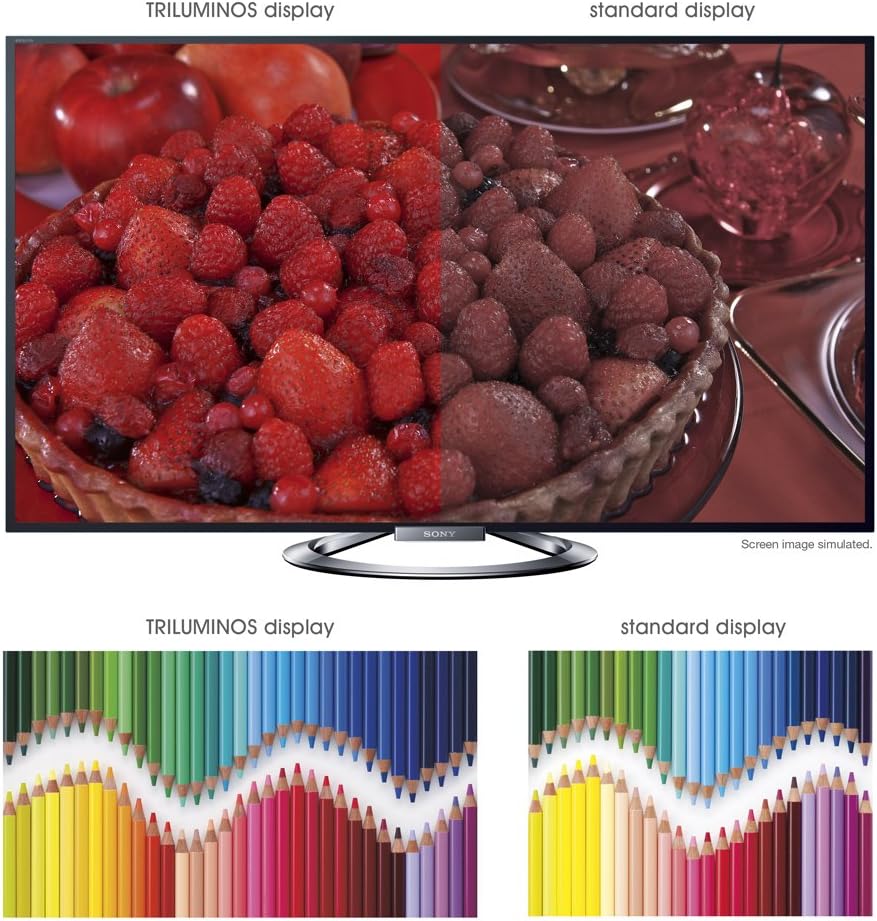
Imagem: A split-screen comparison illustrating the vibrant and expanded color palette of the TRILUMINOS display versus a standard display.
4D Viewing
To enjoy 3D content, ensure you have active 3D glasses and a 3D-compatible source (e.g., 3D Blu-ray player).
- Put on the active 3D glasses.
- Play 3D content from a connected source. The TV should automatically detect and switch to 3D mode.
- If 3D mode does not activate automatically, check the TV's picture settings for 3D options.
- Ensure 3D glasses are charged or have fresh batteries.
Manutenção
1. Limpando a TV
- Tela: Limpe suavemente a tela com um pano de microfibra macio e seco. Para manchas persistentes, esfregue levemente.ampLimpe o pano com água ou um produto de limpeza específico para telas (não borrife diretamente na tela).
- Gabinete: Limpe o móvel da TV com um pano macio e seco. Evite usar produtos de limpeza abrasivos, ceras ou solventes.
- Desligue sempre a TV da tomada antes de limpá-la.
2. Atualizações de software
Periodically check for software updates to ensure optimal performance and access to the latest features.
- Navigate to the "Settings" menu on your TV.
- Look for "System Software Update" or similar options.
- Follow the on-screen instructions to download and install updates. Ensure the TV remains powered on during the update process.
3. 3D Glasses Care
- Clean lenses with a soft, dry cloth.
- Store glasses in a protective case when not in use.
- Replace batteries as needed (typically AA batteries).
Solução de problemas
| Problema | Possível causa/solução |
|---|---|
| Sem energia |
|
| Sem imagem / Tela preta |
|
| Sem som |
|
| Problemas de conexão de rede |
|
| 3D Image is Blurry or Not Working |
|
If the problem persists after attempting these solutions, please refer to the support section for further assistance.
Especificações
| Recurso | Detalhe |
|---|---|
| Marca | Sony |
| Número do modelo | KDL-55W900A |
| Tamanho da tela | 55 polegadas |
| Tecnologia de exibição | LIDERADO |
| Resolução | 1080p |
| Taxa de atualização | 240 Hz (Motionflow XR 960) |
| Proporção da tela | 16:9 |
| Características especiais | Flat, 3D Capable, Internet TV, X-Reality PRO, TRILUMINOS Display, Dynamic Edge LED Backlight |
| Tecnologia de Conectividade | Ethernet, HDMI, RF, USB, Wi-Fi |
| Dimensões do produto (com suporte) | 48.9" L x 29.9" A x 11.8" P |
| Dimensões do produto (sem suporte) | 48.9" L x 28.5" A x 2.5" P |
| Peso do item | 48.5 libras |
| Pilhas necessárias | 2 pilhas AA (para o controle remoto) |
| Data da primeira disponibilidade | 7 de janeiro de 2013 |
Informações de garantia
Your Sony KDL-55W900A television is covered by a limited warranty. The specific terms and duration of the warranty may vary by region and purchase date. Please refer to the warranty card included with your product or visit the official Sony support website for detailed information regarding warranty coverage, terms, and conditions.
Guarde o comprovante de compra (recibo), pois ele será necessário para qualquer solicitação de garantia.
Suporte ao cliente
For further assistance, technical support, or service inquiries regarding your Sony KDL-55W900A, please contact Sony customer support.
- Suporte online: Visite o suporte oficial da Sony. website for FAQs, troubleshooting guides, software downloads, and contact options.
- Suporte por telefone: Refer to the contact information provided in your product documentation or on the Sony support website for regional telephone numbers.
When contacting support, please have your TV model number (KDL-55W900A) and serial number ready.