1. Introdução
This manual provides detailed instructions for the proper use and maintenance of your TFA 38.2028.02 Digital Timer and Stopwatch. This device is designed for precise timekeeping in various applications, featuring a reversible display, touch-sensitive buttons, and magnetic mounting options. Please read this manual thoroughly before operating the device.
2. Recursos do Produto
- Reversible Display: Permite fácil viewvindo de diferentes ângulos.
- Touch-Sensitive Buttons: For intuitive operation.
- Luz de fundo: Proporciona visibilidade nítida em condições de pouca luz.
- Montagem Magnética: Securely attaches to metallic surfaces.
- Wall or Tabletop Mounting: Opções versáteis de posicionamento.
- Intervalo do temporizador: Counts up to 99 minutes and 59 seconds.
- Design compacto: Dimensions of 76 x 25 x 76 mm.
3. Conteúdo da embalagem
- TFA 38.2028.02 Digital Timer and Stopwatch Unit
- Manual do usuário (este documento)
Note: 2 x 1.5V AAA batteries are required and not included in the package.
4. Configuração
4.1 Instalação da bateria
- Localize a tampa do compartimento da bateria na parte traseira da unidade.
- Deslize ou levante a tampa com cuidado para abrir o compartimento.
- Insira duas (2) pilhas AAA de 1.5 V, certificando-se da polaridade correta (+/-) conforme indicado dentro do compartimento.
- Recoloque a tampa do compartimento da bateria, certificando-se de que ela se encaixe firmemente no lugar.
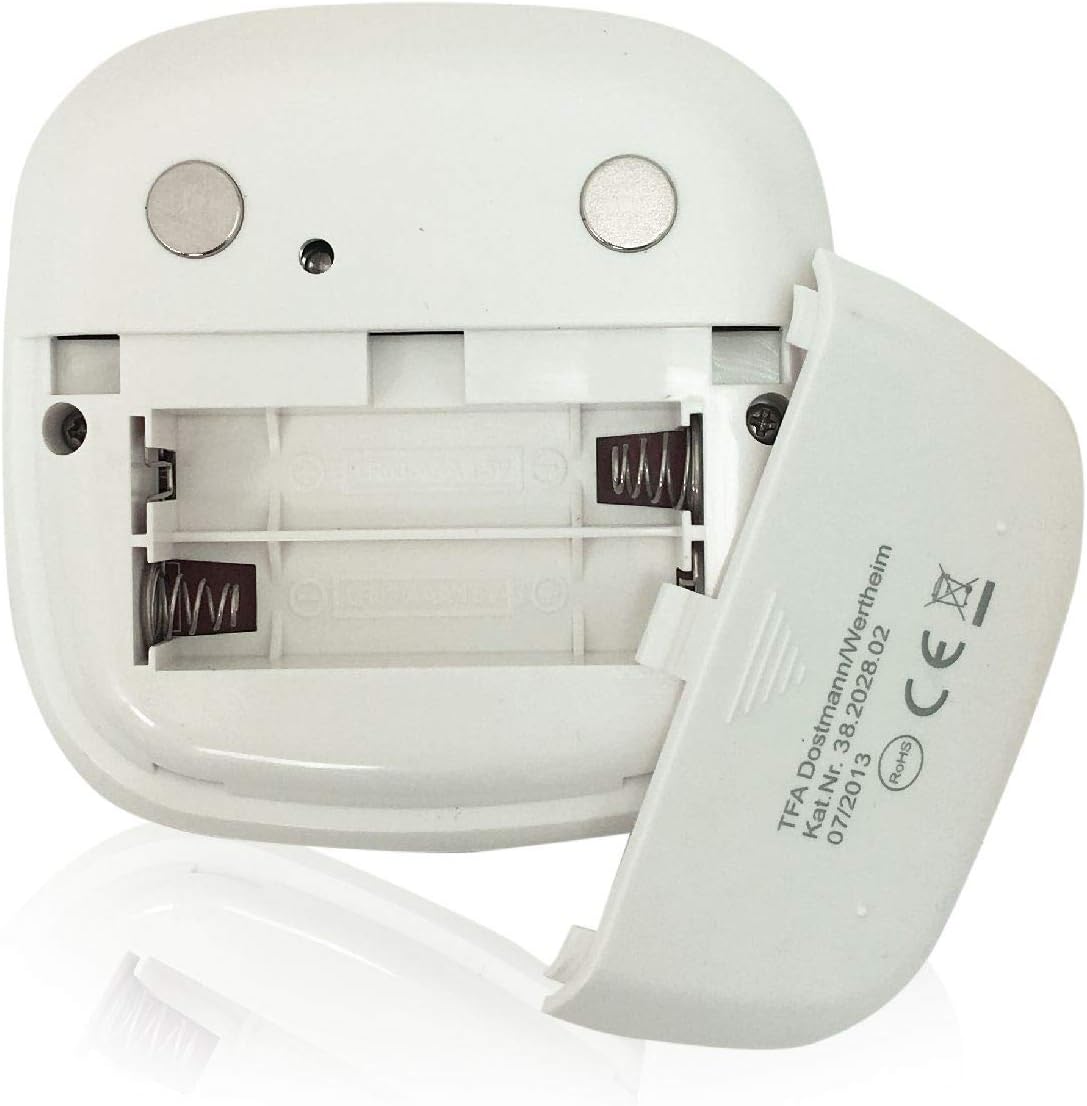
Imagem: Traseira view of the timer with the battery compartment open, illustrating where to insert the two AAA batteries.
4.2 Inicialização Inicial
Once batteries are installed, the display will illuminate, and the device will be ready for use. The default display shows "00:00".
5. Instruções de operação

Imagem: Frente view of the TFA 38.2028.02 timer, highlighting the digital display and the three touch-sensitive buttons: 'M' for minutes, 'S' for seconds, and 'S/S' for Start/Stop.
5.1 Funções dos botões
- M (Minutes): Press to increase minutes. Hold to rapidly increase minutes.
- S (Seconds): Press to increase seconds. Hold to rapidly increase seconds.
- S/S (Start/Stop): Press to start or stop the timer/stopwatch.
5.2 Setting the Timer (Countdown)
- Ensure the display shows "00:00". If not, press M e S simultaneamente para reiniciar.
- Pressione o M button to set the desired minutes (up to 99 minutes).
- Pressione o S button to set the desired seconds (up to 59 seconds).
- Após definir o tempo desejado, pressione o S/S botão para iniciar a contagem regressiva.
- Para pausar a contagem regressiva, pressione S/S novamente. Imprensa S/S para retomar.
- When the timer reaches "00:00", an alarm will sound. Press any button to stop the alarm.
5.3 Using the Stopwatch (Count-up)
- Ensure the display shows "00:00". If not, press M e S simultaneamente para reiniciar.
- Pressione o S/S button to start the count-up. The display will begin counting from "00:00".
- Para pausar o cronômetro, pressione S/S novamente. Imprensa S/S para retomar.
- To reset the stopwatch to "00:00", pause the stopwatch, then press M e S simultaneamente.
5.4 Função de retroiluminação
The display features a backlight for improved visibility. The backlight activates automatically when buttons are pressed and typically remains on for approximately 30-40 seconds before dimming to conserve battery life.
6. Opções de montagem
The TFA 38.2028.02 timer offers flexible mounting solutions:
- Fixação magnética: The back of the timer is equipped with magnets, allowing it to be securely attached to refrigerators, oven hoods, or any other metallic surface.
- Colocação na mesa: The timer's design allows it to stand upright on a flat surface, such as a kitchen counter or desk.
- Montagem na parede: The unit can also be mounted on a wall using a small hook or screw (not included) through the designated hole on the back.

Imagem: Traseira view of the timer, showing the integrated magnets for secure attachment to metallic surfaces and the model number.
7. Manutenção
7.1 Limpeza
To clean the timer, wipe it with a soft, damp cloth. Do not use abrasive cleaners or immerse the device in water. Avoid getting moisture into the battery compartment or display area.
7.2 Substituição da bateria
When the display becomes dim or the device stops responding, it is time to replace the batteries. Follow the battery installation steps in Section 4.1. Always use fresh 1.5V AAA batteries and dispose of old batteries responsibly.
8. Solução De Problemas
| Problema | Possível causa | Solução |
|---|---|---|
| O dispositivo não liga. | As pilhas estão descarregadas ou instaladas incorretamente. | Verifique a polaridade das pilhas ou substitua-as por pilhas AAA novas. |
| A tela está escura ou piscando. | Bateria fraca. | Substitua as pilhas. |
| Os botões não respondem. | Bateria fraca ou falha temporária de software. | Replace batteries. If problem persists, remove batteries for 1 minute and reinsert. |
| Timer alarm is too quiet. | Alarm volume is fixed and cannot be adjusted. | Ensure the timer is placed in a location where the alarm can be heard. |
9. Especificações
| Recurso | Detalhe |
|---|---|
| Número do modelo | 38.2028.02 |
| Marca | TFA |
| Dimensões (C x L x A) | 76 x 25 x 76 mm (approximately 2.5P x 7.6l x 7.6H cm) |
| Peso | 92 gramas |
| Material | Plastic with integrated magnets |
| Fonte de energia | 2 pilhas AAA de 1.5V (não inclusas) |
| Intervalo do temporizador | Up to 99 minutes, 59 seconds |
| Mostrar | Digital with backlight |
| Opções de montagem | Magnetic, Tabletop, Wall-mountable |

Image: The timer held in a hand, visually demonstrating its compact size and indicating its dimensions (7.6 cm x 7.6 cm x 2.5 cm).
10. Garantia e Suporte
TFA products are manufactured with quality and precision. For specific warranty information, please refer to the documentation provided with your purchase or visit the official TFA website. For technical support or inquiries, please contact TFA customer service through their official channels.
Guarde este manual para referência futura.


