1. Introdução
This manual provides instructions for the APEX LD200RM remote control, designed for use with various APEX LCD and LED television models. This remote control offers full functionality for your compatible APEX television, ensuring convenient operation of all features.
Compatible APEX TV Models:
- LD3249
- LD3288, LD3288T, LD3288M
- LD4077, LE4077M
- LD4088
- LD4688
- LE3212, LE3212D
- LE4012
- LE4612
- LE3242
- LE3942
- LE40B12
- LE4243
- LE4643
- LE5043
2. Configuração
2.1 Instalação da bateria
The APEX LD200RM remote control requires two (2) AA batteries for operation. Follow these steps to install the batteries:
- Localize a tampa do compartimento da bateria na parte traseira do controle remoto.
- Pressione a aba e deslize a tampa para removê-la.
- Insira duas pilhas AA, certificando-se de que os terminais positivo (+) e negativo (-) estejam alinhados corretamente com as marcações dentro do compartimento.
- Deslize a tampa do compartimento da bateria de volta para o lugar até ouvir um clique que a encaixe firmemente.
Observação: Substitua sempre as duas pilhas ao mesmo tempo. Não misture pilhas novas com usadas, nem pilhas de tipos diferentes.
2.2 Uso inicial
The APEX LD200RM remote control is an original replacement and typically does not require any programming or pairing. Once batteries are installed, point the remote control towards your compatible APEX television and begin operation.
3. Instruções de operação
This section details the functions of the buttons on your APEX LD200RM remote control.
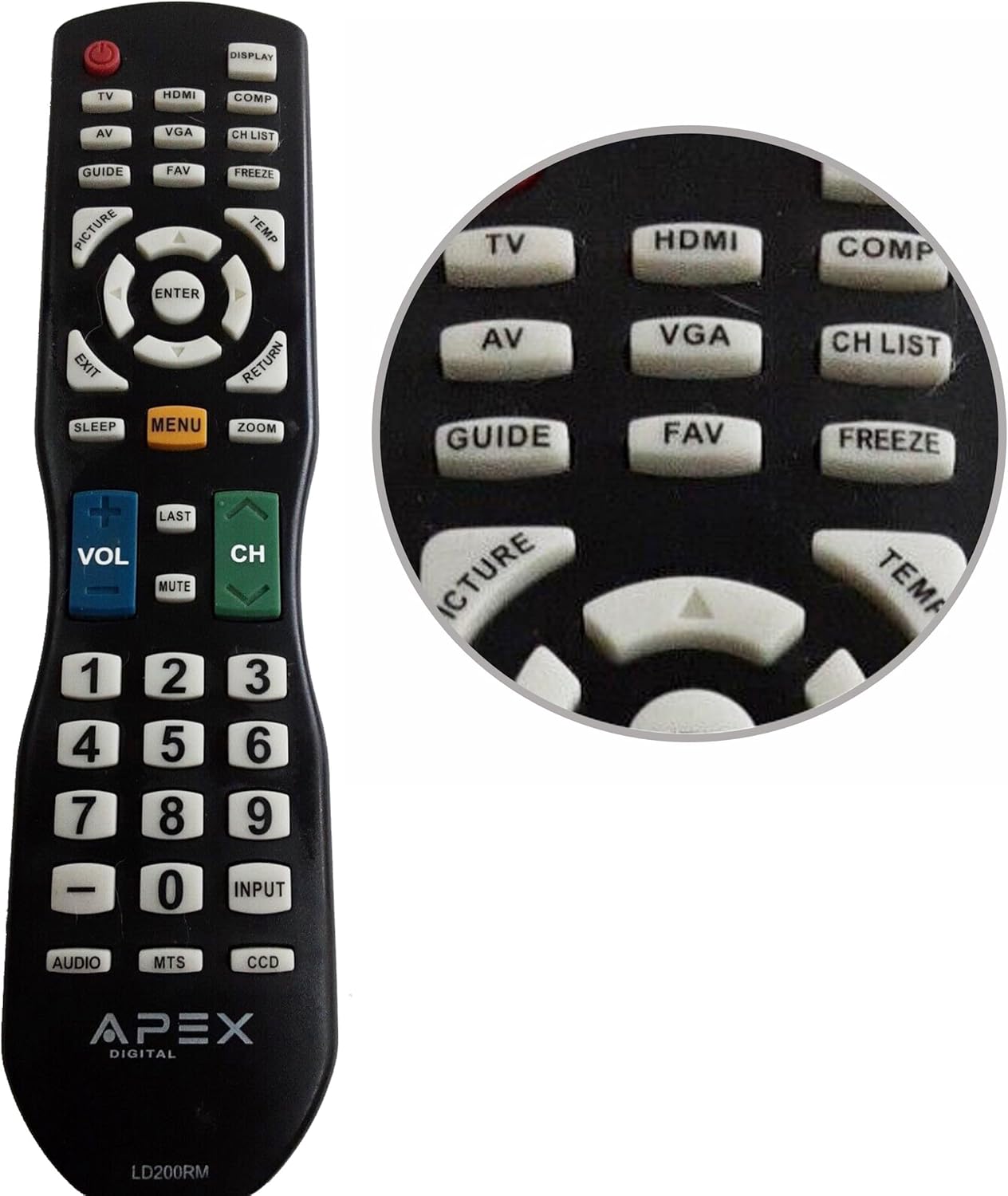
Figure 1: APEX LD200RM Remote Control Layout. This image displays the entire remote control, highlighting the arrangement of its various function buttons, including power, input selection, navigation, volume, channel, and numeric keypad.

Figure 2: Close-up of APEX LD200RM Remote Control Top Buttons. This image provides a detailed view of the upper section of the remote, focusing on buttons such as TV, HDMI, AV, VGA, COMP, CH LIST, DISPLAY, GUIDE, FAV, FREEZE, PICTURE, TEMP, MENU, ENTER, EXIT, RETURN, SLEEP, and ZOOM.
3.1 Power and Input Selection
- POTÊNCIA (Botão Vermelho): Liga ou desliga a televisão.
- TV: Selects the TV tuner input.
- HDMI: Selects the HDMI input.
- AV: Selects the Audio/Video input.
- VGA: Selects the VGA input.
- COMP: Selects the Component video input.
- EXIBIÇÃO: Exibe informações na tela.
3.2 Channel and Volume Control
- VOLUME (+/-): Aumenta ou diminui o nível do volume.
- CH (para cima/para baixo): Muda o canal de televisão para cima ou para baixo.
- ÚLTIMO: Retorna ao anterior viewcanal ed.
- MUDO: Ativa ou desativa o áudio da televisão.
- LISTA CH: Exibe a lista de canais.
3.3 Menu e Navegação
- CARDÁPIO: Abre o menu principal da televisão.
- ENTRAR: Confirms a selection within the menu.
- Botões de seta (para cima/para baixo/para a esquerda/para a direita): Navega pelas opções do menu e ajusta as configurações.
- EXIT: Sai do menu atual ou da exibição na tela.
- RETORNAR: Retorna ao menu ou tela anterior.
3.4 Numeric Keypad and Special Functions
- 0-9 (Numeric Buttons): Insere diretamente os números dos canais.
- ENTRADA: Percorre os ciclos das fontes de entrada disponíveis.
- GUIA: Displays the electronic program guide (if available).
- Favoritos: Acessa canais favoritos.
- CONGELAR: Freezes the current image on the screen.
- FOTO: Ajusta as configurações de imagem.
- TEMP: (Function may vary by model, often related to picture temperature or a specific mode).
- DORMIR: Define o temporizador de suspensão.
- ZOOM: Ajusta o nível de zoom da tela.
- ÁUDIO: Selects audio modes or tracks.
- MTS: Multi-channel Television Sound (stereo/SAP).
- CCD: Closed Captioning Display.
4. Manutenção
4.1 Substituição da bateria
When the remote control's performance degrades or it stops responding, it is likely time to replace the batteries. Refer to Section 2.1 for detailed battery installation instructions. Always use fresh AA batteries.
4.2 Limpeza
Para limpar o controle remoto, use um pano macio e seco. Para sujeira mais difícil de remover, umedeça levemente o controle.ampLimpe o pano com água ou um detergente suave e não abrasivo. Evite usar produtos químicos agressivos ou materiais abrasivos, pois podem danificar a superfície ou os componentes internos do controle remoto.
4.3 Armazenamento
Guarde o controle remoto em local fresco e seco, longe da luz solar direta e de temperaturas extremas. Se o controle remoto não for usado por um longo período, é recomendável remover as pilhas para evitar vazamentos e possíveis danos.
5. Solução De Problemas
- O controle remoto não está respondendo:
- Ensure the batteries are correctly installed with the correct polarity (+/-).
- Substitua as pilhas antigas por pilhas AA novas.
- Check for any obstructions between the remote control and the television's infrared sensor.
- Ensure you are within the effective range of the television's IR receiver.
- Some buttons are not working:
- Isso pode indicar bateria fraca. Troque as baterias.
- Certifique-se de que o controle remoto esteja limpo e que não haja detritos presos sob os botões.
- Verify that the button function is applicable to your specific TV model. Some functions may not be supported by all compatible TVs.
- Television is not turning on/off:
- Confirme se a televisão está ligada a uma tomada elétrica em funcionamento.
- Try using the power button directly on the television to rule out a TV issue.
6. Especificações
| Recurso | Detalhe |
|---|---|
| Número do modelo | LD200RM |
| Marca | Ápice |
| Dispositivos compatíveis | APEX LCD & LED Televisions |
| Fonte de energia | 2 pilhas AA (não incluídas) |
| Dimensões do produto | 10 x 6 x 2 polegadas (aproximadamente) |
| Peso do item | 3.2 onças (aproximadamente) |
| Cor | Preto |
| Recurso especial | Design ergonômico |
7. Informações de garantia
This APEX LD200RM remote control typically comes with a 30-day warranty from the date of purchase. This warranty covers manufacturing defects. For specific details regarding warranty claims, returns, or replacements, please refer to your purchase documentation or contact the seller directly.
8. Suporte
If you encounter issues not covered in this manual or require further assistance, please contact the retailer or the manufacturer's customer support. When contacting support, please have your product model number (LD200RM) and your television model number readily available.


