Introdução
This manual provides instructions for the Vivanco RR 220 remote control, designed for compatibility with Samsung Smart TVs. Please read this manual thoroughly before using the device to ensure proper operation and to understand its features.
Conteúdo da embalagem
- Vivanco RR 220 Remote Control
- Este Manual do Usuário
Observação: as pilhas não estão incluídas e devem ser adquiridas separadamente.
Configurar
1. Instalação da bateria
- Localize o compartimento da bateria na parte traseira do controle remoto.
- Deslize a tampa da bateria para baixo ou pressione a trava e levante para abrir.
- Insert two (2) AAA batteries, ensuring the positive (+) and negative (-) terminals align with the markings inside the compartment.
- Recoloque a tampa da bateria, certificando-se de que ela se encaixe firmemente no lugar.
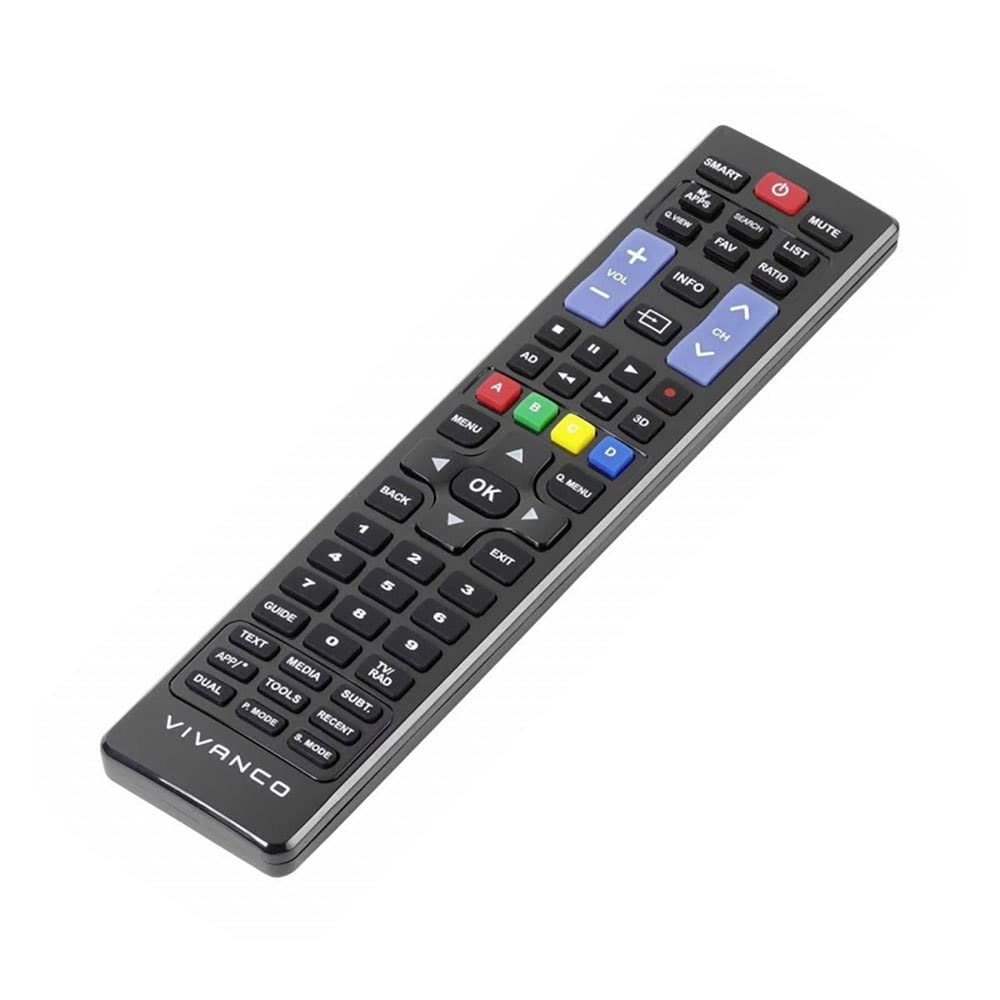
Imagem 1: Vivanco RR 220 remote control. This image displays the front of the remote control, highlighting its 57 buttons and ergonomic design. The battery compartment is located on the reverse side.
2. Uso inicial
The Vivanco RR 220 is pre-programmed for Samsung Smart TVs. No additional setup or pairing is typically required. Once batteries are installed, point the remote control towards your Samsung Smart TV and press the Power button to test functionality.
Instruções de operação
The remote control features 57 buttons, providing comprehensive control over your Samsung Smart TV and compatible devices. Below are common button functions:
- Botão de energia: Liga ou desliga a TV.
- Botões numéricos (0-9): For direct channel selection or data input.
- Aumentar/diminuir volume: Ajusta o volume do áudio.
- Canal para cima/para baixo: Muda de canal na TV.
- Botão Mudo: Silencia o áudio da TV.
- Teclado de navegação (cima, baixo, esquerda, direita, Enter): Utilizado para navegar pelos menus e selecionar opções.
- Botão Voltar/Retornar: Volta para a tela ou menu anterior.
- Smart Hub/Home Button: Accesses the Smart Hub or main menu of your Samsung Smart TV.
- Botão de fonte/entrada: Seleciona as fontes de entrada (HDMI, AV, etc.).
- Botões coloridos (vermelho, verde, amarelo, azul): For specific functions within certain applications or menus, as indicated on-screen.
- Playback Controls (Play, Pause, Stop, Fast Forward, Rewind): Controls media playback on compatible devices or apps.
For specific functions related to your TV model, refer to your Samsung TV's user manual.
Manutenção
Limpando o controle remoto
- Use um pano macio e seco para limpar a superfície do controle remoto.
- Para sujeira persistente, levementeamplimpe o pano com água ou um produto de limpeza suave e não abrasivo.
- Não utilize produtos químicos agressivos, solventes ou esponjas de limpeza abrasivas, pois estes podem danificar o acabamento ou os componentes internos do controle remoto.
- Ensure no liquid enters the remote control through button gaps or the battery compartment.
Substituição da bateria
Replace batteries when the remote's response becomes sluggish or it stops functioning. Always replace both batteries simultaneously with new AAA alkaline batteries. Do not mix old and new batteries or different types of batteries.
Solução de problemas
| Problema | Possível causa | Solução |
|---|---|---|
| O controle remoto não funciona. |
|
|
| Some buttons do not function. |
|
|
Especificações
- Marca: Vivanco
- Nome do modelo: RR 220
- Número do modelo do produto: 38016
- Dispositivos compatíveis: Home cinema, DVD/Blu-ray player, Television (Samsung Smart TV compatible)
- Tecnologia de conectividade: Wireless IR (Infrared)
- Número de botões: 57
- Tipo de Bateria: 2 pilhas AAA (alcalinas recomendadas)
- Pilhas incluídas: Não
- Dimensões do produto: 18 x 4.8 x 2.3 cm
- Peso do produto: 80 g
- Alcance máximo: 15 metros
- Características especiais: IPTV, DVB-T, HDTV compatibility


