1. Introdução
This manual provides comprehensive instructions for the proper use and maintenance of your Horizon SF-400D Digital Precision Scale. Please read this manual thoroughly before operating the device to ensure accurate measurements and prolong its lifespan.
The Horizon SF-400D is a versatile digital precision scale designed for various weighing applications, including jewelry, coins, herbs, spices, and medication. It offers high accuracy and multiple weighing modes, along with a convenient counting function.

Figura 1: Horizon SF-400D Digital Precision Scale. This image shows the overall design of the scale, featuring a black body, a stainless steel weighing platform, and a blue backlit LCD display with control buttons.
2. Precauções de segurança
- Não sobrecarregue a balança além de sua capacidade máxima de 500g.
- Evite expor a balança a temperaturas extremas, umidade ou luz solar direta.
- Mantenha a balança longe de campos eletromagnéticos fortes.
- Limpe a balança com um pano macio, damp pano. Não utilize produtos de limpeza abrasivos nem mergulhe a unidade em água.
- Ensure the scale is placed on a stable, level surface during operation to ensure accuracy.
3. Componentes do produto
Familiarize yourself with the main parts of your SF-400D scale:
- Plataforma de pesagem: Superfície em aço inoxidável para colocar objetos.
- Tela LCD: Backlit screen showing weight, units, and other indicators.
- Botão ON/OFF: Liga ou desliga a balança.
- Botão MODE: Changes weighing units (g, oz, ct, dwt, gn, T).
- Botão TARA: Zera o visor, o que é útil para pesar itens em um recipiente.
- PCS Button: Ativa a função de contagem de peças.
- Botão CAL: Used for calibration.
- Pernas ajustáveis: Located on the bottom for leveling the scale.
- Nível de bolha: Integrated on the scale to assist with leveling.
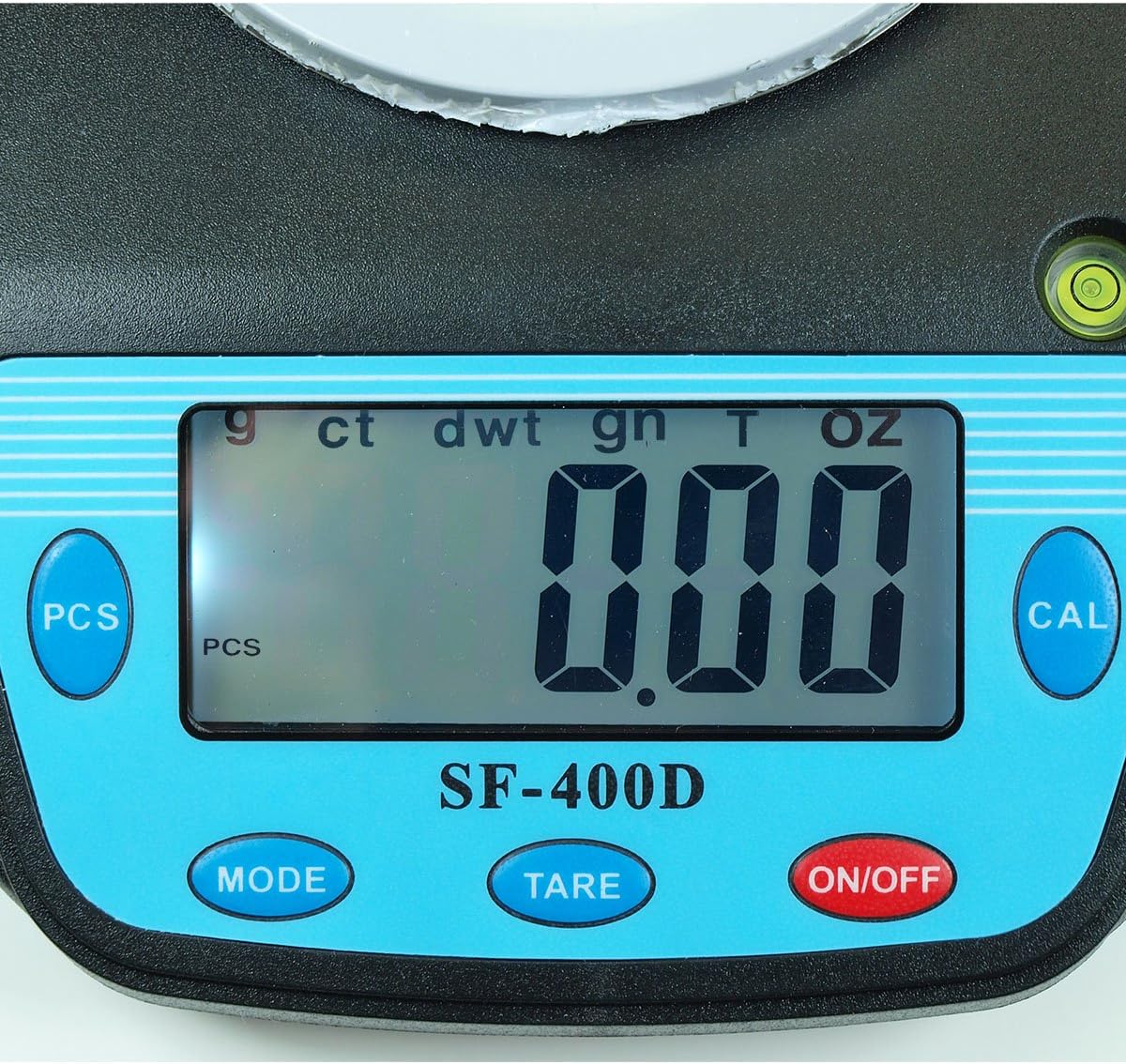
Figura 2: Close-up of the SF-400D display and control buttons. This image highlights the LCD screen, showing various unit indicators (g, ct, dwt, gn, T, oz), and the function buttons: PCS, MODE, TARE, ON/OFF, and CAL.

Figura 3: Underside of the SF-400D scale showing adjustable legs. Green arrows indicate the location of the four adjustable feet, which are used to level the scale for accurate measurements.
4. Configuração
4.1. Fonte de alimentação
The SF-400D scale operates on two AA batteries (included) or an optional AC power adapter (not included).
- Abra a tampa do compartimento da bateria na parte inferior da balança.
- Insira duas pilhas AA, certificando-se da polaridade correta (+/-).
- Feche o compartimento da bateria.
- Alternatively, connect a compatible AC power adapter (6V, amperage not specified in product details, consult manufacturer if needed) to the power port.
4.2. Posicionamento e Nivelamento
For optimal accuracy, the scale must be placed on a stable, flat, and level surface.
- Place the scale on your desired weighing surface.
- Observe the integrated bubble level.
- Adjust the four adjustable legs on the bottom of the scale by rotating them until the bubble is centered within the level indicator.
5. Instruções de operação
5.1. Pesagem Básica
- Pressione o LIGADO/DESLIGADO button to turn on the scale. The display will show "88888" and then "0.00" (or "0.0" depending on the unit).
- If the display does not show zero, press the TARA botão para zerar a escala.
- Pressione o MODO button to select your desired weighing unit (g, oz, ct, dwt, gn, T).
- Gently place the item(s) to be weighed on the center of the stainless steel platform.
- Leia o peso estável exibido na tela LCD.
- Para desligar a balança, pressione e segure o botão. LIGADO/DESLIGADO button for a few seconds. The scale also features an auto shut-off function to conserve battery power.
5.2. Função Tara
The Tare function allows you to subtract the weight of a container, so only the contents are weighed.
- Coloque um recipiente vazio na plataforma de pesagem.
- Aguarde até que o visor estabilize e mostre o peso do recipiente.
- Pressione o TARA botão. O visor será reiniciado para "0.00" (ou "0.0").
- Adicione os itens que deseja pesar no recipiente. O visor mostrará apenas o peso líquido dos itens.
- Para zerar a tara, remova todos os itens da plataforma e pressione TARA Novamente, se o visor não retornar a zero automaticamente.
5.3. Função de Contagem de Peças (PCS)
This function is useful for counting multiple identical items.
- Turn on the scale and ensure it is zeroed.
- Pressione o PCs button. The display will show "PCS" and a sample size (e.g., "25", "50", "75", "100").
- Pressione o MODO button to cycle through the available sample sizes (25, 50, 75, 100 pieces). Select the sample size that matches the number of items you will place on the scale for sampling.
- Place the exact number of sample items (e.g., 25 pieces) onto the weighing platform according to your selected samptamanho do arquivo.
- Pressione o PCs botão novamente para confirmar o sample. The display will now show the number of pieces.
- Agora você pode adicionar mais itens do mesmo tipo, e a balança exibirá a contagem total.
- Para sair do modo de contagem, pressione o MODO botão.
5.4. Calibração
Calibration ensures the accuracy of your scale. It is recommended to calibrate the scale periodically or if you suspect inaccurate readings. You will need a known calibration weight (e.g., 500g) for this process.

Figura 4: SF-400D display showing "CAL" during calibration mode. This image illustrates the scale's screen indicating it is in calibration mode, prompting the user to place a calibration weight.
- Ensure the scale is on a stable, level surface and turned off.
- Pressione e segure o CAL botão e, em seguida, pressione o LIGADO/DESLIGADO button simultaneously. Release both buttons when the display shows "CAL".
- The display will then show a flashing weight value (e.g., "500.00g"). This is the required calibration weight.
- Place the exact calibration weight (e.g., 500g) onto the center of the weighing platform.
- Wait for the display to stabilize and show "PASS" or return to normal weighing mode. This indicates successful calibration.
- Remove the calibration weight. The scale is now calibrated and ready for use.
- If "FAIL" or an error message appears, repeat the calibration process.
6. Manutenção
6.1. Limpeza
- Wipe the scale surface with a soft, slightly damp pano.
- Não utilize produtos químicos agressivos, produtos de limpeza abrasivos ou mergulhe a área incrustada em água.
- Certifique-se de que a balança esteja completamente seca antes de guardá-la ou utilizá-la novamente.
6.2. Armazenamento
- Guarde a balança em local fresco e seco, longe da luz solar direta e de temperaturas extremas.
- Se for armazenar as baterias por um período prolongado, remova-as para evitar vazamentos.
7. Solução De Problemas
| Problema | Possível causa | Solução |
|---|---|---|
| A balança não liga. | Low or dead batteries; incorrect battery installation; no power from AC adapter. | Replace batteries; check battery polarity; ensure AC adapter is properly connected and functional. |
| Leituras imprecisas. | Scale not level; unstable surface; needs calibration; overloaded; strong air currents or vibrations. | Ensure scale is level using adjustable legs and bubble level; place on stable surface; perform calibration; do not exceed 500g capacity; operate in a stable environment. |
| "O_Ld" or "EEEE" displayed. | A balança está sobrecarregada. | Remove excess weight immediately. Do not exceed 500g capacity. |
| Display shows "UNST". | Unstable environment or surface. | Move the scale to a more stable location, away from vibrations or drafts. |
| Counting function not working correctly. | s incorretosample size selected; sample items not identical in weight. | Certifique-se deample size matches the number of items placed for sampling; use identical items for accurate counting. |
8. Especificações
| Recurso | Detalhe |
|---|---|
| Modelo | SF-400D |
| Capacidade | 500 grams (g) / 17.5 ounces (oz) |
| Accuracy (Readability) | 0.01 grams (g) / 0.0005 ounces (oz) |
| Modos de pesagem | g (grams), oz (ounces), ct (carats), dwt (pennyweights), gn (grains), T (troy ounces), pcs (pieces) |
| Material da plataforma | Aço inoxidável |
| Platform Diameter | 4.2 polegadas |
| Mostrar | LCD com luz de fundo |
| Poder | 2 x AA batteries (included) or 6V AC adapter (not included) |
| Dimensões (C x L x A) | 8.25" x 6.0" x 1.75" |
| Características | Tare function, Piece Counting, Auto Shut-Off, Backlit Display, Adjustable Legs, Bubble Level |
9. Garantia e Suporte
For warranty information or technical support, please refer to the documentation included with your purchase or contact the retailer. Specific warranty terms may vary by region and retailer.
Para dúvidas gerais ou para explorar outros produtos, você pode visitar o site. Horizon Store on Amazon.