1. Introdução
The SVAKOM Gaga is a rechargeable device designed with a built-in camera, integrated light, and multiple vibration modes. This manual provides essential information for the safe and effective use, maintenance, and troubleshooting of your SVAKOM Gaga.
2. Informações de segurança
- Segurança do material: The device is constructed from medical-grade silicone, which is phthalate-free and latex-free. Clean the device thoroughly before and after each use.
- Resistência à água: The device has an IPX4 water repellency rating, meaning it is resistant to splashing water from any direction. Do not submerge the device in water.
- Carregamento: Use only the provided USB cable for charging. Do not use the device while it is charging. Ensure the charging port is dry before connecting the cable.
- Armazenar: Store the device in a cool, dry place, away from direct sunlight and extreme temperatures. Keep out of reach of children.
- Disposição: Não descarte o dispositivo junto com o lixo doméstico. Siga as normas locais para o descarte de lixo eletrônico.
3. Conteúdo da embalagem
Verifique se todos os itens listados abaixo estão incluídos em seu pacote:
- SVAKOM Gaga Device
- Cabo de carregamento USB
- Bolsa de armazenamento
- Manual do usuário (este documento)

Image: All items included in the SVAKOM Gaga package, laid out for inspection.
4. Produto acabadoview
The SVAKOM Gaga features a sleek design with intuitive controls and a specialized tip housing the camera and light.
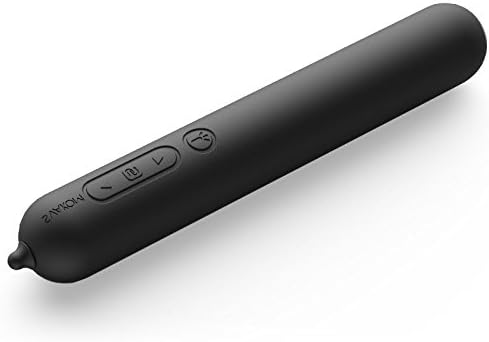
Image: The SVAKOM Gaga device, highlighting the control buttons on its body.
Principais características:
- Botões de controle: Located on the device body for power and vibration mode adjustments.
- Lente da câmera: Integrated at the tip for visual feedback.
- Luz Integrada: Illuminates the area for the camera.
- Porta USB: Para carregar e conectar a um computador.

Image: Close-up of the device tip, showing the embedded camera lens and light.
5. Configuração
5.1 Carregando o dispositivo
- Localize a porta de carregamento USB no dispositivo.
- Connect the provided USB cable to the device's charging port.
- Conecte a outra extremidade do cabo USB a um adaptador de energia USB padrão (não incluído) ou à porta USB de um computador.
- The indicator light on the device will illuminate during charging. A full charge takes approximately 1.5 hours.
- Once fully charged, the indicator light will change or turn off (refer to specific device behavior). The device offers up to 8 hours of continuous use on a full charge.
5.2 Connecting to a Computer for Camera Function
- Certifique-se de que o dispositivo esteja carregado.
- Conecte o dispositivo ao seu computador usando o cabo USB fornecido.
- Your computer should recognize the device as a webcam. Access the camera feed through your computer's default camera application or compatible software.
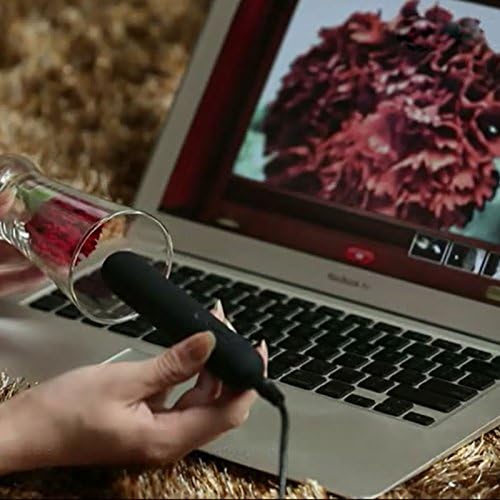
Image: The SVAKOM Gaga device connected to a laptop, demonstrating the camera feed displayed on the screen.
6. Instruções de operação
6.1 Ligar/Desligar
- Para ligar: Press and hold the power button (usually indicated by a power symbol) for 2-3 seconds until the device vibrates or an indicator light illuminates.
- Para desligar: Press and hold the power button again for 2-3 seconds until the device stops vibrating and the indicator light turns off.
6.2 modos de vibração
The SVAKOM Gaga features 6 distinct vibration modes, including an intelligent mode.
- Modos de mudança: While the device is on, short press the mode button (often indicated by a wave or pattern symbol) to cycle through the available vibration patterns.
- Ajustando a intensidade: Use the '+' and '-' buttons to increase or decrease the vibration intensity within the current mode.
- Modo Inteligente: This mode automatically adjusts vibration patterns based on usage. Refer to the device's specific indicator for intelligent mode activation.
6.3 Camera and Light Function
The camera and integrated light activate automatically when the device is connected to a computer via USB and recognized as a webcam. The light provides illumination for the camera feed.
7. Manutenção
7.1 Limpeza
- Limpe sempre o aparelho antes e depois de cada utilização.
- Lave o aparelho com água morna e um sabão neutro próprio para brinquedos ou um produto de limpeza específico para brinquedos.
- Enxágue bem para remover todos os resíduos de sabão.
- Dry the device completely with a lint-free cloth before storing.
- Não utilize produtos de limpeza que contenham álcool, derivados de petróleo ou acetona, pois estes podem danificar o material de silicone.
7.2 Armazenamento
Store the SVAKOM Gaga in its provided storage pouch in a clean, dry, and cool place, away from direct sunlight and extreme temperatures. Avoid storing with other materials that could react with silicone.
8. Solução De Problemas
- Dispositivo não liga: Ensure the device is fully charged. If it still doesn't turn on, try connecting it to the charger for a few minutes.
- Vibration is Weak or Inconsistent: The battery may be low; recharge the device. If the issue persists after charging, contact customer support.
- Camera Not Working/No Image on Computer:
- Certifique-se de que o cabo USB esteja firmemente conectado tanto ao dispositivo quanto ao computador.
- Tente uma porta USB diferente em seu computador.
- Verify that your computer's camera application or software is correctly configured to detect external webcâmeras.
- Reinicie o seu computador.
- Dispositivo não carrega: Check the USB cable for damage and ensure the charging port is clean and dry. Try a different USB power source.
9. Especificações
| Número do modelo | 6510 |
| Material | Silicone de grau médico |
| Cor | Preto |
| Dimensões | 25 mm (Diameter) x 165 mm (Length) |
| Peso | 74 g |
| Tipo de Bateria | Bateria de polímero de lítio |
| Capacidade da bateria | 430 mAh |
| Tempo de carregamento | Aproximadamente 1.5 horas |
| Uso contínuo máximo | Até 8 horas |
| Modos de vibração | 6 |
| Repelência à água | IPX4 (À prova de respingos) |
10. Informações de garantia
For detailed warranty information, please refer to the warranty card included in your product packaging or visit the official SVAKOM website. Guarde o comprovante de compra para solicitações de garantia.
11. Suporte ao cliente
If you have any questions, concerns, or require technical assistance, please contact SVAKOM customer support through their official website ou as informações de contato fornecidas na documentação do produto.


