Introdução
This manual provides comprehensive instructions for the setup, operation, and maintenance of your VTech CS6829-2 2-Handset Cordless Phone with Answering System. This system is designed for home use, offering features such as caller ID, a digital answering machine, backlit keypad, and a full duplex speakerphone for enhanced communication.
O que está na caixa
Verifique se todos os itens estão incluídos em seu pacote:
- Unidade base
- 2 aparelhos sem fio
- Carregador
- 2 adaptadores
- 2 baterias
- Cabo de linha telefônica
- Suporte de montagem em parede
- Guia de início rápido
Configurar
Follow these steps to set up your VTech CS6829-2 phone system:
- Conecte a unidade base:
Plug one end of the telephone line cord into the TEL LINE jack on the back of the base unit. Plug the other end into a telephone wall jack. Plug the small end of the power adapter into the POWER jack on the back of the base unit. Plug the large end of the power adapter into a wall outlet not controlled by a wall switch.
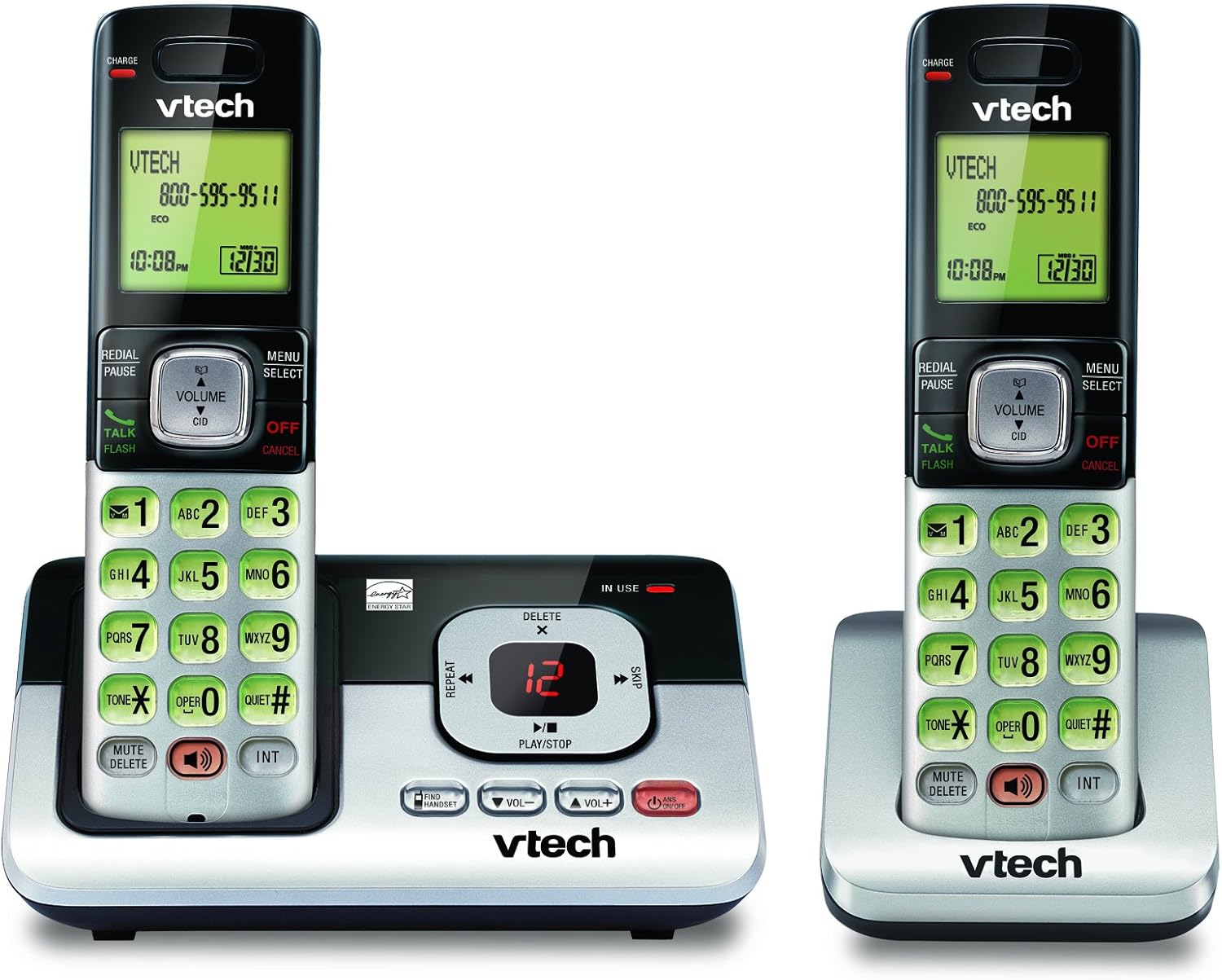
Image: The VTech CS6829-2 base unit with one handset docked, and a second handset with its charging cradle. This illustrates the main components of the phone system.
- Instalar as pilhas do aparelho:
Open the battery compartment cover on the back of each handset. Connect the battery pack connector securely into the jack inside the compartment. Place the battery pack with the label facing up and tuck the wires inside the compartment. Close the battery compartment cover.
- Carregar aparelhos:
Place each handset in the base unit or charger with the display facing up. The CHARGE light on the handset will illuminate, indicating proper charging. Allow the handsets to charge for at least 16 hours before initial use for optimal battery performance.

Imagem: Um ângulo view of the VTech CS6829-2 base unit with one handset docked, and the second handset in its separate charging cradle. This shows how the handsets are placed for charging.
- Definir data e hora:
After the handsets are charged, follow the on-screen prompts or refer to the quick start guide to set the date and time. This is important for accurate caller ID and answering system timestamps.
Instruções de operação
Fazendo e atendendo chamadas
- Fazer uma ligação: Imprensa TALK / FLASH or any dialing key to get a dial tone, then dial the phone number.
- Para atender uma chamada: Quando o telefone tocar, pressione TALK / FLASH ou qualquer tecla de discagem.
- Para encerrar uma chamada: Imprensa DESLIGAR/CANCELAR or place the handset back in the base unit/charger.
Sistema de Atendimento Digital
- Mensagens de reprodução: Na unidade de base, pressione REPRODUZIR/PARAR. On a handset, press MENU/SELECIONAR, scroll to "Answering System", then select "Play Messages".
- Gravação de um anúncio de despedida: On the base unit or handset, navigate to the answering system menu and select "Record OGM" (Outgoing Message).
- Excluindo mensagens: Enquanto a mensagem estiver sendo reproduzida, pressione EXCLUIR on the base unit or handset.
Função de viva-voz
- Para usar o viva-voz: Durante uma chamada, pressione o PALESTRANTE button on the handset. Press it again to switch back to the handset earpiece.
Principais características
- Digital Answering System with LED Indicator and Volume Control: This system records up to 14 minutes of messages, announcements, and memos. An LED indicator notifies you of new messages. Volume control keys on the base allow easy adjustment of message playback volume.
- Caller ID / Call Waiting — Stores up to 50 Calls: Displays the name, number, time, and date of incoming calls, helping you identify callers before answering.
- Viva-voz Full Duplex: The handset features a full duplex speakerphone, enabling natural two-way conversations where both parties can speak and be heard simultaneously.
- Teclado e visor retroiluminados: The entire keypad and LCD screen on the handset illuminate, ensuring clear visibility and easy dialing even in low-light conditions.
- Tecnologia de economia de energia no modo ECO: This technology optimizes power consumption for extended battery performance and energy efficiency.
- Modo silencioso: Allows you to silence the ringer on both the handset and base unit immediately or for a set period, providing peace and quiet when needed.
Manutenção
- Limpeza: Limpe o telefone e a base com um pano macio e seco.amp pano. Não utilize sprays de limpeza ou produtos de limpeza líquidos.
- Cuidados com a bateria: Replace batteries when they no longer hold a charge. Use only the specified battery type. Dispose of old batteries responsibly according to local regulations.
- Condições ambientais: Evite colocar o telefone sob luz solar direta, perto de fontes de calor ou em áreas com umidade excessiva.
Solução de problemas
Se você estiver enfrentando problemas com seu telefone, tente as seguintes soluções:
| Problema | Solução |
|---|---|
| Não esta dando sinal. | Ensure the telephone line cord is securely plugged into both the base unit and the wall jack. Check that the power adapter is plugged into a working electrical outlet. |
| O aparelho não está carregando. | Ensure the handset is properly seated in the base unit or charger. Clean the charging contacts on both the handset and base/charger with a dry cloth. Verify the power adapter is connected. |
| Qualidade de som ruim / Estática. | Move the handset closer to the base unit. Avoid placing the phone near other electronic devices (e.g., microwaves, computers) that may cause interference. Check the telephone line cord for damage. |
| A secretária eletrônica não está gravando mensagens. | Verifique se a secretária eletrônica está ligada. Confira se a memória está cheia; apague as mensagens antigas, se necessário. |
Especificações
| Recurso | Detalhe |
|---|---|
| Número do modelo | CS6829-2 |
| Dimensões do produto | 5.77 x 3.41 x 6.77 polegadas |
| Peso do item | 1.41 libras |
| Baterias | 2 Baterias específicas do produto necessárias (incluídas) |
| Tipo de sistema de atendimento | Digital |
| Memória de identificação de chamadas | Up to 50 calls |
| Tempo de gravação da secretária eletrônica | Até 14 minutos |
| Cor | Preto/Prata |
| Tipo de telefone | Sem fio |
Garantia e Suporte
Para informações sobre garantia e suporte técnico, consulte o cartão de garantia incluído com o seu produto ou visite o site oficial da VTech. website. Guarde o recibo de compra como comprovante para solicitações de garantia.
Você também pode visitar o Loja VTech na Amazon Para obter informações adicionais sobre o produto e recursos de suporte.


