1. Introdução
Thank you for choosing the Antec HCG-850M 850W Power Supply. This manual provides essential information for the safe and efficient installation, operation, and maintenance of your power supply unit. Please read this manual thoroughly before installation and retain it for future reference.
2. Informações de segurança
Always observe the following safety precautions to prevent injury or damage to your system:
- Não Abra a fonte de alimentação casing. Alto volumetagOs resíduos estão presentes no interior, mesmo quando a unidade está desligada da tomada.
- Não insert any objects into the power supply's ventilation openings.
- Certifique-se de que a fonte de alimentação esteja instalada em uma área bem ventilada.
- Use only the modular cables provided with this power supply. Using incompatible cables can cause damage.
- Disconnect the AC power cord from the wall outlet before installing or removing the power supply.
- This product is designed for use in personal computers only.
3. Conteúdo da embalagem
Verifique se todos os itens estão presentes no seu pacote:
- Antec HCG-850M 850W Power Supply
- Modular Cable Set (PCI-E, SATA, Peripheral, CPU)
- Cabo de alimentação CA
- Parafusos de montagem
- Manual do usuário (este documento)
4. Produto acabadoview
The Antec HCG-850M is an 850-watt, 80 PLUS Bronze certified, semi-modular power supply designed for high-performance personal computers. It features a quiet 135mm fan for efficient cooling and robust protection circuits to ensure stable power delivery.
4.1 Principais Características
- 850 Watts Continuous Power
- 80 PLUS Bronze Certified Efficiency
- Semi-Modular Cable Management
- Ventilador silencioso 135mm
- Fator de forma ATX
- Multiple Protection Circuits (OCP, OVP, UVP, SCP, OPP, OTP)
4.2 Unidade de fonte de alimentação
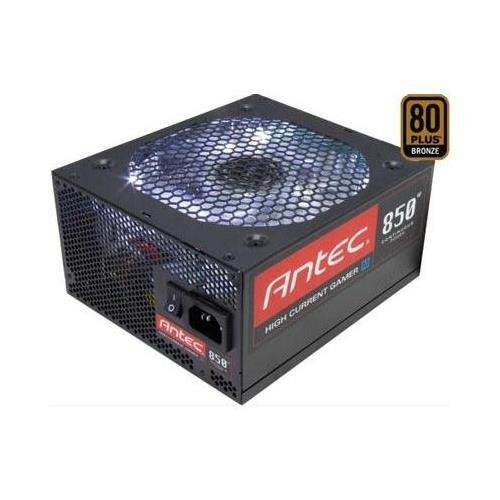
Imagem 1: Frente view of the Antec HCG-850M 850W Power Supply, showing the fan grille and modular cable connectors. This unit provides stable power to your computer components.
5. Configuração e instalação
Follow these steps to install your Antec HCG-850M power supply:
- Prepare seu sistema: Certifique-se de que o computador esteja completamente desligado e desconectado da tomada. Abra o gabinete do computador.
- Remova a fonte de alimentação antiga (se aplicável): Desconecte todos os cabos da sua fonte de alimentação antiga. Desparafuse e remova a fonte de alimentação antiga do gabinete.
- Instale a nova fonte de alimentação: Carefully place the Antec HCG-850M into the power supply bay of your computer case. Secure it with the provided mounting screws. Ensure the fan is oriented correctly for optimal airflow (typically facing down if there's a bottom vent, or up if not).
- Conecte os cabos essenciais:
- Conecte o cabo de alimentação ATX de 24 pinos da placa-mãe.
- Connect the 4+4-pin or 8-pin EPS/CPU power cable to your motherboard.
- Conecte cabos modulares: Attach the necessary modular cables for your components (e.g., PCI-E for graphics cards, SATA for hard drives/SSDs, Peripheral for fans/accessories). Connect them securely to both the power supply and the respective components.
- Gerenciamento de cabos: Organize os cabos de forma ordenada para melhorar o fluxo de ar e a estética.
- Feche a caixa e ligue o aparelho: Close your computer case. Connect the AC power cord to the power supply and then to a wall outlet. Flip the power switch on the PSU to the 'ON' position. Power on your computer.
6. Instruções de operação
Once installed, the Antec HCG-850M operates automatically. Here are some general operating guidelines:
- Ligar/desligar: Use your computer's power button to turn the system on or off. The switch on the power supply itself should generally remain in the 'ON' position during normal operation.
- Estabilidade do sistema: Ensure your system is stable. If you experience unexpected shutdowns or reboots, refer to the troubleshooting section.
- Ventilação: Maintain good airflow around your computer case to prevent overheating of components, including the power supply.
7. Manutenção
Proper maintenance can extend the lifespan of your power supply:
- Limpeza de pó: Periodically clean dust from the power supply's fan grille and the interior of your computer case using compressed air. Always disconnect the AC power cord before cleaning.
- Verificação do cabo: Occasionally check that all power cables are securely connected to the power supply and components.
- Ambiente: Operate the power supply in a clean, dry environment with stable temperatures.
8. Solução De Problemas
Se você tiver problemas com sua fonte de alimentação, tente os seguintes passos:
8.1 No Power to System
- Certifique-se de que o cabo de alimentação CA esteja firmemente conectado tanto à tomada quanto à fonte de alimentação.
- Check that the power supply's ON/OFF switch is in the 'ON' position.
- Verify all internal power cables (24-pin ATX, CPU, PCI-E) are correctly and firmly connected.
- Teste a tomada com outro aparelho para garantir que ela esteja energizada.
- If possible, test the power supply in another known working system or with a PSU tester.
8.2 System Instability or Random Shutdowns
- Certifique-se de que os requisitos de energia do seu sistema não excedam a capacidade de 850 W da fonte de alimentação.
- Check for overheating components. Ensure proper case ventilation and clean any dust buildup.
- Verify all power connections are secure. Loose connections can cause intermittent power delivery.
- If the issue persists, it may indicate a fault with the power supply or another component. Consider professional diagnosis.
9. Especificações
| Recurso | Detalhe |
|---|---|
| Número do modelo | HCG-850M |
| Potência de saídatage | 850 Watts |
| Certificação de Eficiência | 80PLUS bronzes |
| Fator de forma | ATX |
| Método de resfriamento | Air (135mm Fan) |
| Tipo modular | Semi-modular |
| Dispositivos compatíveis | Computador pessoal |
| Peso do item | 9 libras (aproximadamente 4.08 kg) |
| ASIN | B00ESAI3M0 |
10. Garantia e Suporte
Os produtos Antec são cobertos pela garantia do fabricante. Para obter informações específicas sobre os termos e condições da garantia, consulte o certificado de garantia que acompanha o produto ou visite o site oficial da Antec. website. For technical support or customer service, please contact Antec directly through their official support channels.
Antec Oficial Website: www.antec.com


