Introdução
Welcome to the user manual for your Alcatel Sigma 260 DECT Cordless Phone. This guide provides detailed instructions on how to set up, operate, maintain, and troubleshoot your new phone. Please read this manual carefully to ensure optimal performance and longevity of your device.
The Alcatel Sigma 260 is a reliable DECT cordless phone featuring a 50-entry phonebook, hands-free function, and caller ID, designed for clear communication and ease of use.
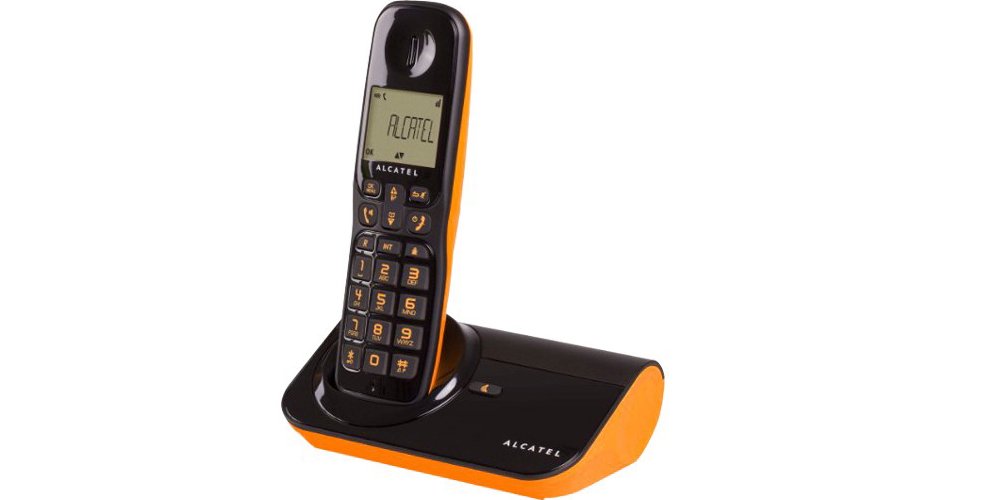
Figura 1: Alcatel Sigma 260 DECT Cordless Phone Handset and Base Station.
1. Configuração
Follow these steps to set up your Alcatel Sigma 260 phone.
1.1 Desembalagem e Conteúdo da Embalagem
Carefully unpack all items and ensure you have the following components:
- Alcatel Sigma 260 Handset
- Alcatel Sigma 260 Base Station
- Adaptador de energia para estação base
- Cabo de linha telefônica
- Rechargeable AAA Batteries (typically 2x)
- Manual do usuário (este documento)
1.2 Instalação da bateria
- Localize a tampa do compartimento da bateria na parte traseira do aparelho.
- Deslize ou levante a tampa para abrir o compartimento.
- Insert the rechargeable AAA batteries, observing the correct polarity (+ and -) as indicated inside the compartment.
- Recoloque a tampa do compartimento da bateria, certificando-se de que ela se encaixe firmemente no lugar.
Importante: Only use the supplied rechargeable batteries or equivalent approved replacements. Non-rechargeable batteries may damage the device.
1.3 Conectando a Estação Base
- Connect one end of the telephone line cord to the TEL socket on the base station.
- Conecte a outra extremidade do cabo da linha telefônica à tomada telefônica na parede.
- Plug the power adapter into the DC IN socket on the base station.
- Conecte o adaptador de alimentação a uma tomada elétrica adequada.
- Place the handset on the base station to charge the batteries. Allow at least 12-15 hours for the initial charge.
Observação: Position the base station away from other electrical appliances to avoid interference.
1.4 Handset Registration (for additional handsets or re-registration)
Your primary handset is usually pre-registered. If you have additional handsets (up to 4 connectable handsets are supported) or need to re-register a handset, follow these general steps:
- On the base station, press and hold the registration button (often marked with a signal icon or "PAGE") for approximately 5 seconds until an indicator light on the base starts flashing.
- On the handset, access the menu, navigate to "Registration" or "Register Handset" (refer to the handset display for exact menu options).
- Enter the system PIN (default is usually 0000 or 1234).
- The handset will search for the base station and register. A confirmation message will appear on the handset display once successful.
Dica: If registration fails, ensure the handset is close to the base station and try again.
2. Operando seu telefone
This section covers the basic functions of your Alcatel Sigma 260.
2.1 Fazer chamadas
- Discagem direta: Pegue o fone ou pressione o FALAR button. Enter the phone number using the keypad. The call will connect automatically.
- Da agenda telefônica: Pressione o LISTA TELEFÔNICA button (or navigate via menu). Use the arrow keys to scroll through entries. Press FALAR para discar o número selecionado.
- Remarcação: Pressione o REDISCAR botão para view a list of recently dialed numbers. Use arrow keys to select, then press FALAR.
2.2 Recebendo chamadas
- Quando o telefone tocar, pressione o FALAR botão para atender a chamada.
- Para encerrar uma chamada, pressione a tecla FIM pressione o botão ou coloque o aparelho de volta na base.
2.3 Phonebook (50 Entries)
Your phone can store up to 50 names and numbers.
- Adicionar um contato: Access the menu, select "Phonebook", then "Add New Entry". Enter the name and number using the keypad. Save the entry.
- Editando um contato: Access the phonebook, select the contact, then "Edit". Make changes and save.
- Excluindo um contato: Access the phonebook, select the contact, then "Delete". Confirm deletion.
2.4 Função mãos-livres
Para ativar o viva-voz durante uma chamada, pressione o PALESTRANTE button (often marked with a speaker icon). Press it again to switch back to handset mode.
2.5 ID do chamador
If you subscribe to Caller ID service from your telephone provider, the caller's number (and name, if available in your phonebook or provided by the service) will be displayed on the handset screen before you answer the call.
3. Manutenção
Proper care ensures the longevity of your Alcatel Sigma 260.
3.1 Limpeza
Limpe o aparelho e a base com um pano macio e seco.amp cloth. Do not use abrasive cleaners, solvents, or strong chemicals, as these can damage the surfaces. Ensure no liquid enters the device openings.
3.2 Cuidados com a bateria
- Always return the handset to the base station when not in use to ensure it remains charged.
- Se o telefone não for usado por um longo período, remova as baterias para evitar vazamentos.
- Replace batteries when their performance significantly degrades. Use only approved rechargeable AAA batteries.
4. Solução De Problemas
If you encounter issues with your phone, try the following solutions before seeking professional assistance.
| Problema | Possível causa/solução |
|---|---|
| Sem tom de discagem |
|
| Não consigo fazer nem receber chamadas. |
|
| Qualidade de som ruim / Estática |
|
| O aparelho não está carregando. |
|
| A tela está em branco ou ilegível. |
|
5. Especificações técnicas
Below are the key technical specifications for the Alcatel Sigma 260 DECT Cordless Phone:
| Marca | Alcatel |
| Número do modelo | Sigma 260 |
| Tipo de telefone | Telefone sem fio DECT |
| Fonte de energia | Battery Powered (Rechargeable AAA) |
| Tipo de teclado | Teclado único |
| Identificador de chamadas | Sim |
| Capacidade da agenda telefônica | Entradas 50 |
| Função mãos-livres | Sim |
| Connectable Handsets | Até 4 |
| Tipo de exibição | Alfanumérico |
| Secretária eletrônica | Não |
6. Garantia e Suporte
For information regarding warranty terms and conditions, please refer to the warranty card included with your product or contact your retailer. Specific warranty details are not provided in this manual.
For technical support or inquiries, you may contact the seller directly via email:
E-mail: tecnotorba.amazon@gmail.com
Please provide your product model (Alcatel Sigma 260) and a detailed description of your issue when contacting support.