1. Produto acabadoview
The Gioteck EX-05S High Definition Headset is designed to deliver superior stereo game sound and crystal-clear voice communication. It is compatible with multiple platforms including PS4, PS3, Xbox 360, PC, and Mac. This headset features 40mm high-quality stereo drivers, a noise-isolating microphone, and breathable micro-fibre ear cups for extended comfort.
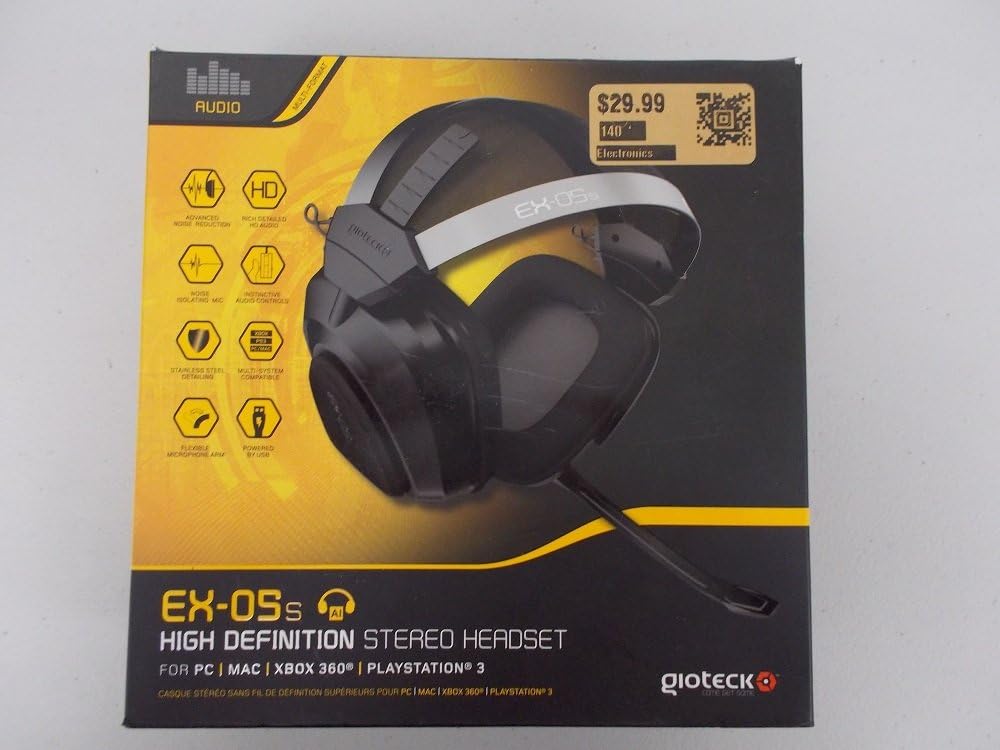
Figure 1.1: Gioteck EX-05S Headset packaging, highlighting key features and compatibility.

Figura 1.2: Lateral view of the Gioteck EX-05S Headset, showing the ear cup and microphone arm.
2. Características
- 40mm High Quality Stereo Drivers: Delivering rich, detailed audio for an immersive gaming experience.
- Noise Isolating Microphone: Designed to eliminate echo and external noise for clear communication.
- Breathable Micro-Fibre Ear Cups: Ensures comfort during long gaming sessions.
- Redução de ruído avançada: Minimizes game sound interference from external speakers.
- Flexible and 180-Degree Rotating Microphone Arm: Allows for optimal microphone positioning.
- Instinctive and Accessible Controls: Conveniently located controls for voice and game sound adjustments.
- Stainless Steel Detailing: Provides durability and a premium finish.
- Compatibilidade multiplataforma: Works with PS4, PS3, Xbox 360, PC, and Mac.
3. Conteúdo da embalagem
Certifique-se de que todos os seguintes itens estejam presentes em sua embalagem:
- Gioteck EX-05S Universal High Definition Stereo Headset
4. Guia de configuração
4.1 Connecting to Gaming Consoles (PS4, PS3, Xbox 360)
- Locate the 3.5mm audio jack on your gaming controller or console.
- Insert the 3.5mm connector from the EX-05S headset firmly into the audio jack.
- Ensure your console's audio settings are configured to output game audio and chat through the connected headset. Refer to your console's system settings for specific audio output configurations.
4.2 Conectando ao PC/Mac
- For PCs with separate audio and microphone jacks, you may need a PC splitter cable (not included) to connect the single 3.5mm headset jack to your computer's audio output and microphone input ports.
- For devices with a combined 3.5mm audio/microphone jack, simply plug the headset's 3.5mm connector directly into the port.
- Adjust your computer's sound settings to select the EX-05S headset as the default playback and recording device.
5. Instruções de operação
5.1 Controle de volume
The EX-05S headset features an inline control box on the cable. Use the volume dial to adjust the overall audio level of your game and chat sound.
5.2 Silenciar o microfone
A switch or button on the inline control box allows you to quickly mute or unmute your microphone. Ensure the microphone is unmuted when you wish to communicate.
5.3 Posicionamento do Microfone
The flexible microphone arm can be rotated 180 degrees. Position the microphone approximately 1-2 inches from your mouth for optimal voice clarity and to minimize background noise.
6. Manutenção e Cuidados
- Limpeza: Use a soft, dry cloth to clean the headset. For ear cups, a slightly damp Pode-se usar um pano, mas certifique-se de que não entre umidade nas grades dos alto-falantes. Não use produtos químicos agressivos ou produtos de limpeza abrasivos.
- Armazenar: Guarde o fone de ouvido em local fresco e seco, longe da luz solar direta e de temperaturas extremas. Evite que o cabo se enrole.
- Manuseio: Always grasp the plug when disconnecting the cable, rather than pulling on the cable itself, to prevent damage to the wiring.
- Ear Cups: The breathable micro-fibre ear cups can be gently wiped clean. Avoid excessive pressure or stretching.
7. Solução De Problemas
7.1 Sem som nos fones de ouvido
- Certifique-se de que o conector de 3.5 mm esteja totalmente inserido na porta de áudio.
- Check the inline volume control on the headset cable and ensure it is turned up.
- Verify your device's (console, PC, Mac) audio output settings are configured to send sound to the headset.
- Teste o fone de ouvido em outro dispositivo para descartar um problema específico do dispositivo.
7.2 Microfone não funciona
- Check the microphone mute switch on the inline control box and ensure it is unmuted.
- Verify your device's (console, PC, Mac) microphone input settings are configured to receive input from the headset.
- Ensure the microphone arm is positioned correctly and not obstructed.
- Test the microphone on another device or application to confirm functionality.
7.3 Static or Distorted Audio
- Ensure the connection is secure and free from debris.
- Try adjusting the volume levels on both the headset and the connected device.
- Move away from potential sources of electromagnetic interference (e.g., Wi-Fi routers, cordless phones).
- Faça o teste com outra fonte ou dispositivo de áudio.
8. Especificações
| Recurso | Detalhe |
|---|---|
| Nome do modelo | E5SUNI-11-MU |
| Tecnologia de Conectividade | Com fio |
| Componentes incluídos | Fones de ouvido |
| Faixa etária (Descrição) | Adulto |
| Material | Aço inoxidável |
| Usos específicos para o produto | Jogos |
| Dispositivos compatíveis | Consoles de jogos, computadores |
| Tipo de controle | Controle de volume |
| Recurso de cabo | Retrátil |
| Peso do item | 669 gramas (1.47 libras) |
| Método de controle | Voz |
| Tipo de driver de áudio | Driver Dinâmico |
| Formato do fone de ouvido | Sobre a orelha |
| Entrada para fones de ouvido | 3.5 mm Jack |
| Dimensões do produto | 8.46 x 7.87 x 3.94 polegadas |
9. Garantia e Suporte
Gioteck products are manufactured to high standards and undergo rigorous testing. For information regarding warranty coverage, technical support, or service, please refer to the official Gioteck webou entre em contato diretamente com o suporte ao cliente. Guarde seu comprovante de compra para eventuais solicitações de garantia.
Para obter as informações de suporte mais atualizadas, visite: www.gioteck.com/support