Introdução
The DOD Overdrive Preamp 250 is a legendary analog overdrive pedal designed for guitar and bass instruments. This manual provides essential information for setting up, operating, maintaining, and troubleshooting your DOD Overdrive 250 to ensure optimal performance and longevity.
Configurar
Alimentando o pedal
The DOD Overdrive 250 can be powered by a single 9V alkaline dry battery or an optional 9V DC power supply (PS0913DC). Ensure the power source is correctly connected before use.

Figura 1: Power Supply Connector. Connect a 9V DC power adapter here.
Connecting Your Pedal
Conecte seu instrumento ao IN Conecte o cabo de instrumento padrão de 1/4 de polegada no lado direito do pedal. FORA Conecte o plugue no lado esquerdo do pedal ao seu ampamplificador ou o próximo pedal na sua cadeia de sinal usando outro cabo de instrumento de 1/4 de polegada.

Figura 2: Input and Output Jacks. The input jack is on the right, and the output jack is on the left.
Operando o pedal
The DOD Overdrive 250 features two primary control knobs: GANHO e NÍVEL, along with a footswitch and an LED indicator.
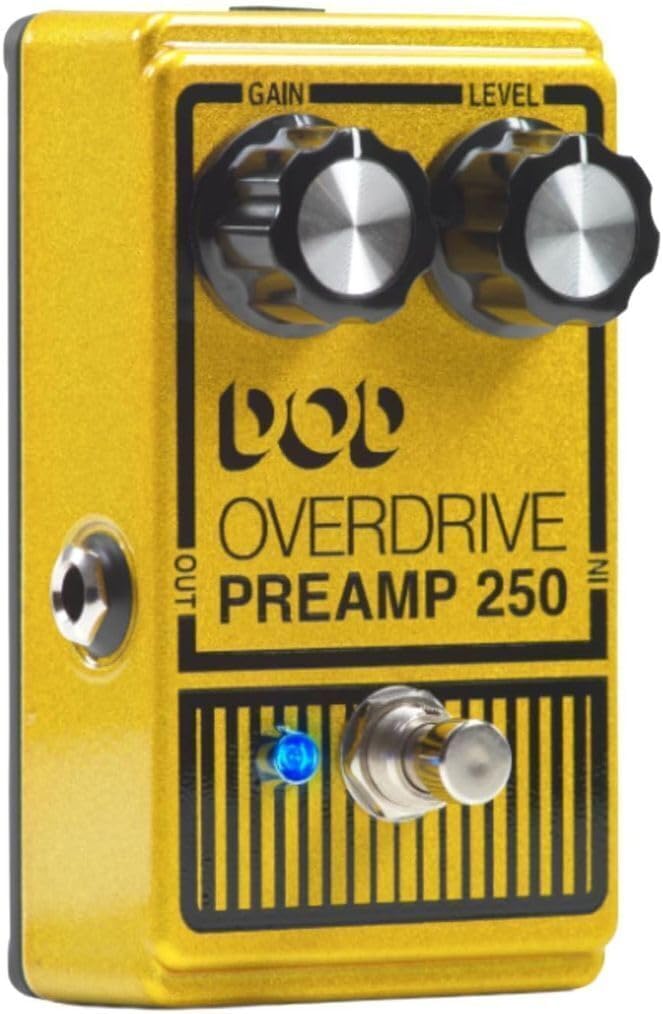
Figura 3: Front Panel Controls. The Gain and Level knobs are at the top, with the footswitch and LED below.
Controles
- GANHO: This knob controls the amount of overdrive or distortion applied to your signal. Turning it clockwise increases the saturation, ranging from a subtle grit to a full, aggressive grind.
- NÍVEL: This knob adjusts the overall output volume of the pedal. It can be used to match the bypassed signal volume, or to provide a significant boost for solos or to push your amplifier harder. With the Gain set low, increasing the Level can provide a clean boost.
Pedal e indicador LED
The large footswitch activates or bypasses the effect. When the effect is active, the crisp blue LED indicator will illuminate, providing clear visual feedback of the pedal's status.

Figura 4: Crisp Blue LED Indication. The LED illuminates when the effect is active.
True bypass
The DOD Overdrive 250 features true bypass circuitry. This means that when the pedal is disengaged (effect off), your guitar's signal passes directly through the pedal without any electronic interference, preserving your original tone. This is a significant improvement over older designs that could color the bypassed signal.
Manutenção
Substituição da bateria
If using a 9V battery, replace it when the LED indicator dims or the pedal's performance degrades. To replace the battery, carefully remove the bottom plate of the pedal. Disconnect the old battery and connect a new 9V alkaline battery, ensuring correct polarity. Securely reattach the bottom plate.
Limpeza
Wipe the pedal's exterior with a soft, dry cloth. Avoid using abrasive cleaners or solvents, as these can damage the finish and internal components.
Armazenar
When not in use for extended periods, disconnect the power supply or remove the battery to prevent leakage and preserve battery life. Store the pedal in a cool, dry place away from direct sunlight and extreme temperatures.
Solução de problemas
| Problema | Possível causa | Solução |
|---|---|---|
| Sem som ou sinal fraco | Incorrect cable connections, dead battery, faulty power supply, pedal not engaged. | Check all cable connections. Replace 9V battery or verify power supply connection. Ensure the pedal is engaged (blue LED on). Test with different cables. |
| Ruído ou zumbido indesejado | Ground loop, faulty cables, interference from other electronics, power supply issues. | Ensure all equipment is properly grounded. Try different cables. Move pedal away from power transformers or fluorescent lights. Use a regulated power supply. |
| LED não acende | No power, dead battery, faulty LED. | Check power supply or replace battery. If problem persists, contact support. |
Especificações
| Recurso | Detalhe |
|---|---|
| Modelo | DOD250-13 |
| Dimensões (C x L x A) | 4.88 x 2.61 x 3.25 polegadas |
| Peso | 9.92 ounces (~0.62 lbs) |
| Entrada (s) | 1/4-inch Instrument |
| Saída(s) | 1/4-inch Instrument |
| Material do chassi | All Metal (Aluminum) |
| Fonte de energia | 9V Alkaline Dry Battery or 9V DC (PS0913DC) |
| Formato do sinal | Analógico |
| Cor | Yellow Metallic Flake |
Garantia e Suporte
For detailed warranty information, please refer to the documentation included with your purchase or visit the official DigiTech website. DigiTech provides support for their products through their authorized service centers and online resources.
You can find more information and contact support via the official DigiTech store: Loja DigiTech na Amazon.
Note: No official product videos from the seller were found in the provided data to be embedded in this manual.


