Introdução
Thank you for choosing the SoundBot SB510 HD Water Resistant Bluetooth Shower Speaker. This manual provides essential information for setting up, operating, and maintaining your speaker to ensure optimal performance and longevity. Designed for convenience and durability, this speaker allows you to enjoy your favorite audio content in various environments, including the shower, without concern for water exposure.
Os principais recursos incluem:
- Design resistente à água: Built to withstand steam, splashes, and humidity, ideal for bathroom use.
- Chamadas com viva-voz: Integrated microphone and control buttons for answering and ending calls.
- Portátil e leve: Compact design for easy transport and use on the go.
- Tempo de jogo estendido: Up to 6 hours of continuous audio playback on a single charge.
- Conexão Bluetooth estável: Reliable streaming up to 33 feet from your device.
- Controles fáceis de usar: Tactile buttons designed for operation even with wet hands.

The SoundBot SB510 HD speaker, showcasingraças ao seu design resistente à água.
O que está na caixa
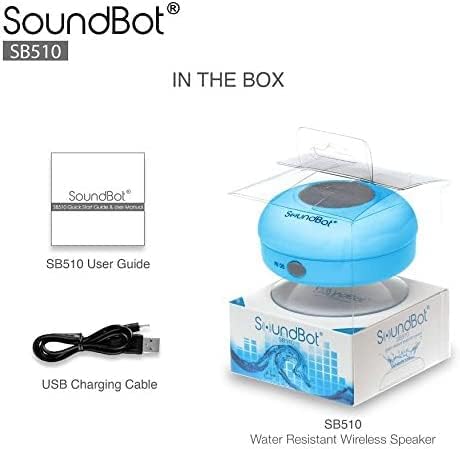
Your SoundBot SB510 HD package includes the following items:
- 1 x SoundBot SB510 Water Resistant Bluetooth Shower Speaker
- 1 x Guia do usuário
- 1 x cabo de carregamento USB

Included components: speaker, USB charging cable, and user guide.
Configurar
Carregando o alto-falante
Before first use, fully charge your SoundBot SB510 HD speaker. A full charge takes approximately 3 hours and provides up to 6 hours of playtime.
- Localize a porta de carregamento na lateral da caixa de som, geralmente protegida por uma aba de borracha.
- Conecte a extremidade menor do cabo de carregamento USB incluído à porta de carregamento da caixa de som.
- Conecte a extremidade mais grossa do cabo USB a uma fonte de alimentação USB (por exemplo, porta USB do computador, adaptador de parede USB).
- The LED indicator light will illuminate during charging and turn off or change color when fully charged.

The speaker connected to its USB charging cable.
Emparelhamento Bluetooth
Pair your speaker with your Bluetooth-enabled device (smartphone, tablet, laptop) to begin wireless audio streaming.
- Certifique-se de que a caixa de som esteja carregada e desligada.
- Pressione e segure o botão Liga/Desliga (⏻) on the speaker until the LED indicator light begins to flash rapidly, indicating it is in pairing mode.
- No seu dispositivo, ative o Bluetooth e procure por dispositivos disponíveis.
- Select "SB510" from the list of found devices.
- Once successfully paired, the LED indicator light on the speaker will stop flashing and remain solid blue. You will also hear an audible confirmation.
- A caixa de som tem um alcance sem fio de até 10 metros (33 pés).
The speaker's control panel, used for initiating Bluetooth pairing.
Instruções de operação
Controles de alto-falante
The SoundBot SB510 HD features intuitive buttons for easy control of your audio and calls:
| Botão | Função (Pressão curta) | Função (pressione longamente) |
|---|---|---|
| ⏻ (Poder) | N / D | Ligar/Desligar |
| ⏵⏸ (Reproduzir/Pausar) | Tocar/Pausar Música | N / D |
| ⏮ (Previous/Volume Down) | Música Anterior | Volume baixo (-) |
| ⏭ (Next/Volume Up) | Próxima música | Aumentar volume (+) |
| 📞 (Telefone) | Atender/encerrar chamada telefônica | N / D |

Detalhado view dos botões de controle do alto-falante e suas funções.
Fazendo e recebendo chamadas
The built-in microphone allows for hands-free communication:
- Atender uma chamada: Quando receber uma chamada, pressione o botão 📞 Pressione uma vez para responder.
- Finalizando uma chamada: Durante uma chamada, pressione o 📞 button once to end the conversation.
- Rediscagem: Pressione duas vezes o 📞 botão para rediscar o último número.
Manutenção
To ensure the longevity and optimal performance of your SoundBot SB510 HD speaker, follow these maintenance guidelines:
- Resistência à água: The speaker is IPX4 water resistant, meaning it is protected against splashing water from any direction. It is suitable for use in showers or near pools, but it should não be submerged in water. Ensure the charging port cover is securely closed when not charging to maintain water resistance.
- Limpeza: Limpe o alto-falante com um pano macio e seco.amp pano. Não utilize produtos de limpeza abrasivos ou solventes, pois estes podem danificar a superfície ou os componentes internos.
- Armazenar: Guarde a caixa de som em local fresco e seco quando não estiver em uso. Evite temperaturas extremas.
- Cuidados com a ventosa: For best adhesion, ensure the surface where you attach the suction cup is clean, smooth, and dry. Periodically clean the suction cup with water to remove any dust or residue.

The speaker's water-resistant design allows for use in wet environments.
Solução de problemas
If you encounter any issues with your SoundBot SB510 HD speaker, please refer to the following common troubleshooting steps:
| Problema | Possível causa | Solução |
|---|---|---|
| Alto-falante não liga. | Bateria fraca. | Charge the speaker fully (approx. 3 hours). |
| Não foi possível emparelhar com o dispositivo. | Speaker not in pairing mode; Bluetooth off on device; device too far. | Ensure speaker is in pairing mode (flashing LED). Turn on Bluetooth on your device. Move device closer to speaker (within 33 ft). Forget previous pairings on your device and try again. |
| Sem som ou volume muito baixo. | Volume muito baixo no alto-falante ou dispositivo; alto-falante não conectado. | Increase volume on both the speaker and your connected device. Ensure speaker is successfully paired and connected. |
| Distorção de som. | Dispositivo muito distante; interferência. | Move your device closer to the speaker. Avoid obstacles between the speaker and device. Reduce interference from other wireless devices. |
| Suction cup not sticking. | A superfície está suja, molhada ou irregular. | Clean and dry the surface thoroughly. Ensure the surface is smooth (e.g., tile, glass). Clean the suction cup itself. |
Especificações
Detailed technical specifications for the SoundBot SB510 HD speaker:
| Recurso | Descrição |
|---|---|
| Nome do modelo | SB510HD |
| Número do modelo do item | SB510-BLU |
| Tecnologia de Conectividade | Bluetooth, USB |
| Tecnologia de comunicação sem fio | Bluetooth |
| Alcance Bluetooth | Até 10 metros (33 pés) |
| Nível de resistência à água | IPX4 (resistente à água) |
| Tipo de alto-falante | Desktop / Portable |
| Potência máxima de saída do alto-falante | 3 Watts |
| Modo de saída de áudio | Estéreo |
| Duração da bateria | 6 horas |
| Tempo de carregamento | 3 horas |
| Tipo de Bateria | 1 bateria de íon de lítio necessária |
| Microfone embutido | Sim |
| Dimensões do produto | 3.5"P x 3.5"L x 2.3"A |
| Peso do item | 1.59 onças |
| Material | Plástico, Borracha |
Garantia e Suporte
The SoundBot SB510 HD Water Resistant Bluetooth Shower Speaker comes with a Limited Warranty. For specific details regarding warranty coverage, duration, and terms, please refer to the warranty information provided in the original product packaging or contact SoundBot customer support directly.
For technical assistance, troubleshooting beyond this manual, or warranty claims, please visit the official SoundBot website or contact their customer service department. Contact information can typically be found on the product packaging or the SoundBot website.


