1. Introdução
This instruction manual provides essential information for the safe and efficient operation of your Nuwave Pro Plus Infrared Oven. Please read all instructions thoroughly before initial use to ensure proper function and to prevent injury or damage. Keep this manual for future reference.
2. Instruções importantes de segurança
Ao usar aparelhos elétricos, precauções básicas de segurança devem sempre ser seguidas para reduzir o risco de incêndio, choque elétrico e ferimentos às pessoas, incluindo o seguinte:
- Leia todas as instruções antes de operar o aparelho.
- Não toque em superfícies quentes. Use alças ou botões.
- Para evitar choques elétricos, não mergulhe o cabo, os plugues ou o aparelho em água ou qualquer outro líquido.
- É necessária supervisão rigorosa quando qualquer aparelho for usado por crianças ou perto delas.
- Desligue da tomada quando não estiver em uso e antes de limpar. Deixe esfriar antes de colocar ou retirar peças.
- Não opere nenhum aparelho com o cabo ou plugue danificado, ou após o aparelho apresentar mau funcionamento ou ter sido danificado de qualquer forma.
- O uso de acessórios não recomendados pelo fabricante do aparelho pode causar ferimentos.
- Não utilize ao ar livre.
- Não deixe o cabo pendurado na borda da mesa ou do balcão, nem toque em superfícies quentes.
- Não coloque sobre ou perto de um queimador a gás ou elétrico quente, nem em um forno aquecido.
- Deve-se ter extremo cuidado ao mover um aparelho que contenha óleo quente ou outros líquidos quentes.
- Sempre conecte primeiro o plugue ao aparelho e, em seguida, ligue o cabo na tomada. Para desconectar, gire qualquer controle para a posição "desligado" e, em seguida, retire o plugue da tomada.
- Não utilize o aparelho para outro fim que não o pretendido.
3. Componentes do produto
The Nuwave Pro Plus Infrared Oven consists of several key components designed for efficient cooking.

Figure 3.1: The Nuwave Pro Plus Infrared Oven, shown with its instruction manual and a recipe CD.
- Cabeça de força: Contains the heating element, fan, and control panel.
- Cúpula: A transparent, heat-resistant dome that covers the cooking area.
- Rack de Cozinha: Used to elevate food for even cooking.
- Base Pan: Collects drippings and holds the cooking rack.
- Painel de controle digital: For setting time, temperature, and other functions.

Figura 3.2: Close view of the heating element and internal fan located within the power head.
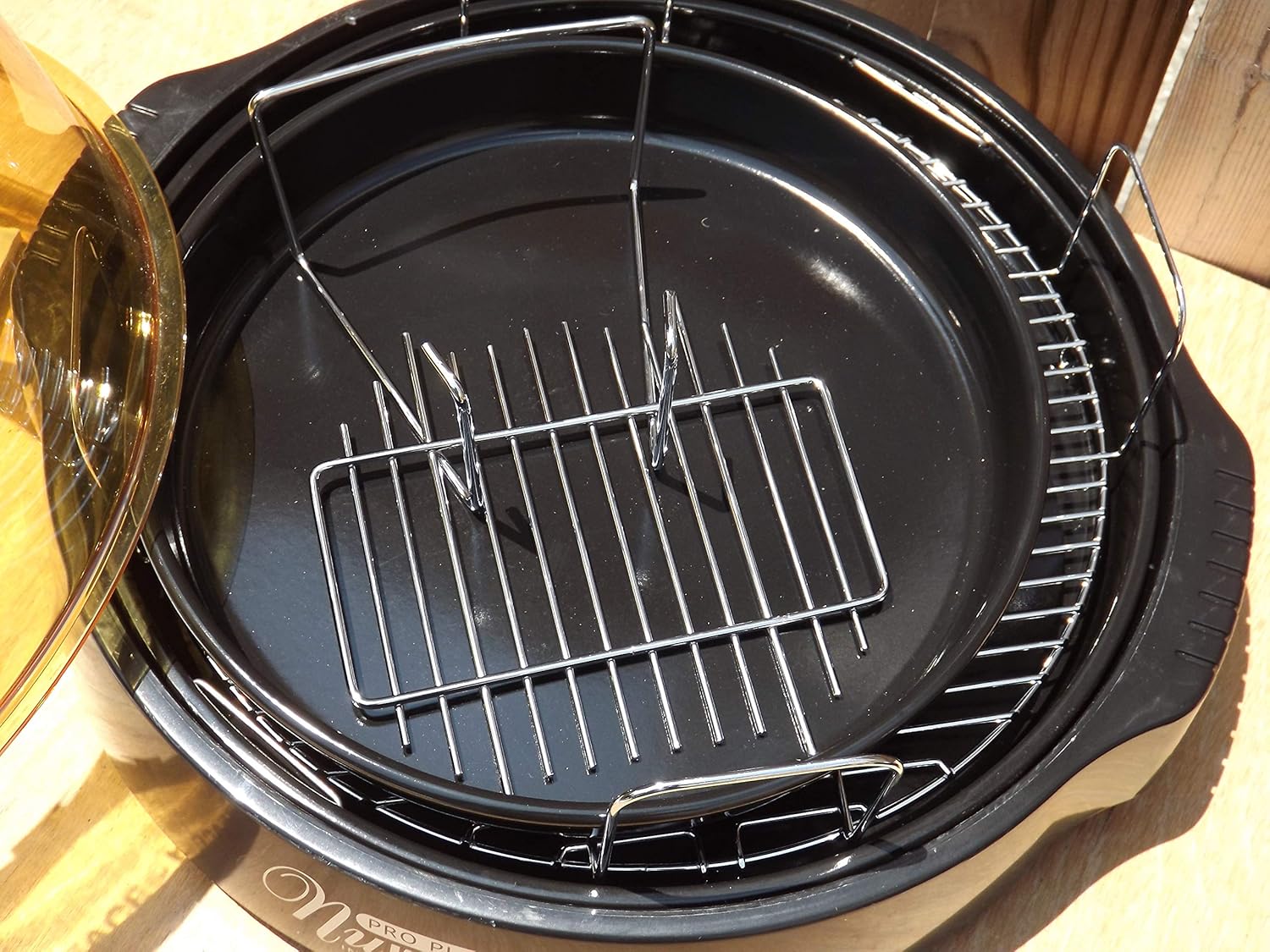
Figure 3.3: The cooking racks positioned within the oven's base pan, ready for food placement.
4. Configuração
Before first use, ensure all packaging materials are removed and the appliance is assembled correctly.
- Descompacte: Remova cuidadosamente todos os componentes da embalagem.
- Limpar: Wash the dome, cooking rack, and base pan with warm, soapy water. Rinse thoroughly and dry completely. The power head should only be wiped with a damp pano.
- Montar: Place the base pan on a stable, heat-resistant surface. Insert the desired cooking rack into the base pan. Place the food on the rack. Carefully position the dome over the base pan. Finally, place the power head securely on top of the dome.
- Conexão de energia: Conecte o cabo de alimentação a uma tomada elétrica padrão de 120 V AC.
5. Instruções de operação
The Nuwave Pro Plus Infrared Oven features a digital control panel for precise cooking.

Figure 5.1: The digital control panel with buttons for Cook Time, Cook Temp, Reheat, Warm, Delay, Pause/Clear, Start, and numerical input.
- Ligar: Once plugged in, the display will illuminate.
- Definir tempo de cozimento: Press the 'Cook Time' button. Use the numerical keypad to enter the desired cooking duration in minutes. Press 'Start' to confirm.
- Set Cooking Temperature: Press the 'Cook Temp' button. Use the numerical keypad to enter the desired temperature in degrees Fahrenheit. Press 'Start' to confirm.
- Comece a Cozinhar: After setting time and temperature, press the 'Start' button to begin the cooking cycle.
- Pause/Clear: To temporarily stop cooking, press 'Pause/Clear'. Press 'Start' to resume. To cancel the current program, press 'Pause/Clear' twice.
- Função de reaquecer: Press the 'Reheat' button for a preset reheating cycle. Adjust time if necessary using 'Cook Time'.
- Função Quente: Press the 'Warm' button to keep food warm after cooking.
- Função de atraso: Press the 'Delay' button to set a delayed start time for cooking. Follow on-screen prompts to set the delay duration.
Always monitor food during cooking. Cooking times may vary based on food type, quantity, and desired doneness.
6. Manutenção e Limpeza
Regular cleaning ensures optimal performance and extends the life of your Nuwave Pro Plus Infrared Oven.
- Desconecte e refresque-se: Always unplug the oven from the power outlet and allow all components to cool completely before cleaning.
- Dome, Rack, and Base Pan: These components are dishwasher safe or can be washed by hand with warm, soapy water. Use a non-abrasive sponge or cloth. Rinse thoroughly and dry completely.
- Cabeça de força: The power head contains electrical components and should NEVER be immersed in water. Wipe the exterior with a damp cloth. For stubborn stains, use a mild detergent on the cloth, then wipe with a clean, damp cloth. Ensure it is completely dry before storage or next use.
- Armazenar: Guarde o forno em local limpo e seco quando não estiver em uso.
7. Solução De Problemas
Consulte esta seção para obter informações sobre problemas comuns e suas soluções.
| Problema | Possível causa | Solução |
|---|---|---|
| O forno não liga. | Não está conectado; energia outage; tomada defeituosa. | Verifique se o cabo de alimentação está firmemente conectado. Verifique o disjuntor. Tente outra tomada. |
| A comida não está cozinhando uniformemente. | Improper food placement; too much food; incorrect temperature/time. | Ensure food is placed on the rack and not directly on the base. Do not overcrowd the oven. Adjust cooking time or temperature as needed. |
| Fumaça ou odor incomum durante o funcionamento. | Food drippings on heating element; residue from previous cooking. | Unplug immediately. Allow to cool and clean all components thoroughly. Ensure no food particles are on the heating element. |
| Painel de controle não responde. | Temporary electrical glitch; power head not seated correctly. | Unplug the oven for 1 minute, then plug back in. Ensure the power head is securely placed on the dome. |
8. Especificações
Detailed technical specifications for the Nuwave Pro Plus Infrared Oven.
- Marca: Nova onda
- Nome do modelo: Nu-Wave Oven
- Tipo de controle: Knob (Digital Keypad)
- Estilo da porta: Side Swing (Dome Lift)
- Componentes incluídos: Crumb Tray (Base Pan), Cooking Rack
- Tipo de acabamento: Pintado
- Tipo de material da porta: Stainless Steel (referring to internal components/accents)
- Fonte de energia: Adaptador CA
- Número de prateleiras: 1 (Cooking Rack)
- Tamanho: Médio
- Peso do item: 14.26 libras
- Dimensões da embalagem: 15.8 x 14.9 x 12.1 polegadas
- ASIN: B00IXC09QC
- Código UPC: 652185206021
9. Garantia e Suporte
For warranty information and customer support, please refer to the documentation included with your purchase or visit the official Nuwave webGuarde o comprovante de compra como prova para eventuais solicitações de garantia.
For further assistance, you may contact Nuwave customer service directly. Contact details are typically found on the product packaging or the manufacturer's official website.


