1. Introdução
This manual provides essential information for the safe and efficient installation, operation, and maintenance of your APEX AL-A300ATX 300W ATX12V Power Supply. Please read this manual thoroughly before installation and retain it for future reference.
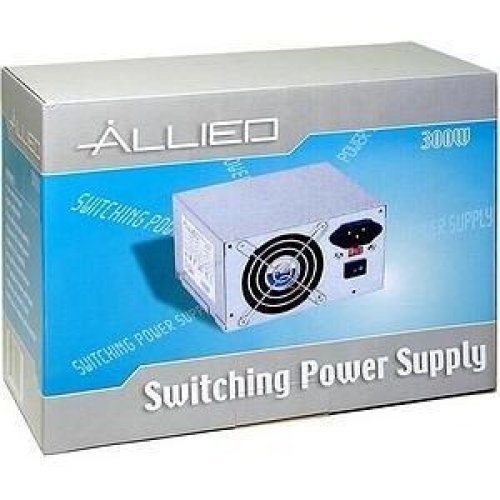
Image: The AL-A300ATX 300W ATX12V Power Supply shown in its retail packaging, indicating it is a "Switching Power Supply" from "ALLIED".
2. Informações de segurança
Always observe the following safety precautions to prevent injury or damage to the power supply or other components:
- Certifique-se de que a fonte de alimentação esteja desconectada da tomada CA antes da instalação ou remoção.
- Não abra a fonte de alimentação casing. Alto volumetagExistem componentes internos, mesmo quando desconectados. Não há peças que possam ser reparadas pelo usuário.
- Install the power supply in a well-ventilated area. Do not block ventilation openings.
- Evite expor a fonte de alimentação à umidade ou a temperaturas extremas.
- Use only the cables provided or approved for use with this power supply.
- If the power supply is damaged or malfunctioning, discontinue use immediately and contact support.
3. Conteúdo da embalagem
Verifique se todos os itens estão presentes na embalagem:
- APEX AL-A300ATX 300W ATX12V Power Supply Unit
- AC Power Cord (may vary by region)
- Parafusos de montagem
- Manual do usuário (este documento)
4. Configuração e instalação
Siga estes passos para instalar a fonte de alimentação no seu computador:
- Preparação:
- Desligue o computador e desconecte o cabo de alimentação da tomada.
- Abra o gabinete do seu computador. Consulte o manual do seu computador para obter instruções específicas.
- Se for substituir uma fonte de alimentação existente, desconecte todos os cabos da fonte antiga e remova-a do gabinete.
- Montagem da fonte de alimentação:
- Carefully slide the AL-A300ATX power supply into the designated PSU bay in your computer case.
- Alinhe os orifícios dos parafusos na fonte de alimentação com os da caixa.
- Prenda a fonte de alimentação usando os parafusos de montagem fornecidos.
- Cabos de conexão:
- 24-Pin ATX Main Power Connector: Conecte este conector grande à porta correspondente na sua placa-mãe. Certifique-se de que ele se encaixe no lugar com um clique.
- CPU Power Connector (4-pin or 8-pin): Connect the appropriate CPU power cable to the CPU power port on your motherboard.
- Conectores de alimentação SATA: Connect these flat connectors to your SATA hard drives, SSDs, and optical drives.
- Molex (Peripheral) Connectors: Connect these 4-pin connectors to older drives or case fans if needed.
- PCI-E Power Connectors (if applicable): If your graphics card requires additional power, connect the appropriate PCI-E power cable from the PSU to the graphics card. This model is listed with a "24 Pin" PCI-Express Connector Configuration, implying the main ATX connector.
- Gerenciamento de cabos: Organize os cabos de forma ordenada para melhorar o fluxo de ar e a estética dentro do seu gabinete.
- Verificação final: Verifique novamente todas as conexões para garantir que estejam seguras.
- Fechar caso: Close your computer case and secure it.
5. Instruções de operação
Após a instalação bem-sucedida, siga estas etapas para ligar o sistema:
- Conecte a alimentação CA: Plug the AC power cord into the power supply's inlet and then into a grounded wall outlet or surge protector.
- Interruptor de alimentação: Locate the power switch on the back of the power supply (usually a rocker switch labeled "I" for ON and "O" for OFF). Ensure it is in the "ON" (I) position.
- Power On Computer: Press the power button on your computer case. The system should now power on.
To turn off your computer, always use the operating system's shutdown procedure. Do not use the power supply's switch for regular shutdowns, as this can lead to data loss or system instability.
6. Manutenção
Proper maintenance helps ensure the longevity and optimal performance of your power supply:
- Limpeza de pó: Periodically (every 3-6 months, depending on environment) clean dust from the power supply's fan and ventilation grilles using compressed air. Ensure the computer is powered off and unplugged before cleaning.
- Fluxo de ar: Ensure that the computer case has adequate airflow and that the power supply's fan is not obstructed.
- Gerenciamento de cabos: Maintain tidy cable routing to prevent obstruction of airflow.
7. Solução De Problemas
Se você encontrar problemas com sua fonte de alimentação, consulte os problemas e soluções comuns a seguir:
| Problema | Possível causa | Solução |
|---|---|---|
| O computador não liga. |
|
|
| O sistema liga, mas desliga imediatamente. |
|
|
| O ventilador está fazendo barulho ou não está girando. |
|
|
If the problem persists after attempting these solutions, contact APEX customer support or a qualified technician.
8. Especificações
| Recurso | Detalhe |
|---|---|
| Nome do modelo | AL-A300ATX |
| Marca | APEX |
| Potência de saídatage | 300 Watts |
| Fator de forma | ATX12V |
| Dispositivos compatíveis | Computador pessoal |
| Tipo de conector | ATX (24 Pin PCI-Express Connector Configuration) |
| Método de resfriamento | Ar |
| Volume mínimo de entradatage | 110 Volts (CA) |
| Peso do item | 3.64 libras |
| Dimensões da embalagem | 9.6 x 7.2 x 4.1 polegadas |
| Data da primeira disponibilidade | 22 de abril de 2014 |
9. Garantia e Suporte
For information regarding warranty coverage, technical support, or service, please refer to the official APEX webou entre em contato diretamente com o serviço de atendimento ao cliente. Guarde o comprovante de compra como prova de aquisição.
APEX Contact Information: Please visit the official APEX webAcesse o site para obter as informações de contato e recursos de suporte mais recentes.


