Introdução
This manual provides comprehensive instructions for the setup, operation, and maintenance of your Genius SW-2.1 355 Speaker System. Please read this manual thoroughly before using the product to ensure proper functionality and to maximize your listening experience.
Informações de segurança
Observe as seguintes precauções de segurança para evitar danos ao dispositivo ou ferimentos a si mesmo:
- Não exponha as caixas de som à água ou umidade.
- Evite colocar as caixas de som perto de fontes de calor ou sob luz solar direta.
- Garanta uma ventilação adequada ao redor do subwoofer para evitar superaquecimento.
- Use apenas o adaptador de energia fornecido com a unidade.
- Não tente abrir ou reparar a unidade por conta própria. Encaminhe todos os serviços de manutenção a pessoal qualificado.
- Mantenha fora do alcance de crianças.
Conteúdo da embalagem
Verifique se todos os itens estão presentes na embalagem:
- 1 x Subwoofer unit
- 2 x alto-falantes satélites
- 1 x Audio input cable (3.5mm stereo jack)
- 1 x adaptador de energia
- 1 x Manual do Usuário (este documento)
Produto acimaview
The Genius SW-2.1 355 Speaker System consists of a subwoofer and two satellite speakers designed to deliver clear audio and powerful bass for your multimedia needs.
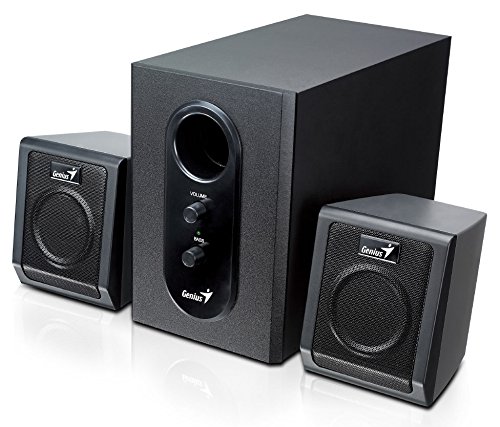
This image displays the Genius SW-2.1 355 Speaker System. It features a central, larger subwoofer unit with volume and bass control knobs on its front panel, and two smaller satellite speakers positioned on either side. All components are black.
Componentes:
- Subwoofer: The main unit housing the bass driver and control panel.
- Alto-falantes satélite: Duas caixas de som compactas para áudio de média e alta frequência.
- Painel de controle: Located on the subwoofer, featuring Volume and Bass adjustment knobs.
Configurar
- Posicionamento dos alto-falantes: Place the subwoofer on the floor or a sturdy surface. Position the satellite speakers on either side of your listening area, facing towards you for optimal stereo separation.
- Conectando alto-falantes satélite: Connect the cables from the two satellite speakers to the corresponding output jacks on the rear of the subwoofer unit. Ensure a secure connection.
- Connecting Audio Source: Connect one end of the 3.5mm audio input cable to the "Audio In" jack on the subwoofer. Connect the other end to the audio output jack (e.g., headphone jack) of your computer, MP3 player, smartphone, or other audio source.
- Conexão de energia: Plug the power adapter into the DC input jack on the subwoofer. Then, plug the power adapter into a standard electrical outlet.
- Ligar: Turn on the speaker system using the power switch, usually integrated with the volume knob.
Operação
- Ligar/desligar e controle de volume: The main knob on the subwoofer controls both power and overall volume. Rotate clockwise to turn on and increase volume; rotate counter-clockwise to decrease volume and turn off.
- Ajuste de graves: Use the "Bass" knob on the subwoofer to adjust the level of low-frequency sound. Rotate clockwise to increase bass, and counter-clockwise to decrease it, according to your preference.
- Audio Source Volume: For optimal sound quality, set the volume on your audio source (computer, phone, etc.) to about 75% and then use the speaker system's volume control for fine adjustments.
Manutenção
- Limpeza: Use um pano macio e seco para limpar a superfície das caixas de som. Não use produtos de limpeza líquidos ou materiais abrasivos.
- Armazenar: Se for guardar as caixas de som por um longo período, desconecte-as da tomada e armazene-as em local fresco e seco.
- Gerenciamento de cabos: Ensure cables are not tangled or pinched to prevent damage.
Solução de problemas
| Problema | Possível causa | Solução |
|---|---|---|
| Sem som |
|
|
| Som distorcido |
|
|
| Baixo fraco |
|
|
Especificações
| Recurso | Detalhe |
|---|---|
| Nome do modelo | SW-2.1 355 |
| Tipo de alto-falante | 2.1 Channel Multimedia Speaker System (Bookshelf, Satellite, Subwoofer) |
| Potência total de saída | 10 Watts RMS (5W Subwoofer + 2.5W x 2 Satellites) |
| Material | Madeira (Subwoofer) |
| Tecnologia de Conectividade | Wired (3.5mm audio input) |
| Dispositivos compatíveis | MP3 Player, Personal Computer, Smartphones, Tablets, Televisions |
| Controles | Volume, Baixo |
| Fonte de energia | DC |
| Peso do item | 2.78 kg |
| Dimensões da embalagem | 39.6 x 25 x 18.4 cm |
Garantia e Suporte
Genius products are designed for reliability and performance. For information regarding warranty coverage, technical support, or service inquiries, please refer to the warranty card included with your product or visit the official Genius webGuarde o comprovante de compra como prova de aquisição.


