Introdução
The Behringer NEKKST K8 is an ultra-linear 150-Watt reference-class studio monitor designed for accurate sound reproduction. It features an 8-inch woofer and a 1-inch silk dome tweeter, utilizing advanced waveguide technology for optimal acoustic dispersion and a wide 'sweet zone'. This monitor operates in a true bi-amping mode with two separate amplifiers for enhanced sound clarity.

Imagem: Frente view of the Behringer NEKKST K8 Studio Monitor, showcasing the 8-inch woofer and 1-inch tweeter.
Instruções importantes de segurança
Please read and follow all safety instructions before operating the Behringer NEKKST K8 studio monitor. Retain these instructions for future reference.
- Risco de choque elétrico: Do not open the device. Refer all servicing to qualified service personnel.
- Não exponha este aparelho à chuva ou umidade.
- Não utilize este aparelho perto de água.
- Limpe apenas com um pano seco.
- Não obstrua as aberturas de ventilação. Instale de acordo com as instruções do fabricante.
- Não instale perto de fontes de calor, como radiadores, registros de calor, fogões ou outros aparelhos (incluindo amplificadores) que produzem calor.
- Proteja o cabo de alimentação para que não seja pisado ou comprimido, principalmente nos plugues, nas tomadas de conveniência e no ponto de saída do aparelho.
- Utilize somente acessórios/anexos especificados pelo fabricante.
- Desligue este aparelho durante tempestades com raios ou quando não for utilizado por longos períodos de tempo.

Image: Safety and regulatory labels found on the Behringer NEKKST K8, indicating electrical warnings and compliance information.
Configurar
Desembalando
Carefully unpack your NEKKST K8 monitor. Inspect the unit for any signs of damage that may have occurred during transit. Retain the original packaging for future transport or storage.
Conexões
The NEKKST K8 offers both balanced XLR and unbalanced RCA input options. Connect your audio source (e.g., audio interface, mixer) to the appropriate input on the rear panel of the monitor.
- Entrada XLR: For balanced audio signals, providing optimal noise rejection.
- Entrada RCA: For unbalanced audio signals, commonly used with consumer audio equipment.
Ensure the monitor is powered off before making any connections.
Placement and Room Compensation
Proper placement of your studio monitors is crucial for accurate sound reproduction. The NEKKST K8 features 'ROOM COMPENSATION' switches on the rear panel to help optimize its performance for your specific acoustic environment.
- Free Field: Use this setting when the monitor is placed away from walls and corners.
- Parede: Select this setting if the monitor is placed close to a wall.
- Canto: Choose this setting if the monitor is placed in a corner, which typically results in increased bass response.
Experiment with these settings to achieve the most balanced sound in your listening space.
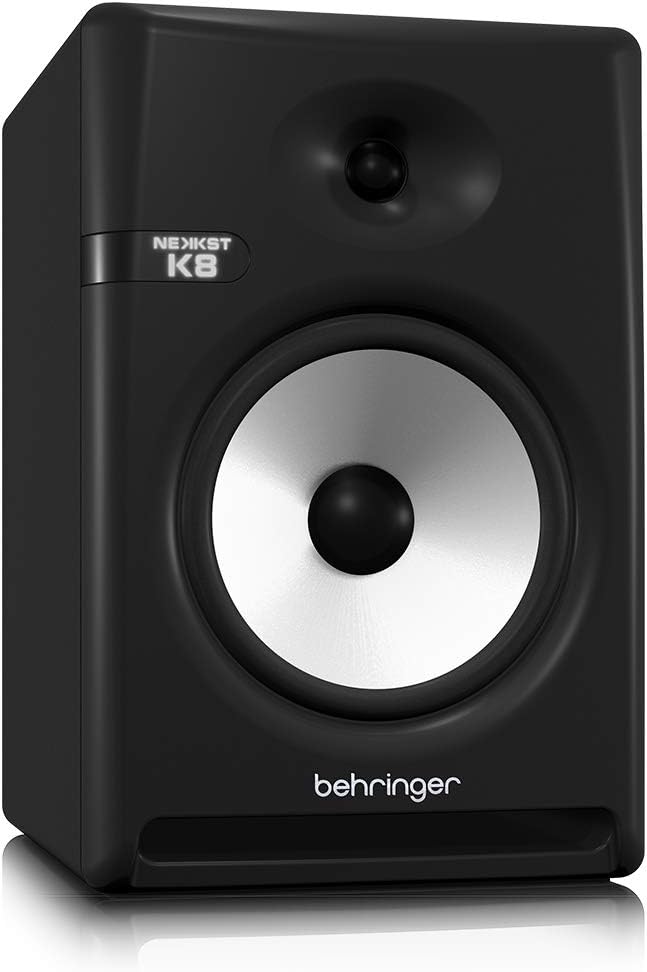
Image: Rear panel of the Behringer NEKKST K8, displaying XLR and RCA inputs, along with various control switches for room compensation and frequency adjustments.

Imagem: Detalhada view of the NEKKST K8's rear control panel, highlighting the input trim, frequency adjustments, and room compensation switches.
Conexão de energia
Connect the provided power cord to the AC IN socket on the rear panel and then to a suitable power outlet. Ensure the power switch is in the OFF position before connecting to power.
Operação
Ligar/desligar
After all connections are made, switch the power button on the rear panel to the ON position. It is recommended to power on your monitors last and power them off first to prevent any pops or clicks through your speakers.
Input Trim Adjustment
The 'INPUT TRIM' knob on the rear panel allows you to adjust the input sensitivity of the monitor. Start with the knob at a lower setting and gradually increase it to achieve a comfortable listening level without distortion. This control helps match the output level of your audio source to the monitor's input.
Frequency Adjustments
The NEKKST K8 provides 'HIGH FREQUENCY' and 'LOW FREQUENCY' switches for fine-tuning the monitor's response to your listening environment and personal preference. These switches allow you to cut or boost specific frequency ranges.
- ALTA FREQÜÊNCIA: Adjusts the treble response. Options typically include flat, -2 dB, +2 dB.
- LOW FREQUENCY: Adjusts the bass response. Options typically include flat, -2 dB, -4 dB, -6 dB. This can be useful for compensating for room acoustics or when using a subwoofer.
Refer to the markings on the rear panel for specific dB adjustments.
Manutenção
Limpeza
To clean the exterior of your NEKKST K8 monitor, use a soft, dry cloth. Do not use liquid cleaners, abrasive cleaners, or solvents, as these can damage the finish or internal components. Ensure the monitor is unplugged before cleaning.
Armazenar
If storing the monitor for an extended period, it is recommended to use the original packaging to protect it from dust and physical damage. Store in a cool, dry place away from direct sunlight and extreme temperatures.
Solução de problemas
| Problema | Possível causa | Solução |
|---|---|---|
| Sem som |
|
|
| Som distorcido |
|
|
| Zumbido ou ruído |
|
|
Se o problema persistir após tentar essas soluções, entre em contato com o suporte ao cliente da Behringer.
Especificações
| Nome do modelo | K8 |
| Tipo de alto-falante | Monitor |
| Diâmetro do woofer | 8 polegadas |
| Diâmetro do tweeter | 1 polegadas |
| Potência máxima de saída do alto-falante | 150 Watts |
| O quetage | 150 watts |
| Resposta de frequência | 20000 Hz (Upper limit; full range typically wider) |
| Tecnologia de Conectividade | RCA, XLR |
| Modo de saída de áudio | Estéreo |
| Fonte de energia | Elétrico com fio |
| Dimensões do produto | 13.4"P x 13.4"L x 18.8"A |
| Peso do item | 19.18 libras |
| Material | Plástico, metal, tecido |
| Fabricante | Tribo Musical EUA |
| UPC | 748252139344 |
Informações de garantia
The Behringer NEKKST K8 Studio Monitor comes with a Limited Warranty. For detailed information regarding warranty terms, conditions, and registration, please refer to the official Behringer website ou o cartão de garantia incluído com o seu produto.
Apoiar
For further assistance, technical support, or to download the latest drivers and software, please visit the official Behringer website ou entre em contato com o departamento de atendimento ao cliente.
Você também pode visitar o Loja Behringer na Amazon Para informações sobre o produto e acessórios.


