Introdução
The DigiTech TRIO is an innovative electric guitar multi-effect pedal designed to be your personal band. It listens to your guitar playing and automatically generates accompanying bass and drum parts. This manual provides comprehensive instructions for setting up, operating, and maintaining your TRIO pedal, ensuring you get the most out of its unique features.
Principais características
- Seven Music Genres and Twelve Song Styles Per Genre to Choose From
- The TRIO can learn up to three different song parts that can be recalled on-the-fly
- Adjustable Tempo & Alternate Half Time/Double Time Variants Bass & Drum Level Controls
- Hands-Free Control Using a DigiTech FS3X Footswitch (optional)
- Amp & Mixer Outputs Headphone Output w/Level Control Power Supply Included
Guia de configuração
Follow these steps to set up your DigiTech TRIO pedal:
- Connect the included 9V DC power supply to the PODER input on the pedal and plug it into a power outlet.
- Conecte sua guitarra elétrica ao ENTRADA DE GUITARRA conector usando um cabo de instrumento padrão de 1/4 de polegada.
- Conecte o AMP FORA Conecte o cabo à sua guitarra. ampA entrada do amplificador utiliza outro cabo de instrumento de 1/4 de polegada.
- For connecting to a mixer or PA system, use the SAÍDA DO MISTURADOR Jack.
- Para prática privada, conecte fones de ouvido ao FONE DE OUVIDO Jack.
- Optionally, connect a DigiTech FS3X Footswitch to the CONTROLE EM jack for extended hands-free control.
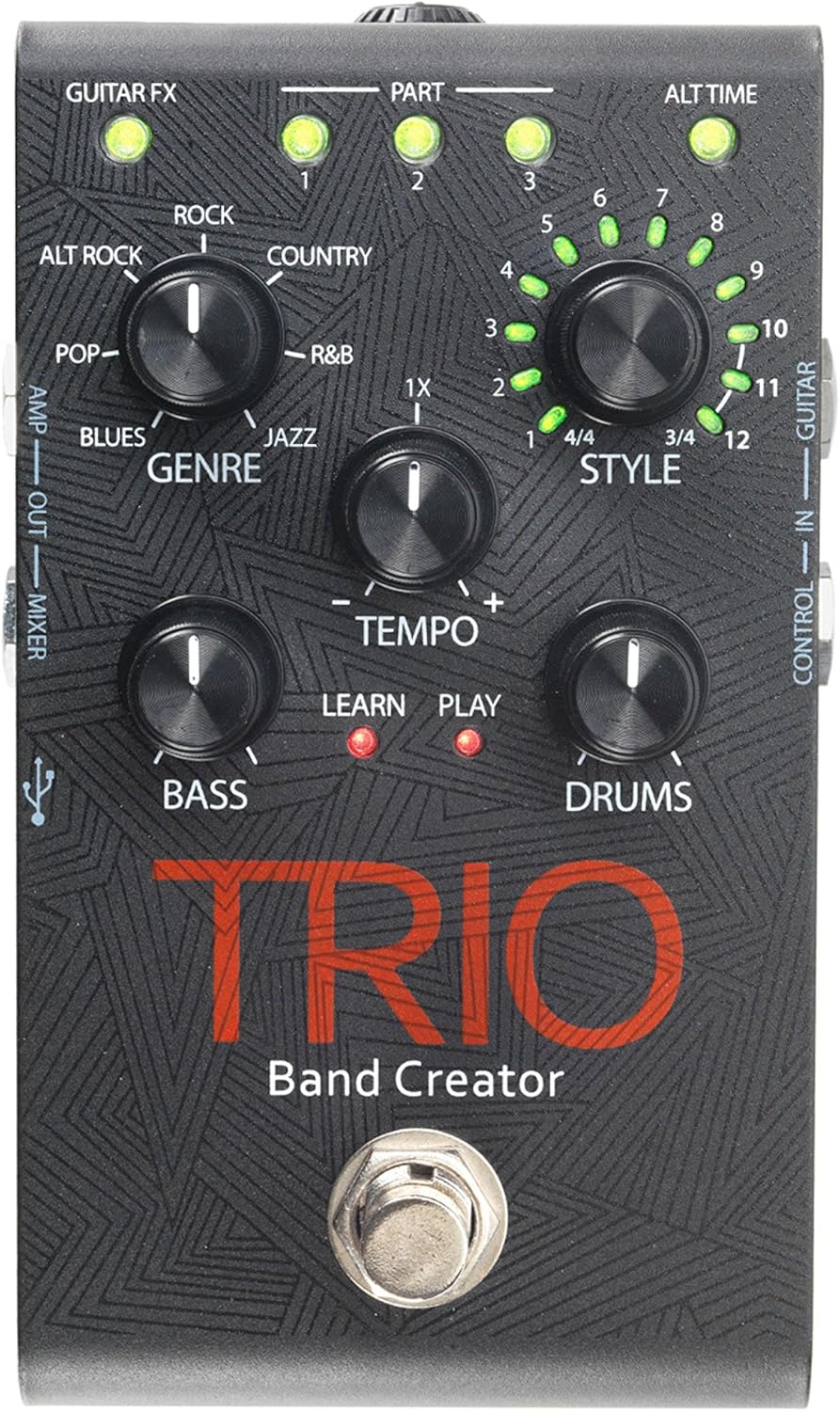
Figura 1: parte superior view of the DigiTech TRIO pedal, showing the main controls and footswitch.
Instruções de operação
Basic Operation: Teaching the TRIO a Song
- Pressione o BANDA footswitch once to enter 'Listen' mode. The APRENDER O LED acenderá.
- Play your desired chord progression and rhythm clearly. The TRIO will analyze your playing.
- Pressione o BANDA footswitch again to stop 'Listen' mode. The JOGAR LED will illuminate, and the TRIO will immediately begin playing generated bass and drum parts.
- You can now play along with your virtual band.
Genre and Style Selection
- Use o GÊNERO knob to select from Blues, Pop, Alternative Rock, Rock, Country, R&B, and Jazz. The genre affects the overall feel of the generated bass and drum parts.
- Use o ESTILO knob to choose from twelve different song styles available for each genre. This allows for further customization of the rhythm and feel.
- O ALT TIME button allows you to switch between 3/4 and 4/4 time signatures.
Looping and Song Parts
- The TRIO can learn up to 3 different song parts. To record a new part, select an empty PAPEL slot (1, 2, or 3) using the corresponding buttons.
- Follow the 'Basic Operation' steps to teach the TRIO the new song part.
- During playback, you can switch between learned song parts on-the-fly by pressing the corresponding PAPEL botão.
- O LAÇO footswitch allows you to record and playback your own guitar loops. Press once to start recording, press again to stop recording and start playback, and press and hold to clear the loop.
Adjusting Levels and Tempo
- O TEMPO knob adjusts the playback speed of the band and loops.
- O BASS knob controls the volume level of the generated bass line.
- O BATERIA knob controls the volume level of the generated drum track.
- O LAÇO knob controls the volume level of your recorded guitar loop.

Figura 2: Angulado view of the DigiTech TRIO pedal, highlighting the control knobs and input/output jacks.
Controles e Conexões
The DigiTech TRIO pedal features a user-friendly layout with clearly labeled controls and versatile connection options:
Controles do painel frontal:
- GUITAR FX: Activates built-in guitar effects tailored to the selected genre.
- PART 1, 2, 3: Buttons to select and recall different learned song parts.
- ALT TIME: Toggles between 3/4 and 4/4 time signatures.
- TEMPO Knob: Adjusts the overall playback speed.
- GENRE Knob: Selects the musical genre (Blues, Pop, Alt Rock, Rock, Country, R&B, Jazz).
- STYLE Knob: Selects one of twelve styles within the chosen genre.
- LOOP Knob: Controls the volume of your recorded guitar loop.
- Botão BASS: Controla o volume da linha de baixo gerada.
- DRUMS Knob: Controla o volume da faixa de bateria gerada.
- LOOPER Footswitch: Records/plays/clears guitar loops.
- BAND Footswitch: Enters 'Listen' mode to learn chords/rhythm, or starts/stops band playback.
Side and Rear Panel Connections:
- GUITARRA EM: 1/4-inch input for your electric guitar.
- AMP FORA: 1/4-inch output to your guitar ampmais vivo.
- MIXER OUT: 1/4-inch output for connecting to a mixer or PA system.
- SAÍDA DO FONE DE OUVIDO: Saída estéreo de 1/8 de polegada para fones de ouvido.
- CONTROLE EM: 1/4-inch input for optional DigiTech FS3X Footswitch.
- PODER: 9V DC input for the included power supply.
- USB: Mini-USB port for firmware updates.

Figura 3: Traseira view of the DigiTech TRIO pedal, showing the power input and headphone jack.
Especificações
| Recurso | Detalhe |
|---|---|
| Peso do item | 10.6 onças (0.3 kg) |
| Dimensões do produto | 4.63 x 3.19 x 2.13 polegadas (11.76 x 8.10 x 5.41 cm) |
| Número do modelo do item | TRIO |
| Baterias | 1 9V battery required (for internal use, not primary power) |
| interface de hardware | Áudio de 1/4 de polegada |
| Formato do sinal | Analógico |
| Fonte de energia | Corded Electric (9V DC adapter included) |
| Volumetage | 9 Volts |
| Ampidade | 300 Miliamps |
Manutenção
- Mantenha o pedal limpo, passando um pano macio e seco. Evite usar produtos de limpeza abrasivos ou solventes.
- Guarde o pedal em local fresco e seco, longe da luz solar direta e de temperaturas extremas.
- Certifique-se de que todos os cabos estejam firmemente conectados para evitar perda de sinal ou danos.
- Evite soltar o pedal bruscamente ou submetê-lo a impactos fortes.
Solução de problemas
- Sem som: Verifique todas as conexões de cabos (guitarra, amp, power). Ensure the pedal is powered on and the volume knobs are not set to zero.
- Má qualidade de som: Verify that your instrument and amplifier are functioning correctly. Check for damaged cables.
- Band Not Generating Correctly: Ensure you are playing clear, distinct chords during the 'Listen' phase. Try different genres and styles to see if a different setting better interprets your playing.
- Footswitch Unresponsive: Disconnect and reconnect the power supply. If using an optional FS3X footswitch, ensure it is properly connected.
Garantia e Suporte
Para informações sobre garantia e suporte técnico, consulte o site oficial da DigiTech. webou entre em contato com o serviço de atendimento ao cliente. Guarde o comprovante de compra para eventuais solicitações de garantia.


